Complete Guide to TreeMap in Java with Examples
Overview of TreeMap
The TreeMap class is part of the Java Collections Framework and implements the SortedMap interface. It maintains its elements in a sorted order based on the natural ordering of keys or a specified comparator. This makes TreeMap ideal for scenarios where you need a sorted collection of key-value pairs, such as managing a leaderboard in a game or maintaining a sorted list of contacts.
One of the key advantages of using a TreeMap is its ability to perform operations like searching, inserting, and deleting elements in logarithmic time complexity. This efficiency is achieved through the underlying Red-Black tree structure, which ensures that the elements are always balanced and sorted.
TreeMap is particularly useful in real-world applications where you need to process data in a sorted manner. For instance, it can be used in applications like databases, where records need to be sorted based on some key, or in web applications that require sorting of user-generated content.
Prerequisites
To effectively use TreeMap in Java, you should have a basic understanding of Java programming, including familiarity with classes, objects, and the Java Collections Framework. Additionally, knowledge of how comparators work will be beneficial when you need to implement custom sorting logic.
Usage of TreeMap
To use a TreeMap, you need to import the java.util.TreeMap class:
import java.util.TreeMap;You can create a new instance of TreeMap using its default constructor or by providing a custom comparator if needed:
// Default constructor - sorts elements based on natural ordering of keys
TreeMap<Integer, String> treeMap = new TreeMap<>();

// Using a custom comparator for sorting elements
TreeMap<String, Integer> customTreeMap = new TreeMap<>((a, b) -> b.compareTo(a));
Adding and Accessing Elements
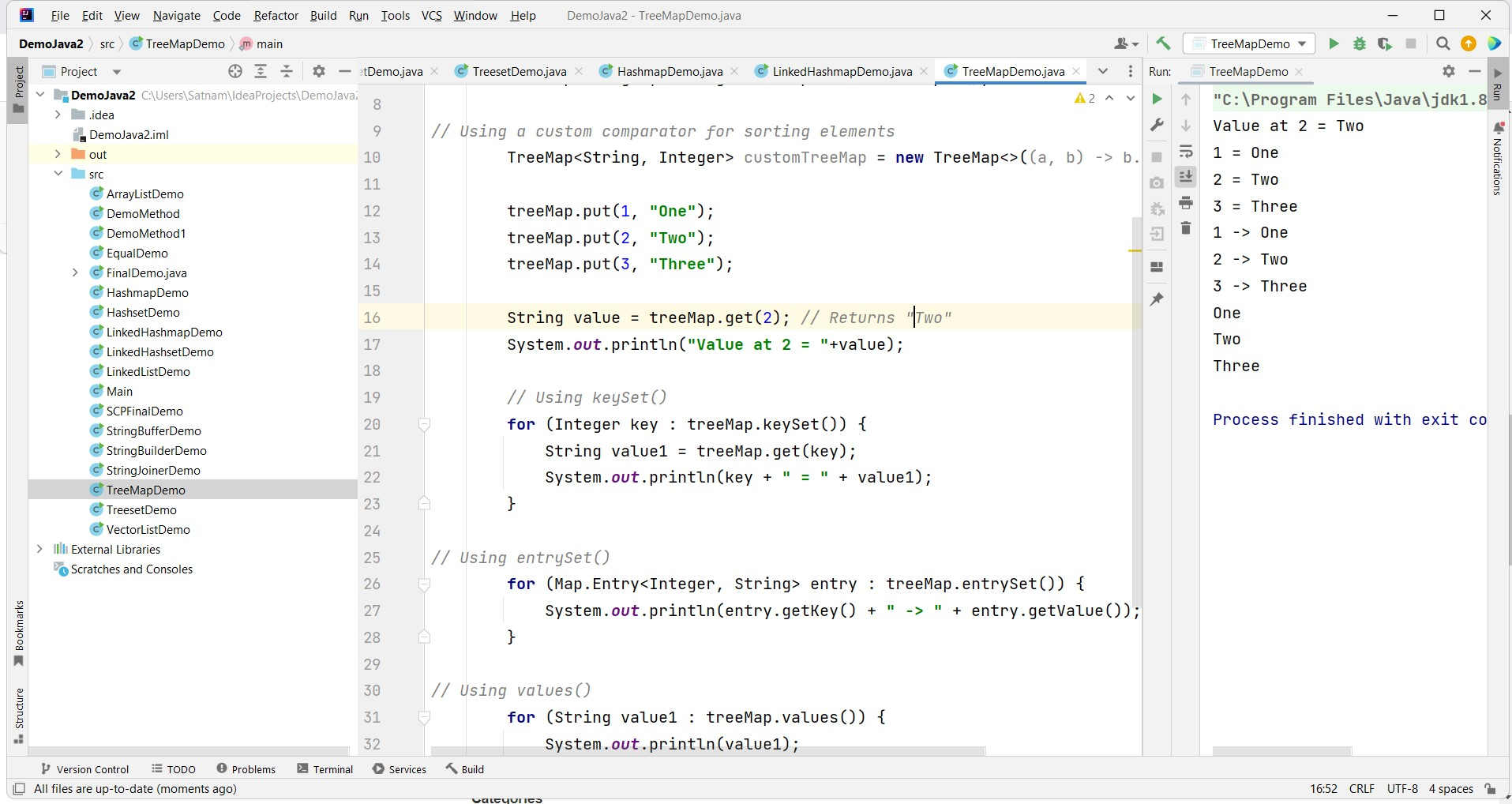
You can add elements to the TreeMap using the put() method, and retrieve elements using the get() method:
treeMap.put(1, "One");
treeMap.put(2, "Two");
treeMap.put(3, "Three");

String value = treeMap.get(2); // Returns "Two"
System.out.println("Value at 2 = " + value);
In this example, we added three key-value pairs to the TreeMap and retrieved the value associated with the key '2'. This demonstrates the simplicity of adding and accessing elements in a TreeMap.
Iterating through TreeMap
You can iterate through the elements of a TreeMap using various methods, such as keySet(), entrySet(), or values():
// Using keySet()
for (Integer key : treeMap.keySet()) {
    String value1 = treeMap.get(key);
    System.out.println(key + " = " + value1);
}

// Using entrySet()
for (Map.Entry<Integer, String> entry : treeMap.entrySet()) {
    System.out.println(entry.getKey() + " -> " + entry.getValue());
}

// Using values()
for (String value1 : treeMap.values()) {
    System.out.println(value1);
}
Each of these methods provides a different way to access the elements in a TreeMap, allowing you to choose the method that best suits your needs.
Other Useful Methods
The TreeMap class provides many useful methods, including:
- size() - returns the number of key-value pairs in the map.
- containsKey() - checks if a specific key exists in the map.
- containsValue() - checks if a specific value exists in the map.
- remove() - removes the key-value pair associated with a specific key.
- firstKey() - retrieves the first (lowest) key in the map.
- lastKey() - retrieves the last (highest) key in the map.
Make sure to check the Java documentation for a complete list of available methods and their functionality.
Edge Cases & Gotchas
When using TreeMap, there are a few edge cases and gotchas to be aware of:
- Null Keys: A TreeMap does not allow null keys. Attempting to add a null key will result in a NullPointerException.
- Non-Comparable Keys: If you use a custom comparator, ensure that all keys are comparable with each other. If not, you may encounter a ClassCastException.
- Thread Safety: TreeMap is not synchronized. If you need to use it in a multi-threaded environment, consider using Collections.synchronizedMap() or using ConcurrentSkipListMap.
Performance & Best Practices
TreeMap operations such as insertion, deletion, and lookup are generally O(log n) due to its underlying Red-Black tree structure. Here are some best practices to keep in mind:
- Choose the Right Comparator: When you create a TreeMap with a custom comparator, ensure that it is consistent with the equals method. This helps prevent unexpected behavior.
- Avoid Null Values: Ensure that you do not insert null keys or values, as this will lead to exceptions.
- Use Appropriate Data Types: Use the most efficient data types for your keys to minimize memory usage and improve performance.
Conclusion
In this article, we covered the basics of using TreeMap in Java. It's a powerful data structure that allows you to store and access elements in sorted order based on keys. Remember to explore the Java documentation for a deeper understanding of the available methods and functionalities of the TreeMap class.
- TreeMap implements the SortedMap interface, maintaining elements in sorted order.
- It provides efficient operations for adding, retrieving, and removing elements.
- Be cautious of null keys and ensure keys are comparable when using custom comparators.
- Utilize the various iteration methods to effectively access elements.