
Mastering Java Arrays: A Complete Guide with Examples
Java Arrays
Introduction
In Java, an array is a data structure that allows you to store multiple values of the same type. It provides a convenient way to organize and manipulate collections of data. Arrays are particularly useful when you need to work with a fixed number of elements, such as a list of scores, names, or any other collection of related data. By using arrays, you can enhance the efficiency of your code and improve readability.
Real-world applications of arrays can be seen in various domains. For instance, in a gaming application, you might use an array to store player scores or levels. In a data analysis tool, arrays can help store and process large datasets, enabling quick access to data points.
Prerequisites
Before diving into Java arrays, it's essential to have a basic understanding of Java syntax and programming concepts. Familiarity with variables, data types, and control structures (such as loops and conditionals) will significantly aid your comprehension of how arrays function within the language.
Declaration and Initialization
To declare an array in Java, you specify the type of the elements followed by the array name: type[] arrayName;. For example, to declare an integer array:
int[] numbers;Arrays can be initialized in two ways:
- Using the new keyword:
arrayName = new type[arraySize]; - Inline initialization:
type[] arrayName = {value1, value2, ..., valueN};
For example:
int[] numbers = new int[5]; // Declaration with new keyword
numbers[0] = 10;
numbers[1] = 20;
numbers[2] = 30;
numbers[3] = 40;
numbers[4] = 50;
Accessing and Modifying Elements
Array elements are accessed using their index, which starts at 0. You can use the index in square brackets [] to access or modify an element:
// Accessing elements
int element = numbers[2]; // Retrieves the third element (30)

// Modifying elements
numbers[2] = 35; // Changes the third element to 35
It's important to note that attempting to access an index that is out of bounds (i.e., less than 0 or greater than or equal to the array length) will result in an ArrayIndexOutOfBoundsException.
Array Length
You can obtain the length of an array using the length property:
int size = numbers.length; // size will be 5This allows you to dynamically handle arrays without hardcoding their sizes in your loops or logic.
Iterating over an Array
Looping constructs like for or foreach can be used to iterate over the elements of an array:
// Using a for loop
for (int i = 0; i < numbers.length; i++) {
    System.out.println(numbers[i]); // Process array element
}

// Using a foreach loop
for (int element : numbers) {
    System.out.println(element); // Process array element
}
One Dimensional (1D) Arrays
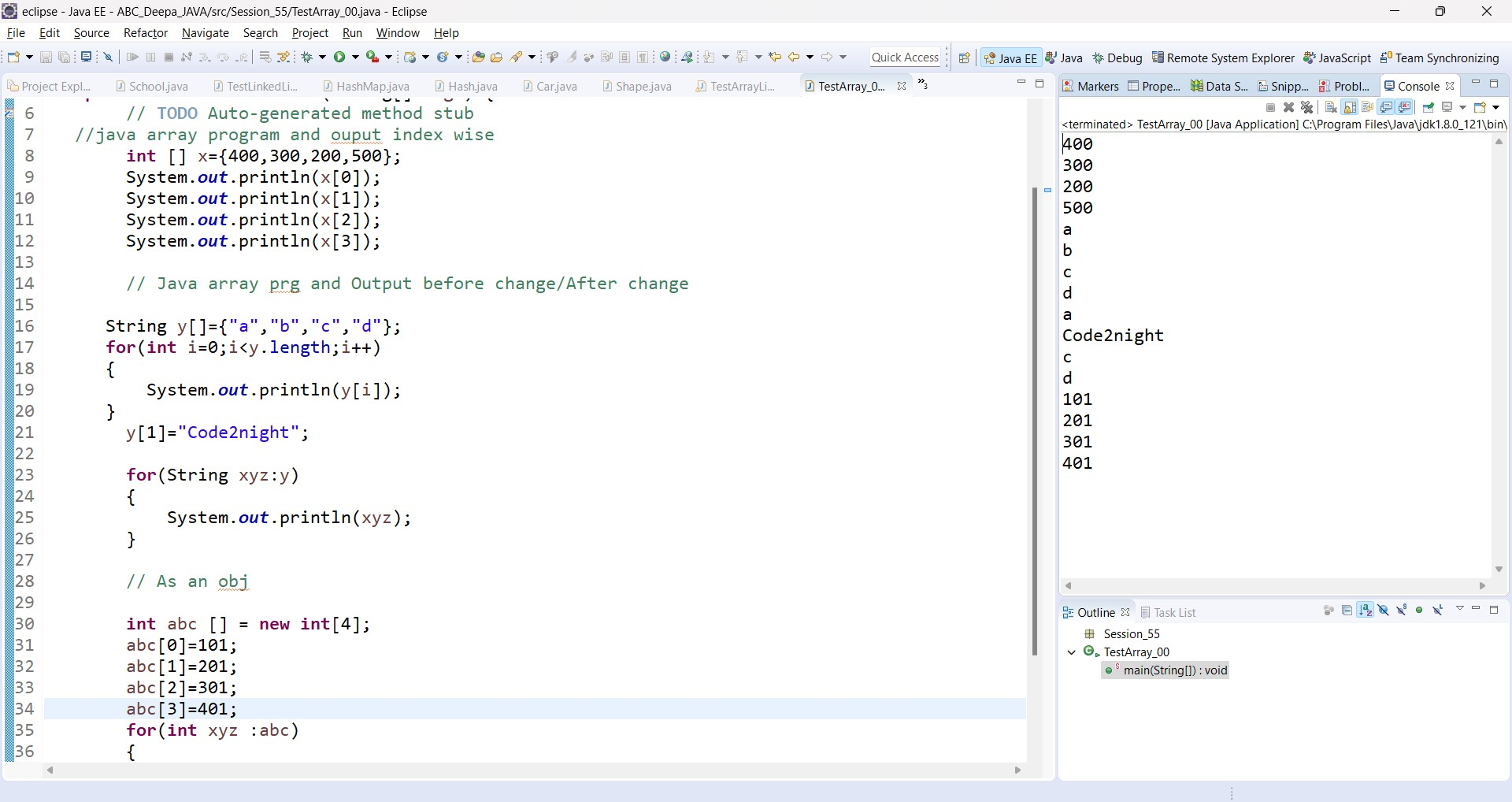
One-dimensional arrays are the simplest form of arrays in Java, where data is stored in a linear fashion. Here’s a simple example demonstrating the declaration, initialization, and access of a 1D array:
int[] x = {400, 300, 200, 500};
System.out.println(x[0]); // 400
System.out.println(x[1]); // 300
System.out.println(x[2]); // 200
System.out.println(x[3]); // 500
Java Array Modification Example
In this example, we will modify the contents of an array:
String[] y = {"a", "b", "c", "d"};
for (int i = 0; i < y.length; i++) {
    System.out.println(y[i]); // Print original array
}

// After Change

// Changing the second element
 y[1] = "Code2night";
for (String xyz : y) {
    System.out.println(xyz); // Print modified array
}
As an object
Arrays in Java are objects, which means they can be instantiated using the new keyword:
int[] abc = new int[4];
abc[0] = 101;
abc[1] = 201;
abc[2] = 301;
abc[3] = 401;
for (int xyz : abc) {
    System.out.println(xyz); // Print array elements
}
Multi-Dimensional Arrays
In addition to one-dimensional arrays, Java supports multi-dimensional arrays, which can be visualized as arrays of arrays. The most common use case is the two-dimensional array, which is often used to represent matrices or grids. Here’s how to declare and initialize a two-dimensional array:
int[][] matrix = {
    {1, 2, 3},
    {4, 5, 6},
    {7, 8, 9}
};
You can access elements in a two-dimensional array using two indices:
int value = matrix[1][2]; // Accesses the element at row 1, column 2 (which is 6)Edge Cases & Gotchas
When working with arrays, there are several edge cases and gotchas to be aware of:
- ArrayIndexOutOfBoundsException: This exception occurs when you try to access an index that is not valid for the array. Always ensure your indices are within the bounds of the array.
- Default Values: When you create an array of primitives, Java initializes the elements to their default values (0 for integers, false for booleans, etc.). However, for object arrays, the elements are initialized to
null. - Immutable Size: Once an array is created, its size is fixed. If you need a resizable collection, consider using ArrayList instead.
Performance & Best Practices
When working with arrays in Java, consider the following best practices to optimize performance and maintainability:
- Use the appropriate type: Always choose the most suitable data type for your array to minimize memory usage.
- Prefer enhanced for-loops: For readability and conciseness, use the enhanced for-loop (foreach) when iterating over arrays.
- Check array bounds: Always ensure that your code checks for array bounds to avoid runtime exceptions.
- Document your code: Add comments and documentation to explain the purpose of the array and its expected contents.
Conclusion
Java arrays are a fundamental part of the language, allowing you to store and manipulate collections of data. Understanding how to declare, initialize, and work with arrays is crucial for Java developers. Here are some key takeaways:
- Arrays are fixed-size data structures that hold elements of the same type.
- They can be declared and initialized in various ways.
- Accessing and modifying elements requires careful attention to array indices.
- Multi-dimensional arrays can represent more complex data structures.
- Best practices include checking bounds and using suitable data types.
