
Complete Guide to Using Vectors in Java with Examples
Overview of Vector in Java
The Vector class is a part of the Java Collections Framework and serves as a dynamic array that can grow and shrink as needed. Unlike traditional arrays, which have a fixed size, vectors can accommodate varying numbers of elements, making them suitable for applications where the number of items is not known in advance. This feature is particularly useful in real-world applications such as managing user sessions, storing temporary data, or handling collections of items that can change over time.
One of the defining characteristics of vectors is their thread safety, which is achieved through synchronization. This makes vectors a preferred choice in multi-threaded applications where multiple threads may attempt to access or modify the same vector simultaneously. However, this synchronization comes at a cost of performance, which is why alternatives like ArrayList are often favored when thread safety is not a concern.
Declaration and Initialization
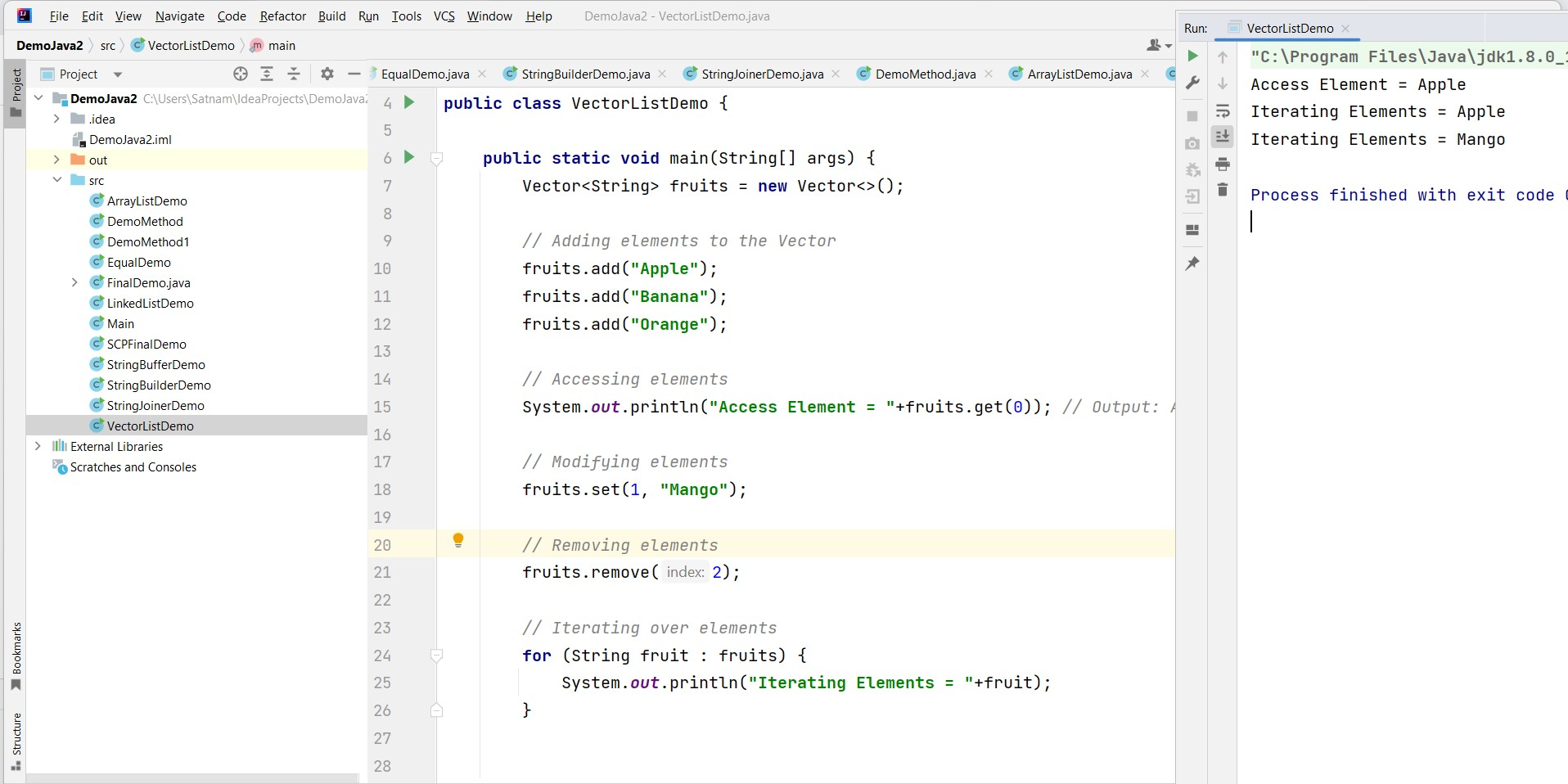
To use a Vector in Java, you need to import the java.util.Vector package. Vectors can be initialized in several ways, including specifying the initial capacity and the capacity increment. Here’s an example of declaring and initializing a Vector:
import java.util.Vector;

public class Example {
    public static void main(String[] args) {
        // Creating a Vector with initial capacity of 10 and capacity increment of 5
        Vector<String> fruits = new Vector<>(10, 5);

        // Adding elements to the Vector
        fruits.add("Apple");
        fruits.add("Banana");
        fruits.add("Orange");

        // Accessing elements
        System.out.println("Access Element = " + fruits.get(0)); // Output: Apple

        // Modifying elements
        fruits.set(1, "Mango");

        // Removing elements
        fruits.remove(2);

        // Iterating over elements
        for (String fruit : fruits) {
            System.out.println("Iterating Elements = " + fruit);
        }
    }
}
Common Vector Operations
Vectors provide a variety of methods for manipulating the data they contain. Here are some commonly used operations:
- add(element): Adds an element to the end of the Vector.
- get(index): Retrieves the element at the specified index.
- set(index, element): Replaces the element at the specified index with a new element.
- remove(index): Removes the element at the specified index.
- size(): Returns the number of elements in the Vector.
- isEmpty(): Checks if the Vector is empty.
- clear(): Removes all elements from the Vector.
In addition to these methods, Vectors also provide synchronization mechanisms like addElement() and removeElement() to ensure thread-safe operations. Here’s an example demonstrating some of these operations:
public class VectorOperations {
    public static void main(String[] args) {
        Vector<Integer> numbers = new Vector<>();
        numbers.add(10);
        numbers.add(20);
        numbers.add(30);

        System.out.println("Size of Vector: " + numbers.size()); // Output: 3

        // Modifying and removing elements
        numbers.set(0, 15);
        numbers.remove(1);

        // Iterating through the Vector
        for (int number : numbers) {
            System.out.println("Element: " + number);
        }
    }
}
Thread Safety and Synchronization
One of the main advantages of using a Vector is its thread safety. The methods of the Vector class are synchronized, meaning that only one thread can execute a method at a time. This is crucial in multi-threaded applications where concurrent modifications to a collection can lead to inconsistent data states or runtime exceptions.
However, the built-in synchronization can lead to performance bottlenecks, especially in scenarios where high throughput is required. For such cases, Java provides alternatives such as CopyOnWriteArrayList or Collections.synchronizedList, which can offer better performance while still ensuring thread safety.
import java.util.Collections;
import java.util.List;
import java.util.ArrayList;

public class SynchronizedListExample {
    public static void main(String[] args) {
        List<String> syncList = Collections.synchronizedList(new ArrayList<>());
        syncList.add("Element 1");
        syncList.add("Element 2");

        synchronized (syncList) {
            for (String element : syncList) {
                System.out.println("Synchronized Element: " + element);
            }
        }
    }
}
Edge Cases & Gotchas
While working with Vectors, there are several edge cases and gotchas developers should be aware of:
- Capacity Management: When a Vector reaches its capacity, it automatically increases its size. However, this resizing can lead to performance overhead. It is advisable to specify an initial capacity if the number of elements is known beforehand.
- Thread Safety Overhead: The synchronization mechanism, while ensuring thread safety, can lead to performance degradation in high-concurrency scenarios. It’s essential to evaluate whether a Vector is necessary or if alternatives would be more efficient.
- Index Out of Bounds: Accessing elements using an index that is out of bounds will throw an ArrayIndexOutOfBoundsException. Always ensure that the index is within the valid range.
Performance & Best Practices
When considering the use of Vectors in Java, it is important to keep performance considerations in mind:
- Use Initial Capacity: If you know the approximate number of elements that will be stored, initialize the Vector with that capacity to avoid unnecessary resizing.
- Prefer ArrayList over Vector: If thread safety is not a requirement, prefer using ArrayList for better performance due to its lack of synchronization.
- Consider Concurrent Collections: For multi-threaded applications, consider using concurrent collections like CopyOnWriteArrayList or ConcurrentHashMap instead of Vector for better scalability.
Conclusion
In conclusion, the Vector class in Java is a useful tool for managing dynamic arrays, particularly in multi-threaded environments. However, developers should be aware of its performance implications and consider alternatives when appropriate.
- Vectors are dynamic arrays that can grow and shrink as needed.
- They are synchronized, making them thread-safe but potentially slower than alternatives.
- Common operations include adding, removing, and accessing elements.
- Be mindful of edge cases like capacity management and index bounds.
- Consider best practices for performance optimization.
