
How to fix CWE-23 Path Traversal vulnerability (Snyk)
Understanding CWE-23 Path Traversal Vulnerability
CWE-23, also known as Relative Path Traversal, is a significant entry in the CWE/SANS Top 25 Most Dangerous Software Errors list. This type of vulnerability arises when an application allows an attacker to manipulate file paths used for accessing files or directories, potentially leading to unauthorized data access. In practical terms, this means that if your application is not properly validating and sanitizing user inputs, an attacker can exploit this weakness to gain access to sensitive files stored on your server.
For instance, consider a scenario where an application accepts a file path as an input parameter. If the application directly uses this input to construct a file path without any validation, an attacker could provide a path like ../config/settings.txt, allowing them to traverse up the directory structure and access files that should remain secure. This makes it imperative to implement robust input validation and sanitization measures.
How Path Traversal Works
The typical flow of a path traversal attack involves the following steps: an attacker sends a crafted request to the application, which includes a manipulated file path. If the application processes this request without proper checks, the attacker can access files beyond the intended scope. This could lead to exposure of sensitive information such as configuration files, user data, or even executable files that could be exploited for further attacks.
To illustrate this, let's look at a simple ASP.NET Core controller action that processes file paths:
public ActionResult Index(string file) {
    if (!Directory.Exists(file)) {
        Directory.CreateDirectory(file);
    }
    var filename = Server.MapPath(file);
    if (System.IO.File.Exists(filename)) {
        System.IO.File.Delete(filename);
    }
    return View();
}
In this code, if the file parameter is not validated, an attacker could exploit it to create or delete files outside the intended directory.
Identifying CWE-23 Vulnerabilities with Snyk
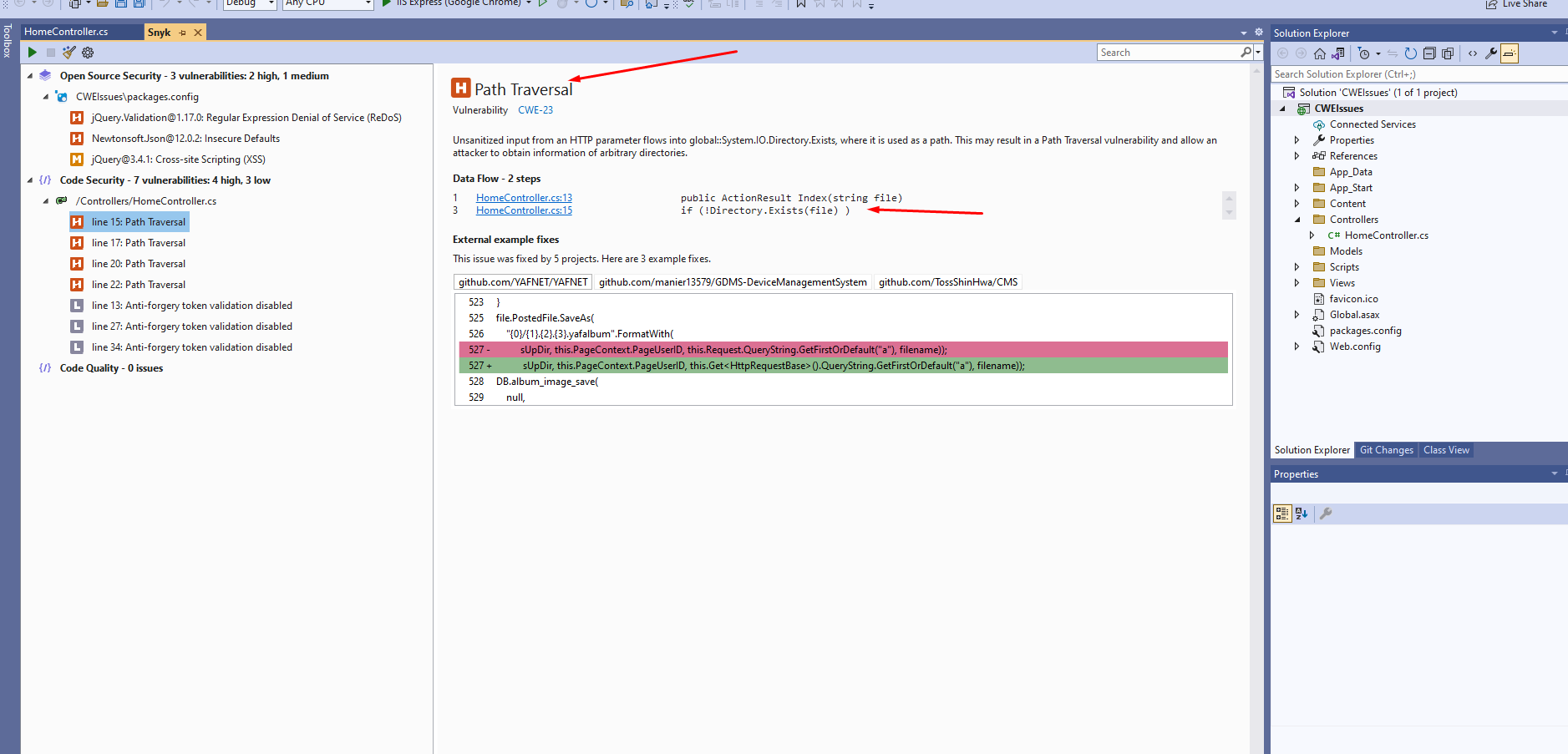
Snyk is a powerful tool that helps developers identify and fix vulnerabilities in their code. When you scan your ASP.NET Core application with Snyk, it can flag potential CWE-23 vulnerabilities by analyzing the code for unsafe file path handling. It is crucial to regularly scan your application to ensure that all known vulnerabilities are addressed promptly.
When Snyk identifies a CWE-23 vulnerability, it typically provides a detailed report indicating where the vulnerability exists and suggestions for remediation. For example, it may highlight instances where user input is directly used in file operations without validation, allowing you to pinpoint exactly where to focus your efforts in securing your application.
Fixing CWE-23 Path Traversal Vulnerability
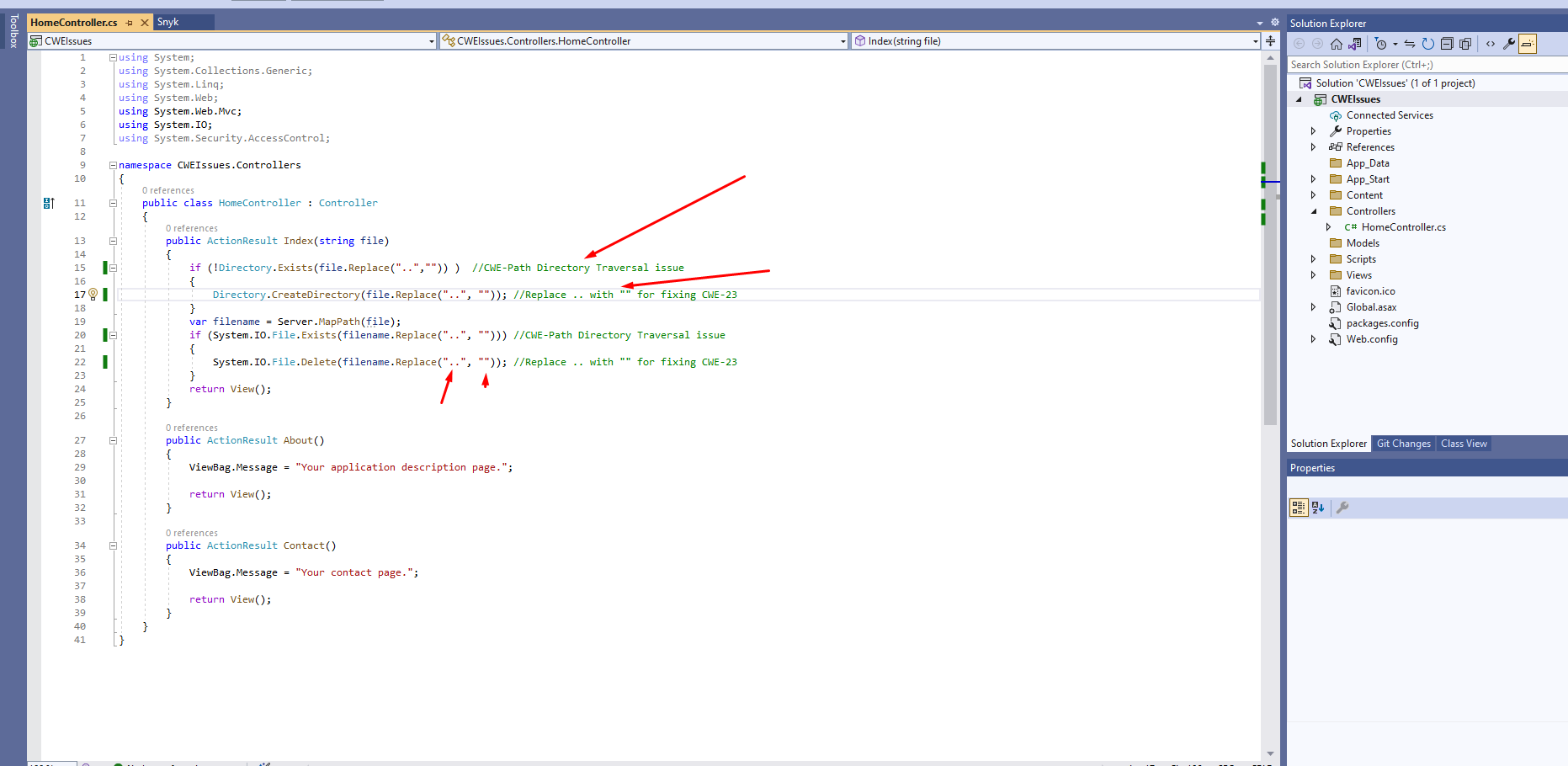
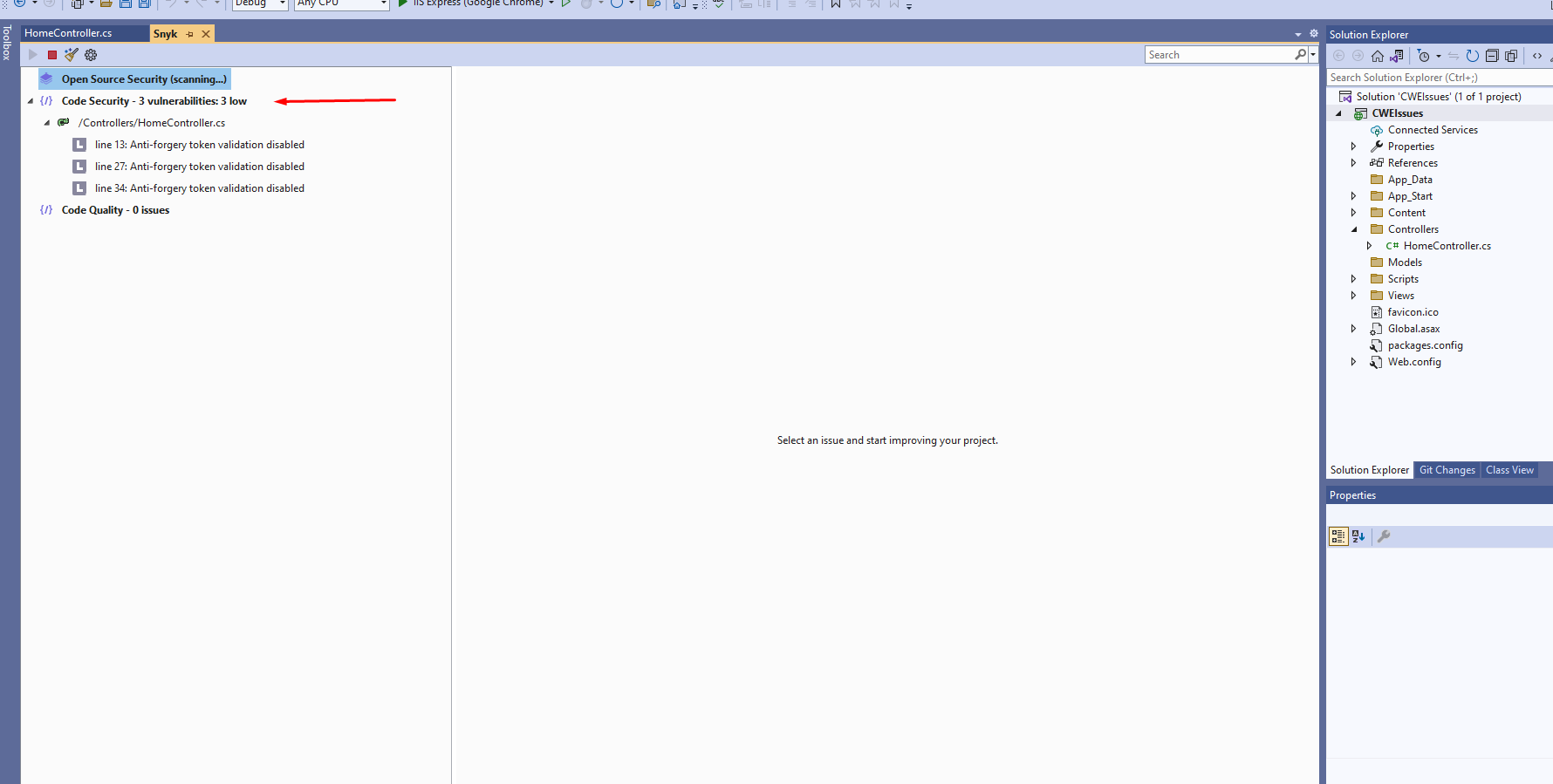
To fix the CWE-23 vulnerability in your application, you need to implement proper input validation and sanitization. A common approach is to remove any instances of .. from the input, which prevents directory traversal. However, simply replacing .. is not sufficient on its own; you also need to ensure that the input is restricted to a safe set of values.
Here’s an enhanced version of the previous code that includes validation to prevent path traversal:
public ActionResult Index(string file) {
    // Sanitize the input to prevent path traversal
    var sanitizedFile = Path.GetFileName(file);

    // Check if the directory exists
    if (!Directory.Exists(sanitizedFile)) {
        Directory.CreateDirectory(sanitizedFile);
    }

    var filename = Server.MapPath(sanitizedFile);
    if (System.IO.File.Exists(filename)) {
        System.IO.File.Delete(filename);
    }
    return View();
}
In this code, we use Path.GetFileName() to extract only the file name from the input, effectively preventing directory traversal.
Edge Cases & Gotchas
While implementing fixes for CWE-23 vulnerabilities, it is important to consider various edge cases. For example, even if you sanitize input by removing .., an attacker might use URL encoding to bypass your checks. An input like %2E%2E%2F could still lead to a path traversal attempt. Therefore, it’s essential to decode any user input before sanitization.
Another edge case to consider is symbolic links. If your application allows file uploads or any kind of file manipulation, an attacker could exploit symbolic links to access files outside the intended directory. Always ensure that your application has proper permissions set and avoid using symbolic links where possible.
Performance & Best Practices
When addressing CWE-23 vulnerabilities, following best practices can significantly enhance the security and performance of your application. Here are some recommendations:
- Always validate user input: Ensure that all user inputs are validated against a strict set of rules to prevent malicious input.
- Use built-in functions: Leverage built-in functions like
Path.GetFileName()andPath.Combine()to manage file paths safely. - Limit user permissions: Apply the principle of least privilege by limiting user permissions to only what is necessary.
- Regularly update dependencies: Keep your libraries and frameworks up to date to mitigate known vulnerabilities.
Conclusion
In summary, addressing CWE-23 Path Traversal vulnerabilities is critical for maintaining the security of your ASP.NET Core applications. By understanding how these vulnerabilities work, identifying them with tools like Snyk, and implementing best practices for input validation and sanitization, you can significantly reduce the risk of unauthorized access to sensitive data.
- Understand the nature of CWE-23 vulnerabilities and the risks they pose.
- Utilize Snyk to identify vulnerabilities in your codebase.
- Implement robust input validation and sanitization techniques.
- Consider edge cases and follow best practices to enhance security.
