
Login Register
Code2night
  • Home
  • Blog Archive
  • Learn
    • Tutorials
    • Videos
  • Interview Q&A
  • Resources
    • Cheatsheets
    • Tech Comparisons
  • Languages
    • Angular Angular js ASP.NET Asp.net Core ASP.NET Core, C# ASP.NET MVC ASP.NET Web Forms C C# C#, ASP.NET Core, Dapper
      C#, ASP.NET Core, Dapper, Entity Framework DotNet General Web Development HTML, CSS HTML/CSS Java JavaScript JavaScript, HTML, CSS JavaScript, Node.js Node.js
      Python Python 3.11, Pandas, SQL Python 3.11, SQL Python 3.11, SQLAlchemy Python 3.11, SQLAlchemy, SQL Python 3.11, SQLite React Security SQL Server TypeScript
  • Post Blog
  • Tools
    • Beautifiers
      JSON Beautifier HTML Beautifier XML Beautifier CSS Beautifier JS Beautifier SQL Formatter
      Dev Utilities
      JWT Decoder Regex Tester Diff Checker Cron Explainer String Escape Hash Generator Password Generator
      Converters
      Base64 Encode/Decode URL Encoder/Decoder JSON to CSV CSV to JSON JSON to TypeScript Markdown to HTML Number Base Converter Timestamp Converter Case Converter
      Generators
      UUID / GUID Generator Lorem Ipsum QR Code Generator Meta Tag Generator
      Image Tools
      Image Converter Image Resizer Image Compressor Image to Base64 PNG to ICO Background Remover Color Picker
      Text & Content
      Word Counter PDF Editor
      SEO & Web
      SEO Analyzer URL Checker World Clock
  1. Home
  2. Blog
  3. SQL Server
  4. How to read json in Sql Server

How to read json in Sql Server

Date- Aug 10,2022 Updated Feb 2026 6070
OpenJson Sql server

JSON in SQL Server

SQL Server allows you to store JSON data as a string in an Nvarchar variable. To read or deserialize this JSON data, you can use the OPENJSON function, which is designed to parse JSON strings and return the data in a tabular format. This capability is particularly useful for applications that need to integrate with JSON APIs or store semi-structured data.

Here’s a simple example of how to read JSON data using the OPENJSON function:

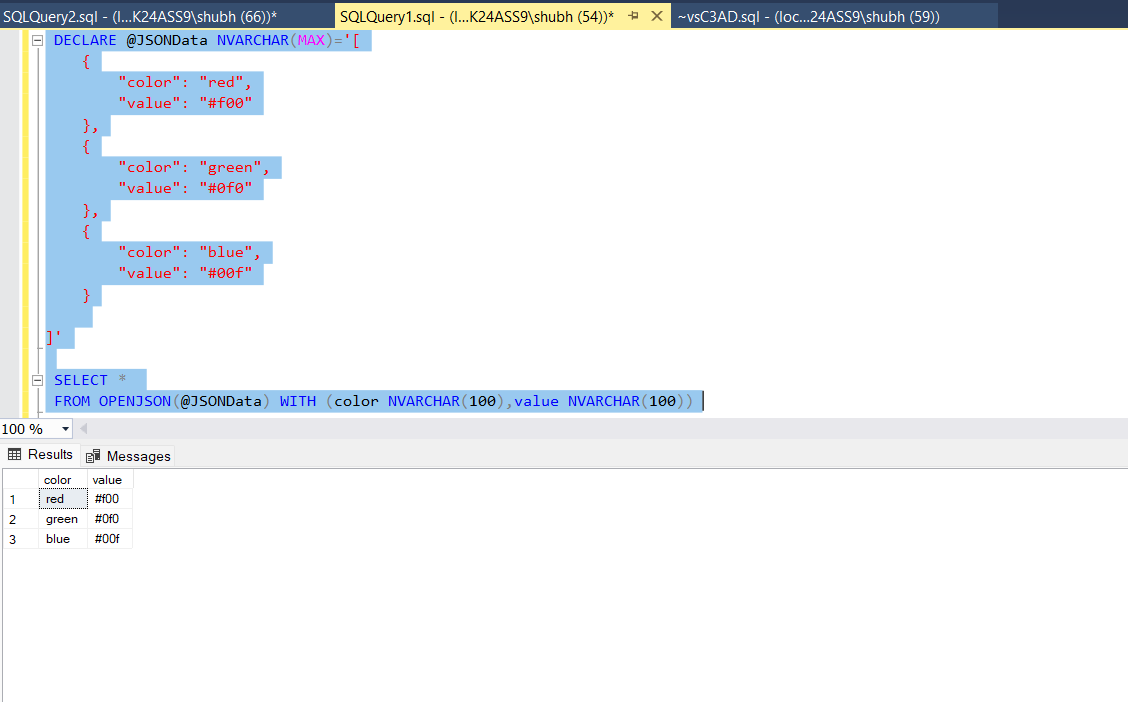
DECLARE @JSONData NVARCHAR(MAX) = '[ { "color": "red", "value": "#f00" }, { "color": "green", "value": "#0f0" }, { "color": "blue", "value": "#00f" } ]';
SELECT * FROM OPENJSON(@JSONData) WITH (color NVARCHAR(100), value NVARCHAR(100));

In this example, we store a JSON array in a variable and then use OPENJSON to parse it. The WITH clause specifies the properties we want to extract from the JSON array. The output will be presented in a table format, making it easy to read and manipulate.
How to read json in Sql Server

Nesting JSON with OPENJSON

JSON data can often be nested, which means you might need to dig deeper to access the properties you want. The OPENJSON function can also handle nested JSON structures. When working with nested JSON, you can use the second parameter of OPENJSON to specify the path to the data you wish to extract.

Consider the following example that demonstrates how to read nested JSON:

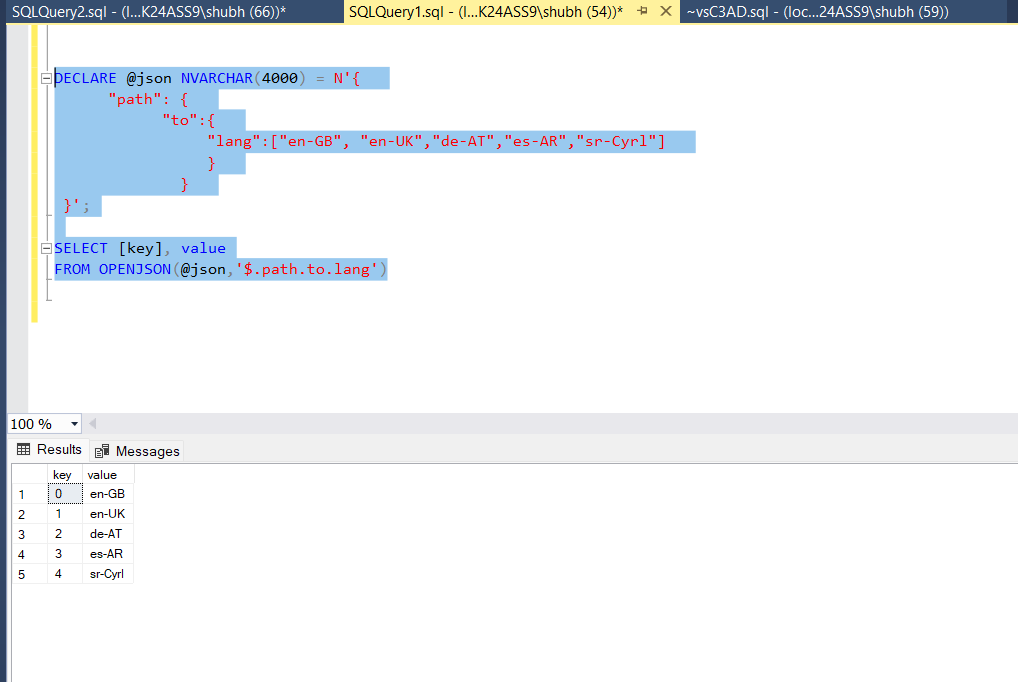
DECLARE @json NVARCHAR(4000) = N'{ "path": { "to":{ "lang":["en-GB", "en-UK","de-AT","es-AR","sr-Cyrl"] } } } }';
SELECT [key], value FROM OPENJSON(@json, '$.path.to.lang');

In this case, we pass the path '$.path.to.lang' to the OPENJSON function, allowing us to extract the array of languages from the nested JSON structure. The output will display each language as a separate row.
How to read json in Sql Server 2

Working with JSON Arrays

When dealing with JSON arrays, you can still utilize the OPENJSON function to parse them effectively. Each element in the array can be treated like a row in a table. This is especially useful when you need to perform operations like filtering or aggregating data based on the properties of the JSON objects.

Here’s an example that demonstrates how to work with a JSON array:

DECLARE @jsonArray NVARCHAR(MAX) = '[{"id":1, "name":"Item1"}, {"id":2, "name":"Item2"}]';
SELECT id, name FROM OPENJSON(@jsonArray) WITH (id INT, name NVARCHAR(100));

This example shows how to read a JSON array of objects, extracting the id and name properties from each object in the array.

Handling Complex JSON Structures

Complex JSON structures may contain multiple levels of nesting or a combination of arrays and objects. To handle these cases effectively, you can combine the use of OPENJSON with other SQL functions like JOIN and OUTER APPLY to flatten the data for easier analysis.

For instance, consider a JSON structure that contains multiple nested arrays:

DECLARE @complexJson NVARCHAR(MAX) = N'{"store": {"books": [{"title": "Book1", "author": "Author1"}, {"title": "Book2", "author": "Author2"}]}}';
SELECT b.title, b.author
FROM OPENJSON(@complexJson, '$.store.books') WITH (title NVARCHAR(100), author NVARCHAR(100)) AS b;

This query extracts the titles and authors of books from a more complex JSON structure, demonstrating how to navigate through multiple levels of nesting.

Edge Cases & Gotchas

When working with JSON in SQL Server, there are several edge cases and potential pitfalls to be aware of:

  • Invalid JSON Format: Ensure that the JSON data you are trying to read is well-formed. Invalid JSON will cause the OPENJSON function to fail, resulting in an error.
  • Data Type Mismatches: Be cautious about data type mismatches when defining the schema in the WITH clause. If the JSON data type does not match the specified SQL data type, it may lead to conversion errors.
  • Nested Structures: When dealing with deeply nested structures, you may need to use multiple OPENJSON calls or leverage OUTER APPLY to flatten the data properly.

Performance & Best Practices

To ensure optimal performance when working with JSON data in SQL Server, consider the following best practices:

  • Indexing: If you're frequently querying JSON data, consider creating computed columns that extract specific properties from your JSON data and indexing those columns for faster retrieval.
  • Limit Data Retrieval: Avoid retrieving more data than necessary. Use the WITH clause to specify only the properties you need from the JSON structure.
  • Validate JSON: Implement validation checks to ensure the JSON data is well-formed before processing it with OPENJSON.

Conclusion

In this blog post, we explored how to read JSON data in SQL Server using the OPENJSON function. We covered various scenarios, including reading simple and nested JSON structures, handling JSON arrays, and working with complex JSON data. By following best practices, you can efficiently manage JSON data in your SQL Server applications.

  • SQL Server supports reading JSON data using the OPENJSON function.
  • You can read both simple and nested JSON structures.
  • JSON arrays can be treated like tables for easy data manipulation.
  • Be aware of edge cases such as invalid JSON formats and data type mismatches.
  • Follow best practices for performance optimization when working with JSON data.

S
Shubham Batra
Programming author at Code2Night — sharing tutorials on ASP.NET, C#, and more.
View all posts →

Related Articles

How to find all tables by column name
Jan 13, 2023
Database Backup .bak
Dec 09, 2023
How to rename table column in sql server
Jan 13, 2023
A Comprehensive Guide to Grok API Response Handling in ASP.NET
Apr 04, 2026
Previous in SQL Server
Batch Script for Creating Database backups from Sql server
Next in SQL Server
How to Connect to a Database with MySQL Workbench
Buy me a pizza

Comments

🔥 Trending This Month

  • 1
    HTTP Error 500.32 Failed to load ASP NET Core runtime 6,933 views
  • 2
    Error-An error occurred while processing your request in .… 11,269 views
  • 3
    Comprehensive Guide to Error Handling in Express.js 233 views
  • 4
    ConfigurationBuilder does not contain a definition for Set… 19,458 views
  • 5
    Mastering JavaScript Error Handling with Try, Catch, and F… 160 views
  • 6
    Mastering Unconditional Statements in C: A Complete Guide … 21,491 views
  • 7
    Unable to connect to any of the specified MySQL hosts 6,225 views

On this page

🎯

Interview Prep

Ace your SQL Server interview with curated Q&As for all levels.

View SQL Server Interview Q&As

More in SQL Server

  • Batch Script for Creating Database backups from Sql server 11211 views
  • How to create a read-only MySQL user 10288 views
  • How to Connect to a Database with MySQL Workbench 7613 views
  • How to find all procedures having table reference in Sql ser… 6984 views
  • Converting commas or other delimiters to a Table or List in … 6506 views
View all SQL Server posts →

Tags

AspNet C# programming AspNet MVC c programming AspNet Core C software development tutorial MVC memory management Paypal coding coding best practices data structures programming tutorial tutorials object oriented programming Slick Slider StripeNet
Free Download for Youtube Subscribers!

First click on Subscribe Now and then subscribe the channel and come back here.
Then Click on "Verify and Download" button for download link

Subscribe Now | 1770
Download
Support Us....!

Please Subscribe to support us

Thank you for Downloading....!

Please Subscribe to support us

Continue with Downloading
Be a Member
Join Us On Whatsapp
Code2Night

A community platform for sharing programming knowledge, tutorials, and blogs. Learn, write, and grow with developers worldwide.

Panipat, Haryana, India
info@code2night.com
Quick Links
  • Home
  • Blog Archive
  • Tutorials
  • About Us
  • Contact
  • Privacy Policy
  • Terms & Conditions
  • Guest Posts
  • SEO Analyzer
Dev Tools
  • JSON Beautifier
  • HTML Beautifier
  • CSS Beautifier
  • JS Beautifier
  • SQL Formatter
  • Diff Checker
  • Regex Tester
  • Markdown to HTML
  • Word Counter
More Tools
  • Password Generator
  • QR Code Generator
  • Hash Generator
  • Base64 Encoder
  • JWT Decoder
  • UUID Generator
  • Image Converter
  • PNG to ICO
  • SEO Analyzer
By Language
  • Angular
  • Angular js
  • ASP.NET
  • Asp.net Core
  • ASP.NET Core, C#
  • ASP.NET MVC
  • ASP.NET Web Forms
  • C
  • C#
  • C#, ASP.NET Core, Dapper
  • C#, ASP.NET Core, Dapper, Entity Framework
  • DotNet
  • General Web Development
  • HTML, CSS
  • HTML/CSS
  • Java
  • JavaScript
  • JavaScript, HTML, CSS
  • JavaScript, Node.js
  • Node.js
  • Python
  • Python 3.11, Pandas, SQL
  • Python 3.11, SQL
  • Python 3.11, SQLAlchemy
  • Python 3.11, SQLAlchemy, SQL
  • Python 3.11, SQLite
  • React
  • Security
  • SQL Server
  • TypeScript
© 2026 Code2Night. All Rights Reserved.
Made with for developers  |  Privacy  ·  Terms
Translate Page
We use cookies to improve your experience and analyze site traffic. By clicking Accept, you consent to our use of cookies. Privacy Policy
Accessibility
Text size
High contrast
Grayscale
Dyslexia font
Highlight links
Pause animations
Large cursor