
Login Register
Code2night
  • Home
  • Blog Archive
  • Learn
    • Tutorials
    • Videos
  • Interview Q&A
  • Resources
    • Cheatsheets
    • Tech Comparisons
  • Languages
    • Angular Angular js ASP.NET Asp.net Core ASP.NET Core, C# ASP.NET MVC ASP.NET Web Forms C C# C#, ASP.NET Core, Dapper
      C#, ASP.NET Core, Dapper, Entity Framework DotNet General Web Development HTML, CSS HTML/CSS Java JavaScript JavaScript, HTML, CSS JavaScript, Node.js Node.js
      Python Python 3.11, Pandas, SQL Python 3.11, SQL Python 3.11, SQLAlchemy Python 3.11, SQLAlchemy, SQL Python 3.11, SQLite React Security SQL Server TypeScript
  • Post Blog
  • Tools
    • Beautifiers
      JSON Beautifier HTML Beautifier XML Beautifier CSS Beautifier JS Beautifier SQL Formatter
      Dev Utilities
      JWT Decoder Regex Tester Diff Checker Cron Explainer String Escape Hash Generator Password Generator
      Converters
      Base64 Encode/Decode URL Encoder/Decoder JSON to CSV CSV to JSON JSON to TypeScript Markdown to HTML Number Base Converter Timestamp Converter Case Converter
      Generators
      UUID / GUID Generator Lorem Ipsum QR Code Generator Meta Tag Generator
      Image Tools
      Image Converter Image Resizer Image Compressor Image to Base64 PNG to ICO Background Remover Color Picker
      Text & Content
      Word Counter PDF Editor
      SEO & Web
      SEO Analyzer URL Checker World Clock
  1. Home
  2. Blog
  3. SQL Server
  4. How to find all tables by column name

How to find all tables by column name

Date- Jan 13,2023 Updated Mar 2026 6574
Sql server database management

Understanding the Importance of Finding Tables by Column Name

In the world of database management, understanding the structure and relationships between tables is crucial. As databases grow in size and complexity, developers often encounter situations where they need to locate specific columns across various tables. This need can arise during debugging, performance optimization, or even during database design reviews. For instance, if you're tasked with removing or altering a column that exists in multiple tables, being able to quickly identify all those tables can save you hours of work.

Additionally, knowing how to find tables by column name can help in data migration tasks, where you might need to transfer data from one schema to another. It can also aid in maintaining data integrity, ensuring that changes in one part of the database do not unintentionally affect other areas.

Prerequisites

Before diving into the methods for finding tables by column name, it's essential to have a basic understanding of SQL Server and its querying capabilities. Familiarity with SQL syntax will be beneficial, as well as access to a SQL Server instance where you can run queries. Additionally, having the necessary permissions to access system views and tables will be crucial for executing the queries discussed in this post.

Using INFORMATION_SCHEMA.COLUMNS to Find Tables

The simplest way to locate tables containing a specific column is by querying the INFORMATION_SCHEMA.COLUMNS view. This view provides metadata about the columns in all tables in the database. By using a straightforward SQL query, you can retrieve a list of tables that contain a specified column name.

SELECT * FROM INFORMATION_SCHEMA.COLUMNS WHERE COLUMN_NAME LIKE '%key%' ORDER BY TABLE_NAME;

In the above query, replace 'key' with the name of the column you are interested in. The result will include all tables that contain a column with a name similar to 'key'. This method is efficient and straightforward, making it a go-to approach for many developers.
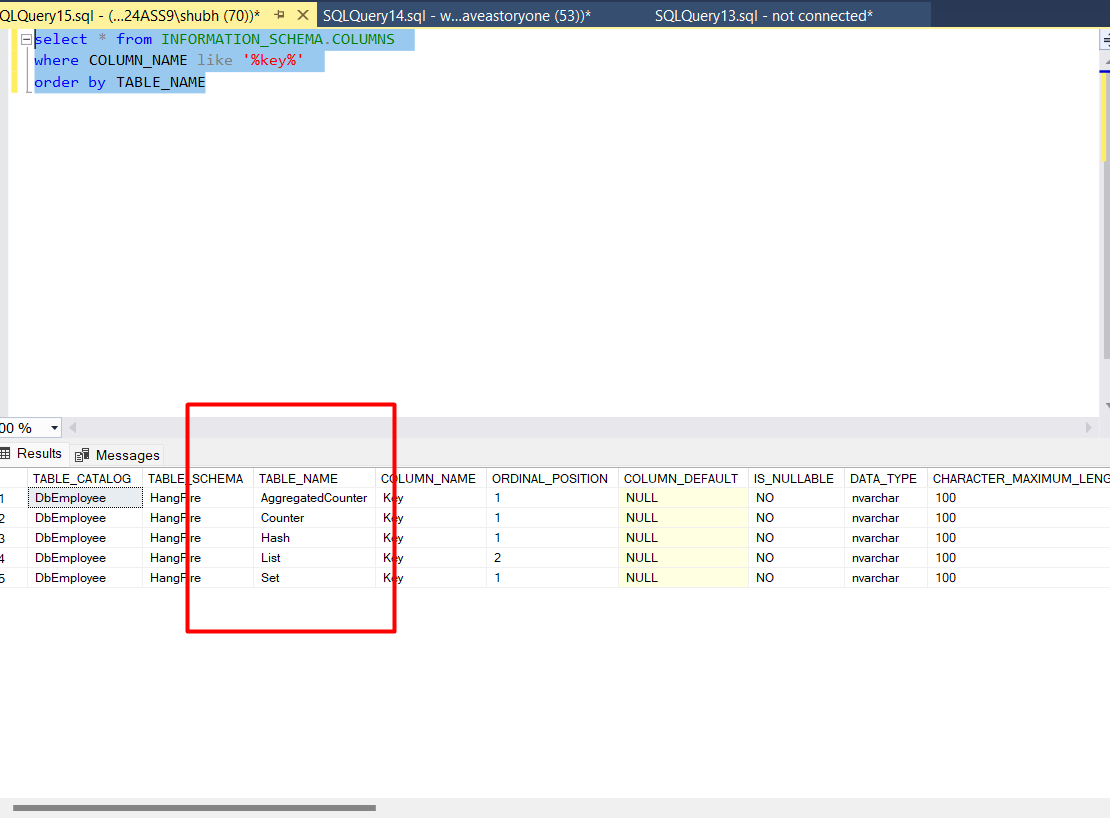
Tables

Querying System Catalog Views

Another method to find tables by column name is to query the system catalog views directly. SQL Server provides several system views, such as sys.columns and sys.tables, which can be combined to obtain detailed information about tables and their columns.

SELECT t.name AS TableName, c.name AS ColumnName
FROM sys.columns c
INNER JOIN sys.tables t ON c.object_id = t.object_id
WHERE c.name LIKE '%key%'
ORDER BY t.name;

This query joins the sys.columns view with the sys.tables view, allowing you to retrieve not just the column names but also the corresponding table names. This method can be particularly useful when you need more detailed information about each table.

Using Dynamic SQL for Advanced Searches

For more complex scenarios, such as searching for multiple columns or incorporating additional filtering criteria, you might consider using dynamic SQL. Dynamic SQL allows you to construct SQL queries programmatically and execute them at runtime, providing flexibility in how you search for tables.

DECLARE @sql NVARCHAR(MAX);
SET @sql = 'SELECT t.name AS TableName, c.name AS ColumnName
FROM sys.columns c
INNER JOIN sys.tables t ON c.object_id = t.object_id
WHERE c.name IN (' + '''key1'', ''key2'')' + '
ORDER BY t.name;';
EXEC sp_executesql @sql;

In this example, we define a dynamic SQL query to search for multiple columns ('key1' and 'key2'). This approach is particularly useful when the column names are not known in advance or when they need to be fetched from another source.

Edge Cases & Gotchas

While finding tables by column name is generally straightforward, there are some edge cases and gotchas to be aware of:

  • Case Sensitivity: SQL Server's default collation is case-insensitive, but if your database uses a case-sensitive collation, ensure that your queries account for this.
  • Schema Considerations: If your database has multiple schemas, be aware that columns with the same name may exist in different schemas. Always check the schema when retrieving results.
  • Permissions: Ensure you have the necessary permissions to access the system views. Lack of permissions can lead to incomplete results or errors.

Performance & Best Practices

When querying for tables by column name, consider the following best practices to enhance performance:

  • Limit Results: If you know the specific schema or type of table you are interested in, include those conditions in your WHERE clause to reduce the number of results returned.
  • Use Indexed Views: If you frequently search for tables by column name, consider creating indexed views or materialized views to improve performance on large datasets.
  • Regular Maintenance: Regularly update statistics and perform maintenance on your database to ensure optimal query performance.

Conclusion

Finding tables by column name in SQL Server is a crucial skill for developers and database administrators. By utilizing the methods outlined in this post, you can efficiently navigate your databases and make informed decisions about your data structure. Here are the key takeaways:

  • Use INFORMATION_SCHEMA.COLUMNS for straightforward queries on column names.
  • Query sys.columns and sys.tables for more detailed information.
  • Consider dynamic SQL for advanced search scenarios.
  • Be aware of case sensitivity and schema considerations.
  • Implement best practices to enhance query performance.

S
Shubham Batra
Programming author at Code2Night — sharing tutorials on ASP.NET, C#, and more.
View all posts →

Related Articles

Database Backup .bak
Dec 09, 2023
How to rename table column in sql server
Jan 13, 2023
How to read json in Sql Server
Aug 10, 2022
Mastering SQL Server Performance Tuning: Proven Tips and Techniques
Apr 01, 2026
Previous in SQL Server
How to find all procedures having table reference in Sql server
Next in SQL Server
How to rename table column in sql server
Buy me a pizza

Comments

🔥 Trending This Month

  • 1
    HTTP Error 500.32 Failed to load ASP NET Core runtime 6,938 views
  • 2
    Error-An error occurred while processing your request in .… 11,273 views
  • 3
    Comprehensive Guide to Error Handling in Express.js 235 views
  • 4
    ConfigurationBuilder does not contain a definition for Set… 19,459 views
  • 5
    Mastering JavaScript Error Handling with Try, Catch, and F… 162 views
  • 6
    Mastering Unconditional Statements in C: A Complete Guide … 21,497 views
  • 7
    Unable to connect to any of the specified MySQL hosts 6,232 views

On this page

🎯

Interview Prep

Ace your SQL Server interview with curated Q&As for all levels.

View SQL Server Interview Q&As

More in SQL Server

  • Batch Script for Creating Database backups from Sql server 11213 views
  • How to create a read-only MySQL user 10290 views
  • How to Connect to a Database with MySQL Workbench 7613 views
  • How to find all procedures having table reference in Sql ser… 6985 views
  • Converting commas or other delimiters to a Table or List in … 6508 views
View all SQL Server posts →

Tags

AspNet C# programming AspNet MVC c programming AspNet Core C software development tutorial MVC memory management Paypal coding coding best practices data structures programming tutorial tutorials object oriented programming Slick Slider StripeNet
Free Download for Youtube Subscribers!

First click on Subscribe Now and then subscribe the channel and come back here.
Then Click on "Verify and Download" button for download link

Subscribe Now | 1770
Download
Support Us....!

Please Subscribe to support us

Thank you for Downloading....!

Please Subscribe to support us

Continue with Downloading
Be a Member
Join Us On Whatsapp
Code2Night

A community platform for sharing programming knowledge, tutorials, and blogs. Learn, write, and grow with developers worldwide.

Panipat, Haryana, India
info@code2night.com
Quick Links
  • Home
  • Blog Archive
  • Tutorials
  • About Us
  • Contact
  • Privacy Policy
  • Terms & Conditions
  • Guest Posts
  • SEO Analyzer
Dev Tools
  • JSON Beautifier
  • HTML Beautifier
  • CSS Beautifier
  • JS Beautifier
  • SQL Formatter
  • Diff Checker
  • Regex Tester
  • Markdown to HTML
  • Word Counter
More Tools
  • Password Generator
  • QR Code Generator
  • Hash Generator
  • Base64 Encoder
  • JWT Decoder
  • UUID Generator
  • Image Converter
  • PNG to ICO
  • SEO Analyzer
By Language
  • Angular
  • Angular js
  • ASP.NET
  • Asp.net Core
  • ASP.NET Core, C#
  • ASP.NET MVC
  • ASP.NET Web Forms
  • C
  • C#
  • C#, ASP.NET Core, Dapper
  • C#, ASP.NET Core, Dapper, Entity Framework
  • DotNet
  • General Web Development
  • HTML, CSS
  • HTML/CSS
  • Java
  • JavaScript
  • JavaScript, HTML, CSS
  • JavaScript, Node.js
  • Node.js
  • Python
  • Python 3.11, Pandas, SQL
  • Python 3.11, SQL
  • Python 3.11, SQLAlchemy
  • Python 3.11, SQLAlchemy, SQL
  • Python 3.11, SQLite
  • React
  • Security
  • SQL Server
  • TypeScript
© 2026 Code2Night. All Rights Reserved.
Made with for developers  |  Privacy  ·  Terms
Translate Page
We use cookies to improve your experience and analyze site traffic. By clicking Accept, you consent to our use of cookies. Privacy Policy
Accessibility
Text size
High contrast
Grayscale
Dyslexia font
Highlight links
Pause animations
Large cursor