
Login Register
Code2night
  • Home
  • Blog Archive
  • Learn
    • Tutorials
    • Videos
  • Interview Q&A
  • Resources
    • Cheatsheets
    • Tech Comparisons
  • Languages
    • Angular Angular js ASP.NET Asp.net Core ASP.NET Core, C# ASP.NET MVC ASP.NET Web Forms C C# C#, ASP.NET Core, Dapper
      C#, ASP.NET Core, Dapper, Entity Framework DotNet General Web Development HTML, CSS HTML/CSS Java JavaScript JavaScript, HTML, CSS JavaScript, Node.js Node.js
      Python Python 3.11, Pandas, SQL Python 3.11, SQL Python 3.11, SQLAlchemy Python 3.11, SQLAlchemy, SQL Python 3.11, SQLite React Security SQL Server TypeScript
  • Post Blog
  • Tools
    • Beautifiers
      JSON Beautifier HTML Beautifier XML Beautifier CSS Beautifier JS Beautifier SQL Formatter
      Dev Utilities
      JWT Decoder Regex Tester Diff Checker Cron Explainer String Escape Hash Generator Password Generator
      Converters
      Base64 Encode/Decode URL Encoder/Decoder JSON to CSV CSV to JSON JSON to TypeScript Markdown to HTML Number Base Converter Timestamp Converter Case Converter
      Generators
      UUID / GUID Generator Lorem Ipsum QR Code Generator Meta Tag Generator
      Image Tools
      Image Converter Image Resizer Image Compressor Image to Base64 PNG to ICO Background Remover Color Picker
      Text & Content
      Word Counter PDF Editor
      SEO & Web
      SEO Analyzer URL Checker World Clock
  1. Home
  2. Blog
  3. SQL Server
  4. Converting commas or other delimiters to a Table or List in SQL Server

Converting commas or other delimiters to a Table or List in SQL Server

Date- Jan 13,2023 Updated Mar 2026 6509

Introduction to Delimiter Conversion

Working with delimited data is a common challenge faced by SQL developers and data analysts. Delimited data refers to strings that contain multiple pieces of information separated by a specific character, such as a comma, tab, or pipe. For instance, a list of countries might be represented as 'India,America,Asia,Europe'. When dealing with such unstructured data, converting it into a structured format, like a table or list, is essential for efficient data processing and analysis.

Understanding how to manipulate delimited data allows for better organization, reporting, and integration with other systems. SQL Server provides a variety of tools and functions that make this task more manageable. In this post, we will discuss various methods to convert delimiters into structured formats, including user-defined functions, built-in string functions, and common use cases.

Prerequisites

Before diving into the details of delimiter conversion, it's essential to have a basic understanding of SQL Server and its querying capabilities. Familiarity with the following concepts will be beneficial:

  • Basic SQL syntax and commands
  • Understanding of data types, particularly string data types
  • Knowledge of SQL Server functions and stored procedures

Creating a Split Function

One of the most common methods to convert delimiters into a table is by creating a user-defined function. The SplitString function provided below demonstrates how to achieve this using a loop within a table-valued function. This function accepts an input string and a delimiter, returning a table of individual items.

CREATE FUNCTION SplitString ( @in_string VARCHAR(MAX), @delimeter VARCHAR(1) ) RETURNS @list TABLE(item VARCHAR(100)) AS BEGIN WHILE LEN(@in_string) > 0 BEGIN INSERT INTO @list(item) SELECT LEFT(@in_string, CHARINDEX(@delimeter, @in_string + @delimeter) - 1) AS Item SET @in_string = STUFF(@in_string, 1, CHARINDEX(@delimeter, @in_string + @delimeter), '') END RETURN END

To use the SplitString function, you can run the following query:

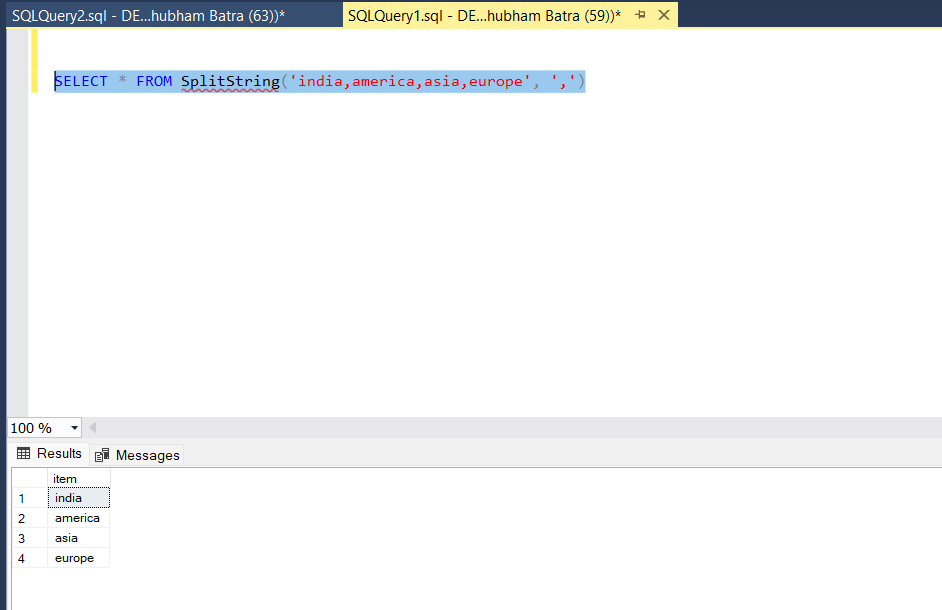
SELECT * FROM SplitString('India,America,Asia,Europe', ',')

The result will be a table with each country listed in a separate row. This simple yet effective approach can be extended to handle various delimiters and input formats.

Using Built-in String Functions

SQL Server offers several built-in string functions that can be utilized for delimiter conversion. Functions like STRING_SPLIT (available in SQL Server 2016 and later) can simplify the process significantly. This function takes a string and a delimiter as inputs and returns a single-column table of the split values.

SELECT value FROM STRING_SPLIT('India,America,Asia,Europe', ',')

This command will yield the same results as our previous function, providing a more efficient and straightforward solution. However, it is essential to note that STRING_SPLIT does not guarantee the order of the output unless the original string is ordered.

Handling Different Delimiters

While commas are a common choice for delimiters, you may encounter data with various other characters, such as pipes ('|'), semicolons (';'), or tabs. The methods discussed can easily be adapted to handle these different delimiters by simply changing the delimiter parameter in the function calls.

For instance, if you have a pipe-delimited string, you can use either the SplitString function or the STRING_SPLIT function with the pipe character as the delimiter:

SELECT * FROM SplitString('India|America|Asia|Europe', '|')

Edge Cases & Gotchas

When working with delimiter conversion, several edge cases and potential pitfalls can arise:

  • Empty Strings: If the input string is empty, the function should gracefully return an empty table.
  • Consecutive Delimiters: Strings with consecutive delimiters (e.g., 'India,,America') can lead to empty rows in the output. Ensure your function accounts for this scenario.
  • Trailing Delimiters: Input strings that end with a delimiter can also cause issues. For example, 'India,America,' should return a row for 'India' and 'America' without an additional empty row.

Performance & Best Practices

Performance is a critical consideration when working with string manipulation in SQL Server. Here are some best practices to keep in mind:

  • Use Built-in Functions: Whenever possible, prefer built-in functions like STRING_SPLIT for better performance and simplicity.
  • Avoid Loops: While loops can significantly degrade performance, especially with large datasets. Aim for set-based operations instead.
  • Test with Different Data Sizes: Always test your functions with various input sizes to identify performance bottlenecks.

Conclusion

In this blog post, we have explored the techniques for converting delimiters into structured formats in SQL Server. We discussed the creation of a user-defined function, the use of built-in functions, and how to handle different delimiters effectively. Key takeaways include:

  • Understanding the importance of converting delimited data for analysis.
  • Utilizing user-defined functions and built-in string functions like STRING_SPLIT.
  • Being aware of edge cases and performance considerations when working with delimiters.
sql server

S
Shubham Batra
Programming author at Code2Night — sharing tutorials on ASP.NET, C#, and more.
View all posts →

Related Articles

Batch Script for Creating Database backups from Sql server
Apr 30, 2022
How to create a read-only MySQL user
Jan 05, 2023
How to Connect to a Database with MySQL Workbench
Jan 04, 2023
How to find all procedures having table reference in Sql server
Jan 13, 2023
Previous in SQL Server
Multiple rows to one comma separated value in Sql Server
Next in SQL Server
How to find all procedures having table reference in Sql server
Buy me a pizza

Comments

🔥 Trending This Month

  • 1
    HTTP Error 500.32 Failed to load ASP NET Core runtime 6,938 views
  • 2
    Error-An error occurred while processing your request in .… 11,273 views
  • 3
    Comprehensive Guide to Error Handling in Express.js 235 views
  • 4
    ConfigurationBuilder does not contain a definition for Set… 19,459 views
  • 5
    Mastering JavaScript Error Handling with Try, Catch, and F… 162 views
  • 6
    Mastering Unconditional Statements in C: A Complete Guide … 21,497 views
  • 7
    Unable to connect to any of the specified MySQL hosts 6,232 views

On this page

🎯

Interview Prep

Ace your SQL Server interview with curated Q&As for all levels.

View SQL Server Interview Q&As

More in SQL Server

  • How to find all tables by column name 6574 views
  • How to read json in Sql Server 6071 views
  • Multiple rows to one comma separated value in Sql Server 5994 views
  • How to rename table column in sql server 5806 views
  • How to Return Query Results as a Comma Separated in MySQL 5457 views
View all SQL Server posts →

Tags

AspNet C# programming AspNet MVC c programming AspNet Core C software development tutorial MVC memory management Paypal coding coding best practices data structures programming tutorial tutorials object oriented programming Slick Slider StripeNet
Free Download for Youtube Subscribers!

First click on Subscribe Now and then subscribe the channel and come back here.
Then Click on "Verify and Download" button for download link

Subscribe Now | 1770
Download
Support Us....!

Please Subscribe to support us

Thank you for Downloading....!

Please Subscribe to support us

Continue with Downloading
Be a Member
Join Us On Whatsapp
Code2Night

A community platform for sharing programming knowledge, tutorials, and blogs. Learn, write, and grow with developers worldwide.

Panipat, Haryana, India
info@code2night.com
Quick Links
  • Home
  • Blog Archive
  • Tutorials
  • About Us
  • Contact
  • Privacy Policy
  • Terms & Conditions
  • Guest Posts
  • SEO Analyzer
Dev Tools
  • JSON Beautifier
  • HTML Beautifier
  • CSS Beautifier
  • JS Beautifier
  • SQL Formatter
  • Diff Checker
  • Regex Tester
  • Markdown to HTML
  • Word Counter
More Tools
  • Password Generator
  • QR Code Generator
  • Hash Generator
  • Base64 Encoder
  • JWT Decoder
  • UUID Generator
  • Image Converter
  • PNG to ICO
  • SEO Analyzer
By Language
  • Angular
  • Angular js
  • ASP.NET
  • Asp.net Core
  • ASP.NET Core, C#
  • ASP.NET MVC
  • ASP.NET Web Forms
  • C
  • C#
  • C#, ASP.NET Core, Dapper
  • C#, ASP.NET Core, Dapper, Entity Framework
  • DotNet
  • General Web Development
  • HTML, CSS
  • HTML/CSS
  • Java
  • JavaScript
  • JavaScript, HTML, CSS
  • JavaScript, Node.js
  • Node.js
  • Python
  • Python 3.11, Pandas, SQL
  • Python 3.11, SQL
  • Python 3.11, SQLAlchemy
  • Python 3.11, SQLAlchemy, SQL
  • Python 3.11, SQLite
  • React
  • Security
  • SQL Server
  • TypeScript
© 2026 Code2Night. All Rights Reserved.
Made with for developers  |  Privacy  ·  Terms
Translate Page
We use cookies to improve your experience and analyze site traffic. By clicking Accept, you consent to our use of cookies. Privacy Policy
Accessibility
Text size
High contrast
Grayscale
Dyslexia font
Highlight links
Pause animations
Large cursor
