
Import Excel in Asp.net MVC using OLE DB
Hello guys and welcome to Code2Night, sometimes we need to import Excel in Asp.net MVC using OLE DB. So we will use OLE DB Connection for that as that is really fast and effective while reading large Excel files. You can check the steps on using that with the asp.net MVC project.
OLE DB
It is a Microsoft technology for access to data. It actually works with Microsoft Access Engine to read Excel or CSV files.
So, for reading Excel data from xlsx file, we will follow these steps.
1. First of all create a new asp.net MVC application and add a view with Html Form and add one input type file control on it along with a button to save the file
@using (Html.BeginForm("ImportExcelFile", "Home", FormMethod.Post, new { @enctype = "multipart/form-data" }))
{
    <div class="container mt-5" style="margin-top:10px;">
        <input type="file" name="file" />
        <br />
        <input type="submit" value="save" />
    </div>
}
So, we have here added a file-upload control on the view and a button for saving the file which we will read data from.

Now after adding the form we will go to the controller and add code for saving the selected file and then reading the data from data Excel file.
So, now take one controller with the name "Home" as we have mentioned in the beginning form. And add an action named "ImportExcelFile". You can copy that from here
using System;
using System.Collections.Generic;
using System.Linq;
using System.Web;
using System.Web.Mvc;
using System.Data.OleDb;
using System.Data;
using System.IO;
namespace Export.Controllers
{
    public class HomeController : Controller
    {
        public ActionResult Index()
        {

            return View();
        }

        public ActionResult ImportExcelFile(HttpPostedFileBase file)
        {
            string lsconnStr = string.Empty;
            DataTable dt = new DataTable();
            OleDbCommand command = null;
            var lsFilePath = Server.MapPath("/Content/TestFile"+DateTime.Now.ToString("ss")+".xlsx");
            file.SaveAs(lsFilePath);
            string lsFileExt = Path.GetExtension(lsFilePath);

            string errorMessage = "";
            string hdr = "Yes";
            int n_rows = 0;

            try
            {

                if (lsFileExt == ".xlsx")

                    lsconnStr = "Provider=Microsoft.ACE.OLEDB.12.0;Data Source=" + lsFilePath + ";Extended Properties='Excel 12.0 Xml;HDR=" + hdr + ";IMEX=1;MAXSCANROWS=0'";
                else if (lsFileExt == ".xls")
                    lsconnStr = "Provider=Microsoft.ACE.OLEDB.12.0;Data Source=" + lsFilePath + ";Extended Properties='Excel 12.0 Xml;HDR=" + hdr + ";IMEX=1;MAXSCANROWS=0'";
                else
                {
                    errorMessage = "Invalid file for import data. Allow only .xlsx.";
                }
                string s_excel_sql = string.Empty;
                OleDbConnection conn = new OleDbConnection(lsconnStr);
                conn.Open();
                DataTable excelSchema = conn.GetOleDbSchemaTable(OleDbSchemaGuid.Tables, null);

                string s_table = string.Empty;
                foreach (DataRow row in excelSchema.Rows)
                {
                    if (!row["TABLE_NAME"].ToString().Contains("FilterDatabase"))
                    {
                        if (!string.IsNullOrEmpty(s_table))
                        {
                            errorMessage = "Excel File contains multiple sheets. Please Upload Excel File with single Sheet.";

                        }
                        s_table = row["TABLE_NAME"].ToString();

                    }
                }

                if (n_rows > 0)
                {


                    s_excel_sql = String.Format(" SELECT TOP {0} * FROM [{1}] ", n_rows, System.IO.Path.GetFileNameWithoutExtension(s_table));
                }
                else
                {
                    s_excel_sql = String.Format(" SELECT * FROM [{0}] ", System.IO.Path.GetFileNameWithoutExtension(s_table));
                }

                command = new OleDbCommand(s_excel_sql, conn);
                OleDbDataAdapter da = new OleDbDataAdapter(command);
                DataTable exceldatatable = new DataTable();
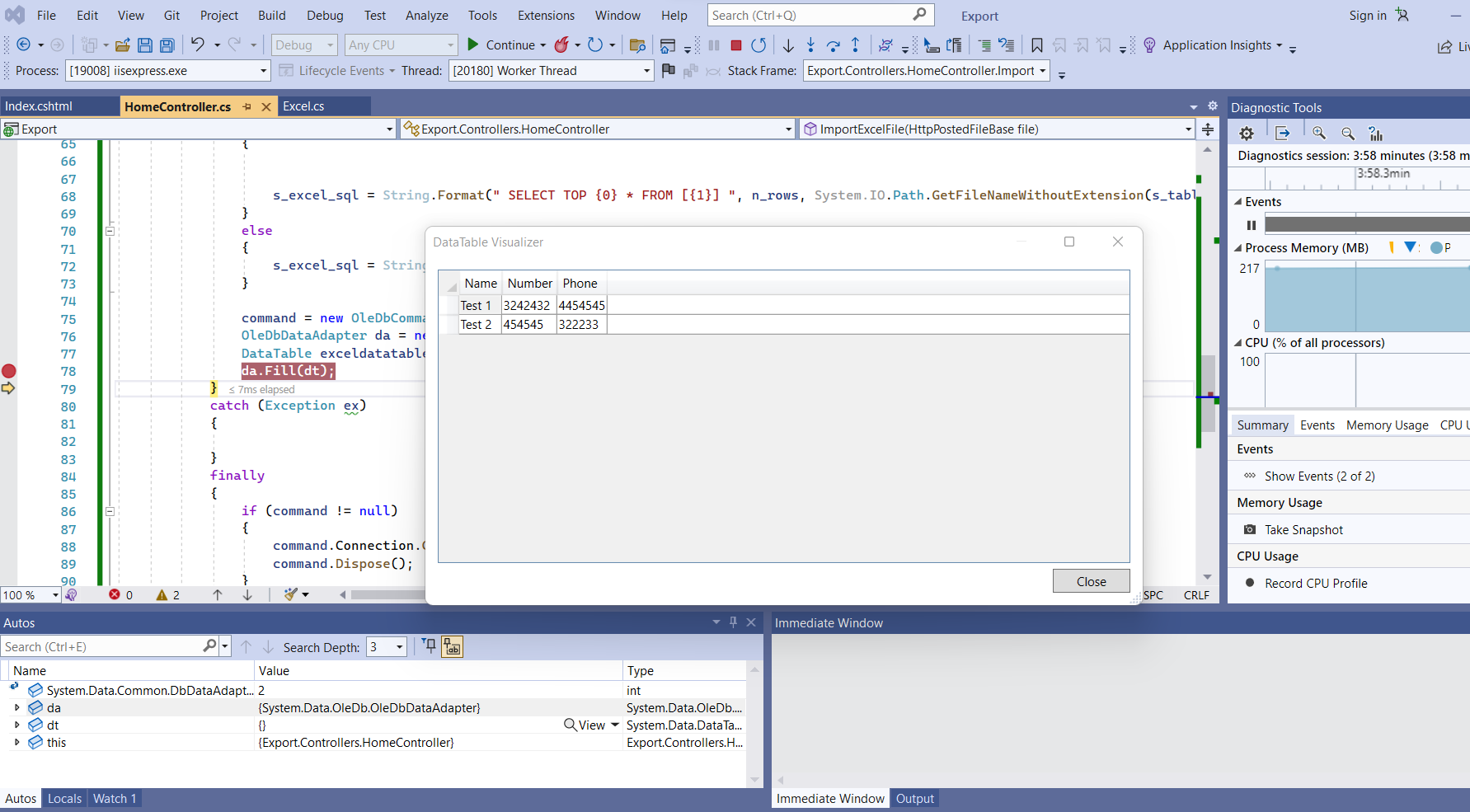
                da.Fill(dt); //You will get the data in this dt datatable
            }
            catch (Exception ex)
            {

            }
            finally
            {
                if (command != null)
                {
                    command.Connection.Close();
                    command.Dispose();
                }
            }
            return RedirectToAction("Index");
        }


    }
}
So, you can copy the action from here and there we will use OLEDbCommand for creating a connection to the file, and then we will use OLEDbDataAdapter for reading the data from the Excel file which is provided in the connection.
You will see the data in the dt like this image
Issue The 'Microsoft.ACE.OLEDB.12.0' provider is not registered on the local machine.
If you get any error saying The 'Microsoft.ACE.OLEDB.12.0' provider is not registered on the local machine while using OLEDB then you will have to fix that error first and you can take reference from Solved 'Microsoft.ACE.OLEDB.12.0' provider is not registered on the local machine.
Just follow the steps from the article and you will be able to solve your error and then you will be able to use OLEDB.
So, this is how you can Import Excel in Asp.net MVC using OLE DB. There is one other way also to import Excel file in asp.net and that is by using ExcelDataReader which you can check below
Import Excel using Excel Data Reader
If you face an issue while working with OLE DB you can try working with Excel Data Reader. You can get all the steps of using ExcelDataReader from our article Import data from Excel in Asp.Net using ExcelDataReader.
Let us know if you face any issues and comment if an issue doesn't solve for you. You can copy the code samples also.
