Login Register
Code2night
  • Home
  • Blog Archive
  • Learn
    • Tutorials
    • Videos
  • Interview Q&A
  • Resources
    • Cheatsheets
    • Tech Comparisons
  • Languages
    • Angular Angular js ASP.NET Asp.net Core ASP.NET Core, C# ASP.NET MVC ASP.NET Web Forms C C# C#, ASP.NET Core, Dapper
      C#, ASP.NET Core, Dapper, Entity Framework DotNet General Web Development HTML, CSS HTML/CSS Java JavaScript JavaScript, HTML, CSS JavaScript, Node.js Node.js
      Python Python 3.11, Pandas, SQL Python 3.11, SQL Python 3.11, SQLAlchemy Python 3.11, SQLAlchemy, SQL Python 3.11, SQLite React Security SQL Server TypeScript
  • Post Blog
  • Tools
    • Beautifiers
      JSON Beautifier HTML Beautifier XML Beautifier CSS Beautifier JS Beautifier SQL Formatter
      Dev Utilities
      JWT Decoder Regex Tester Diff Checker Cron Explainer String Escape Hash Generator Password Generator
      Converters
      Base64 Encode/Decode URL Encoder/Decoder JSON to CSV CSV to JSON JSON to TypeScript Markdown to HTML Number Base Converter Timestamp Converter Case Converter
      Generators
      UUID / GUID Generator Lorem Ipsum QR Code Generator Meta Tag Generator
      Image Tools
      Image Converter Image Resizer Image Compressor Image to Base64 PNG to ICO Background Remover Color Picker
      Text & Content
      Word Counter PDF Editor
      SEO & Web
      SEO Analyzer URL Checker World Clock
  1. Home
  2. Blog
  3. ASP.NET Core
  4. Login With Microsoft in Asp.net

Login With Microsoft in Asp.net

Date- May 14,2023 Updated Mar 2026 8585 Free Download Pay & Download
Microsoft Authentication Login With Microsoft

Microsoft Authentication

Hello everyone and welcome to Code2Night! In today's digital era, incorporating social logins into our web applications has become increasingly important. It provides users with a seamless and convenient way to access various platforms without the hassle of creating new accounts. In this article, we will dive into the world of .net and explore how to implement the "Login With Microsoft" feature. So, grab your coding hats, and let's get started on this exciting journey of integrating Microsoft login functionality into our asp.net applications!

Login with MS is used nowadays for login in web applications. For implementing this we will need to create a new project and API credentials in Microsoft Azure Portal. So you can check in the next steps for implementing MS Authentication

First of all, we have to log in to Azure Portal. You have to search for the App Registration option in the search barMicrosoft
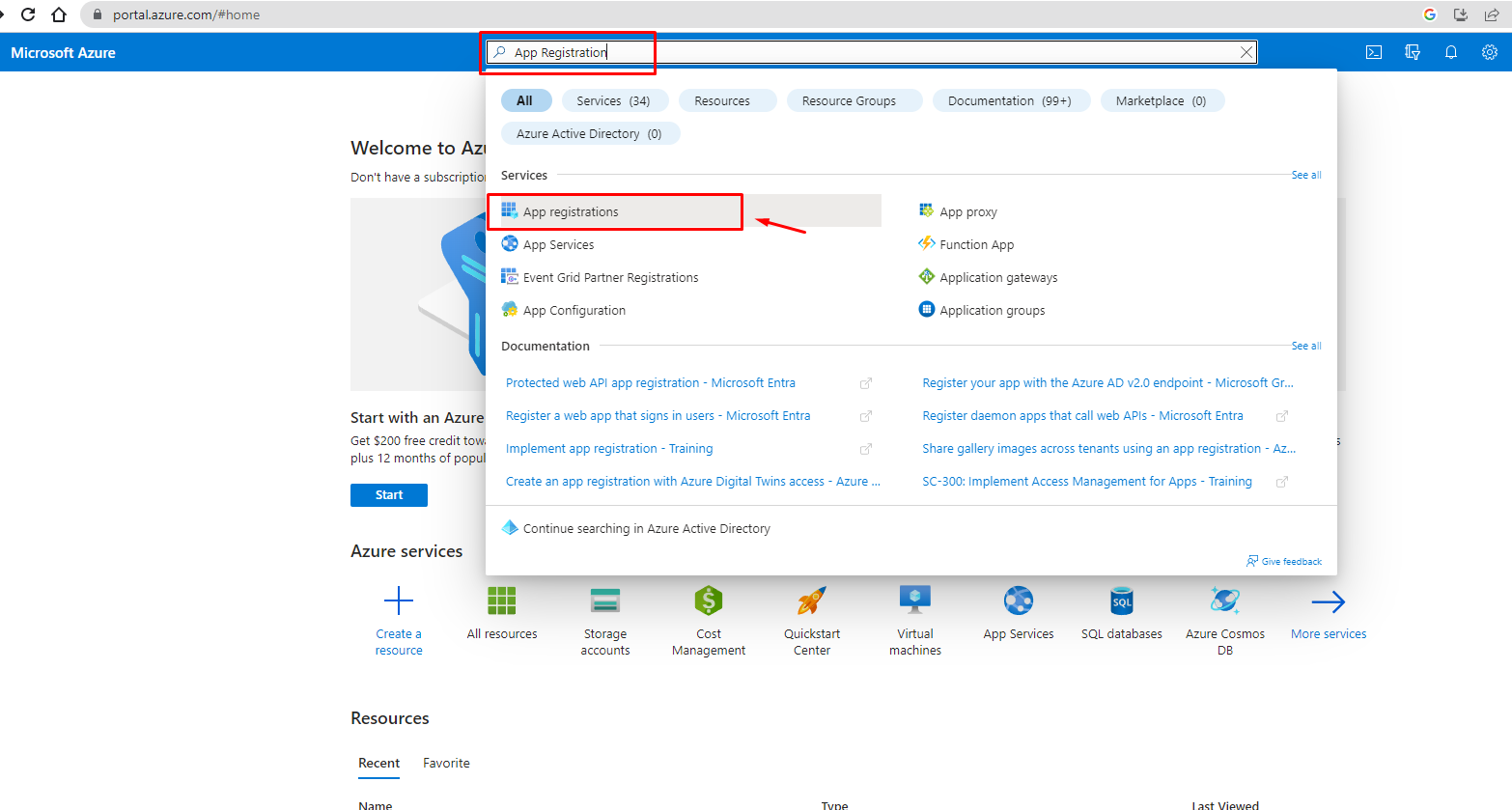
After this, we have to click on App registration which will lead to a page where you will create a new application as shown in the next imageLogin With Microsoft in Aspnet
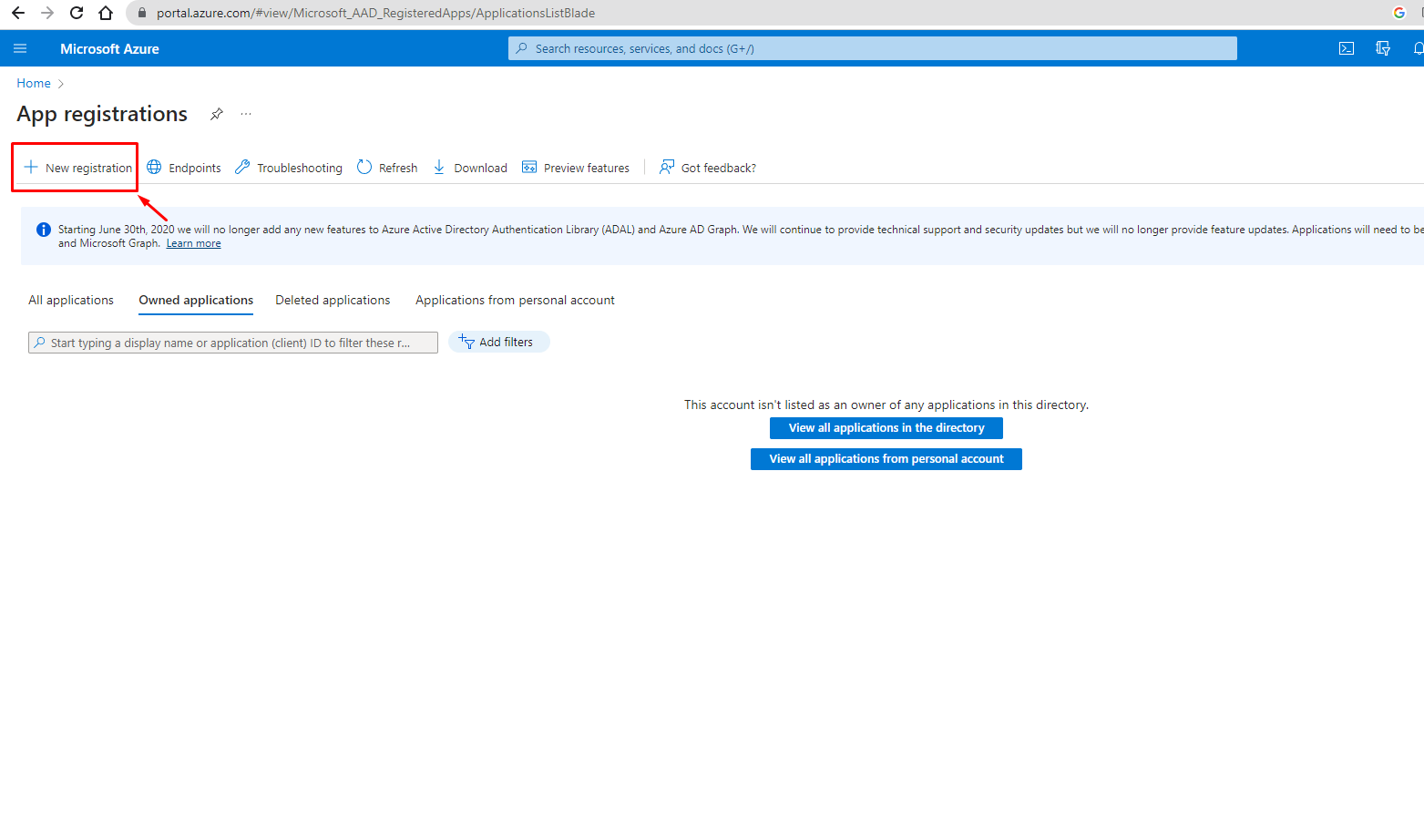
Clicking on this new registration button will redirect you to a new page where you have to add your application details and redirect URLsLogin With Microsoft in Aspnet 2
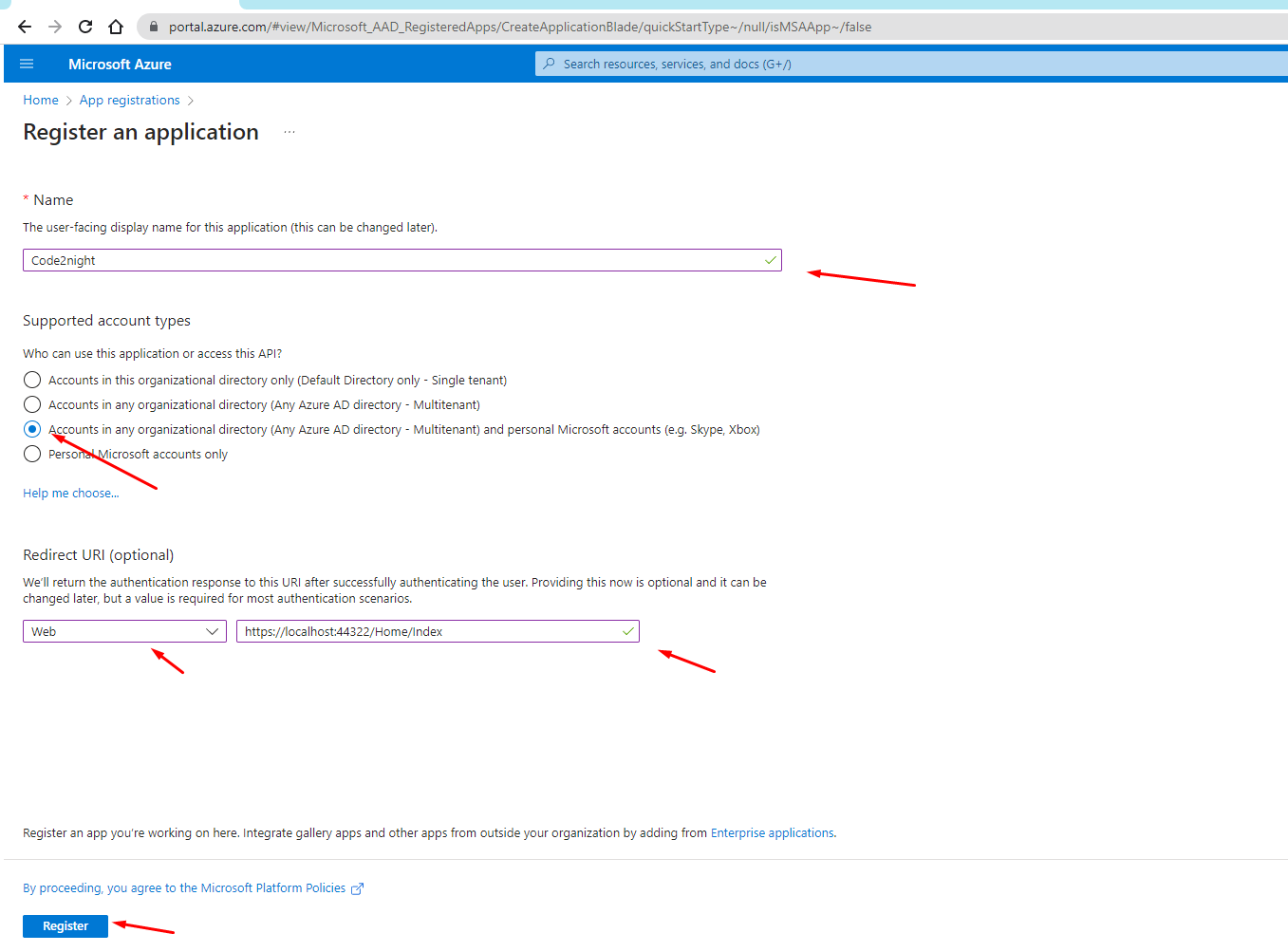
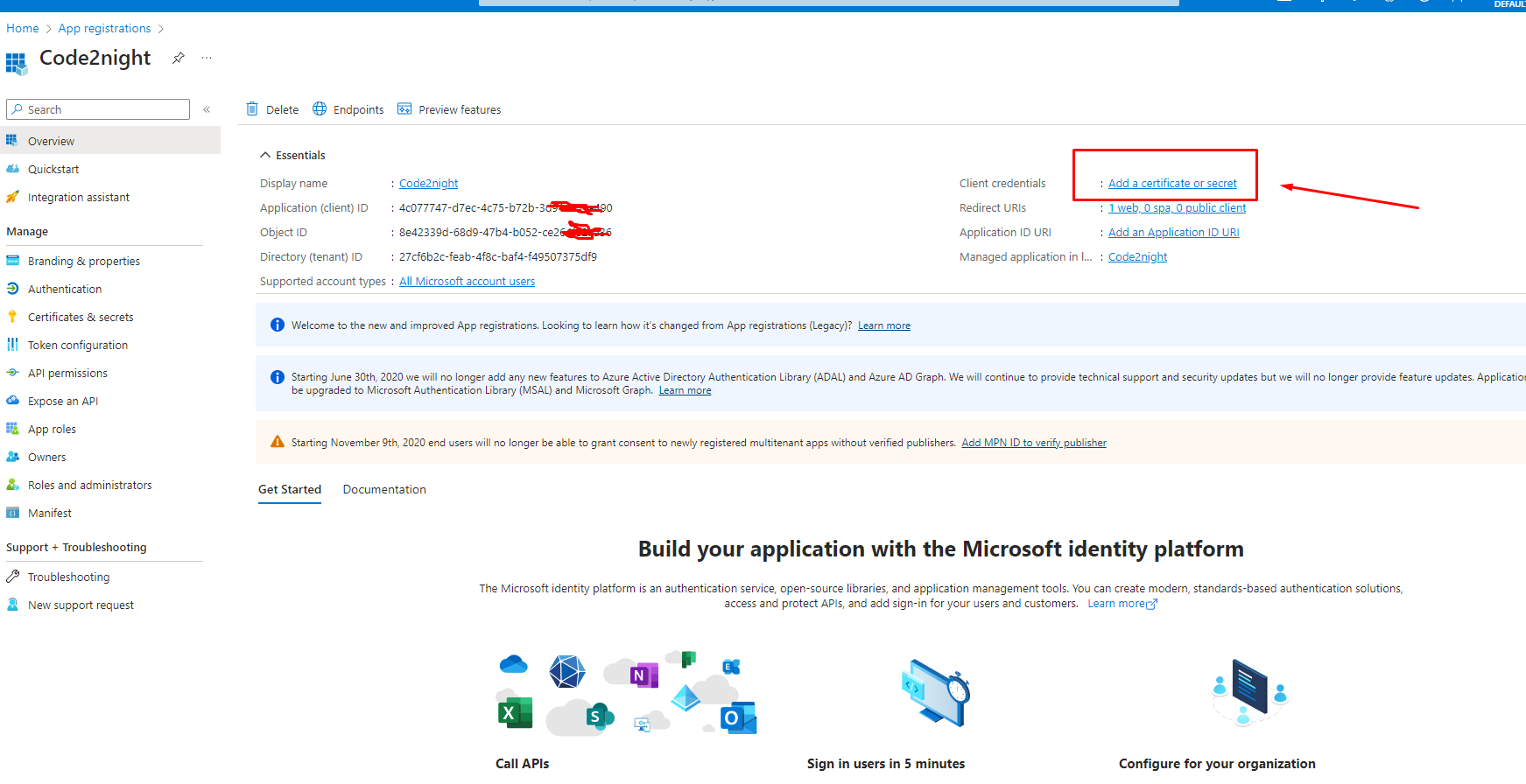
After clicking on register you will redirect to a new screen where you will be able to see client id and application details. You will see the screen shown in the screenshot below
Login With Microsoft in Aspnet 3

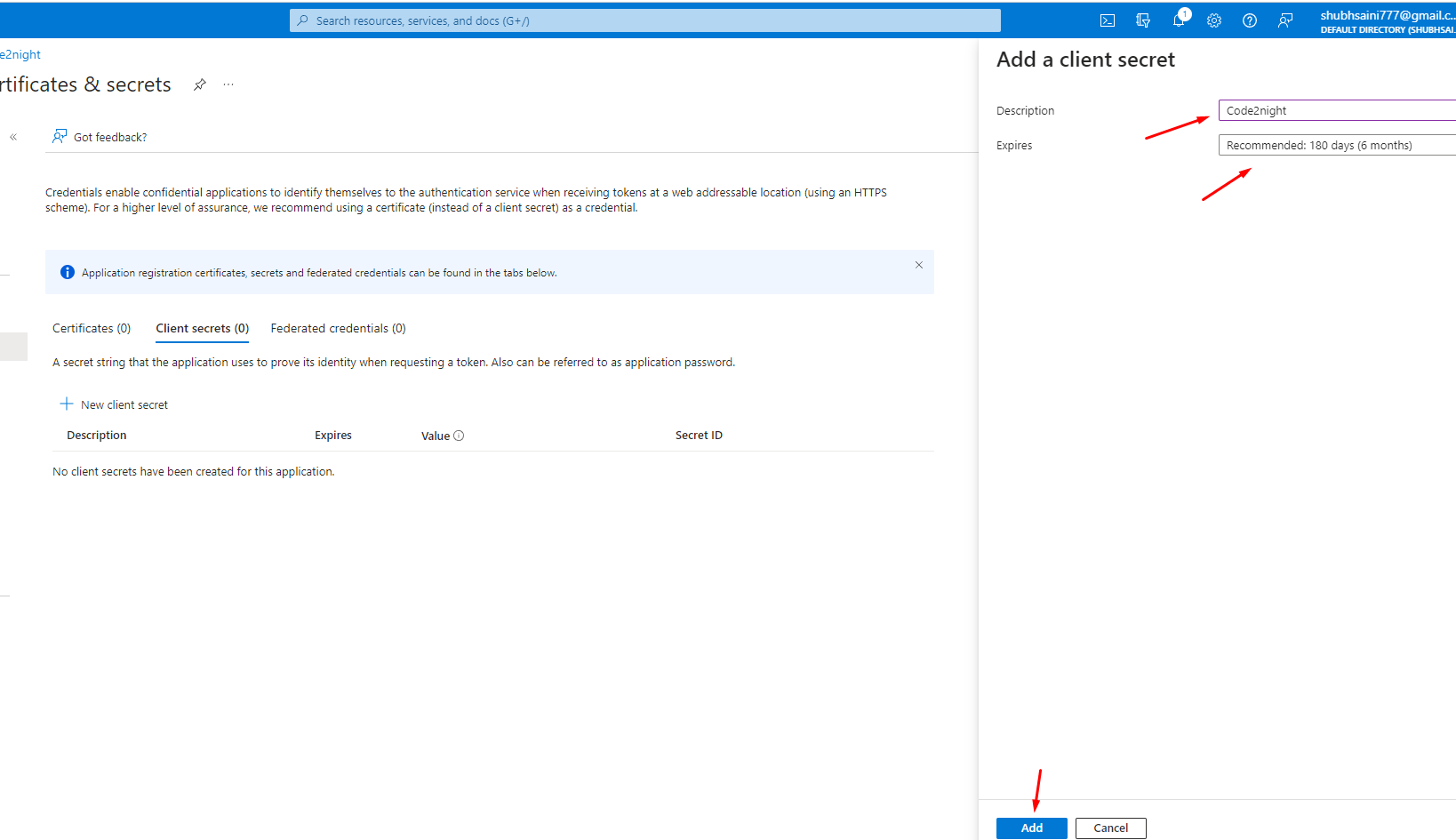
You have to click on the highlighted link above for creating a client secret key for the authentication.Login With Microsoft in Aspnet 4
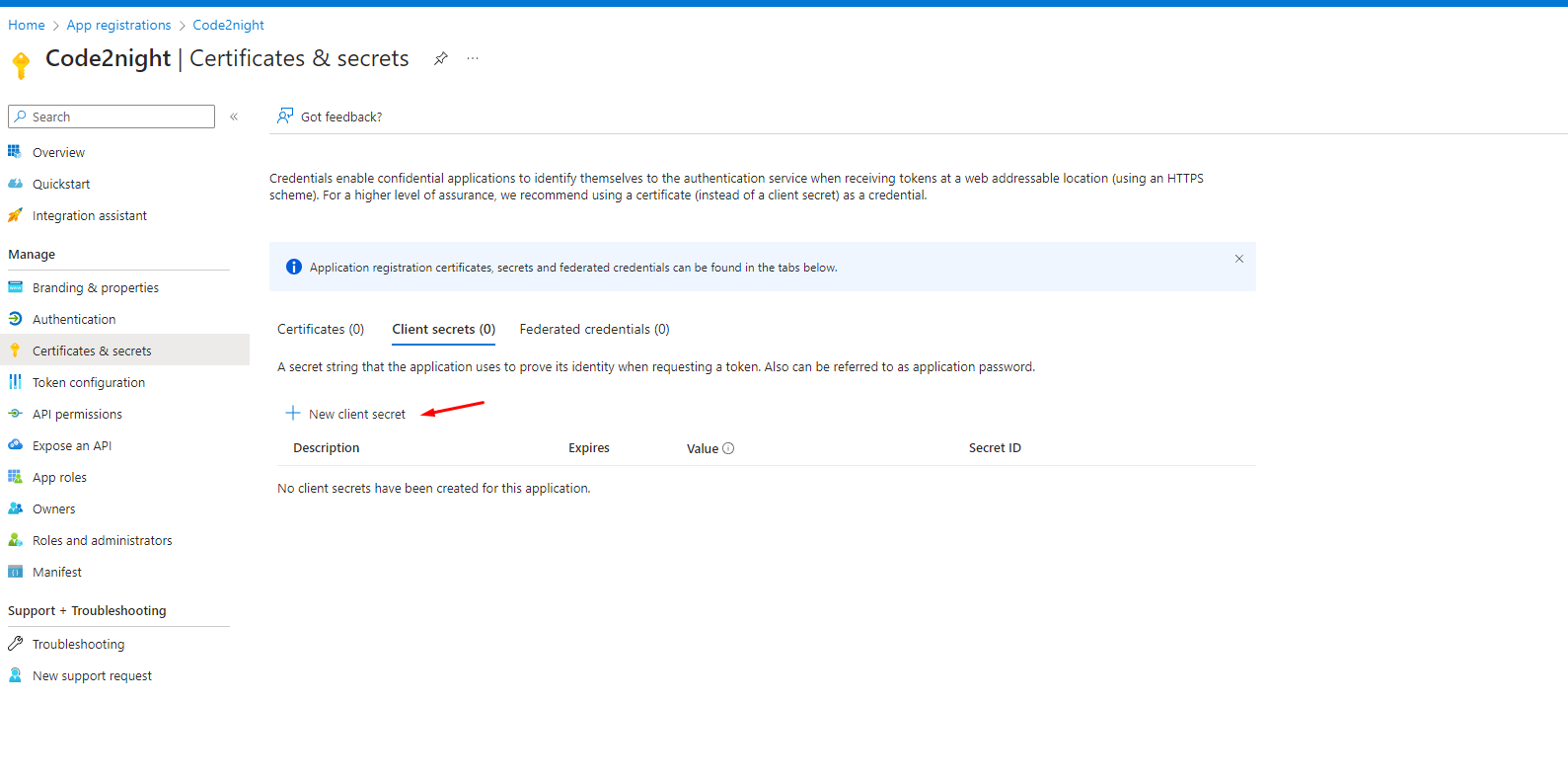

Login With Microsoft in Aspnet 5After this step, you will be able to get your client's secret key as shown in the image below
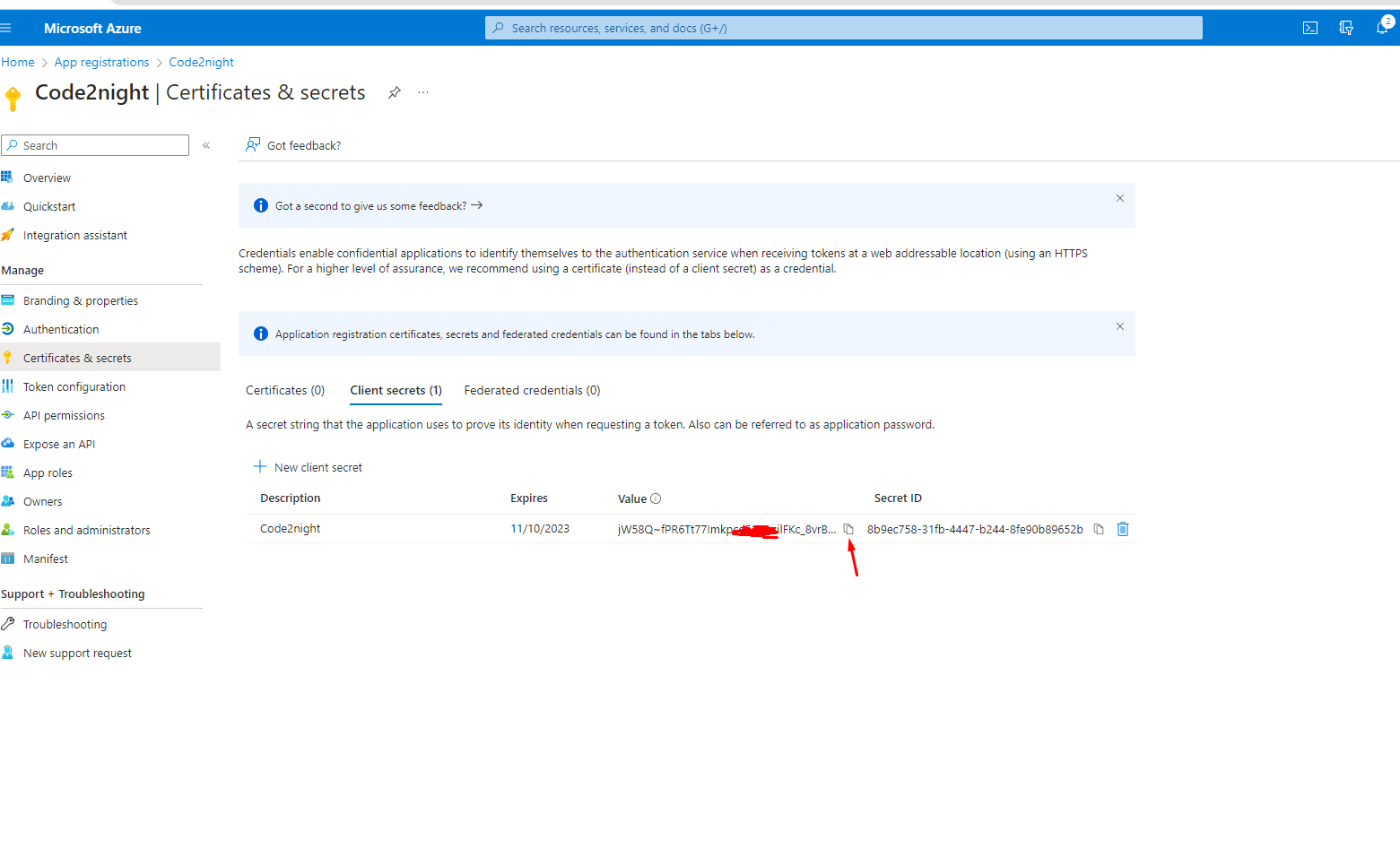
Login With Microsoft in Aspnet 6You have to copy the client value and paste it somewhere as we will use this in the code. Now go back to the main screen using the Overview menu
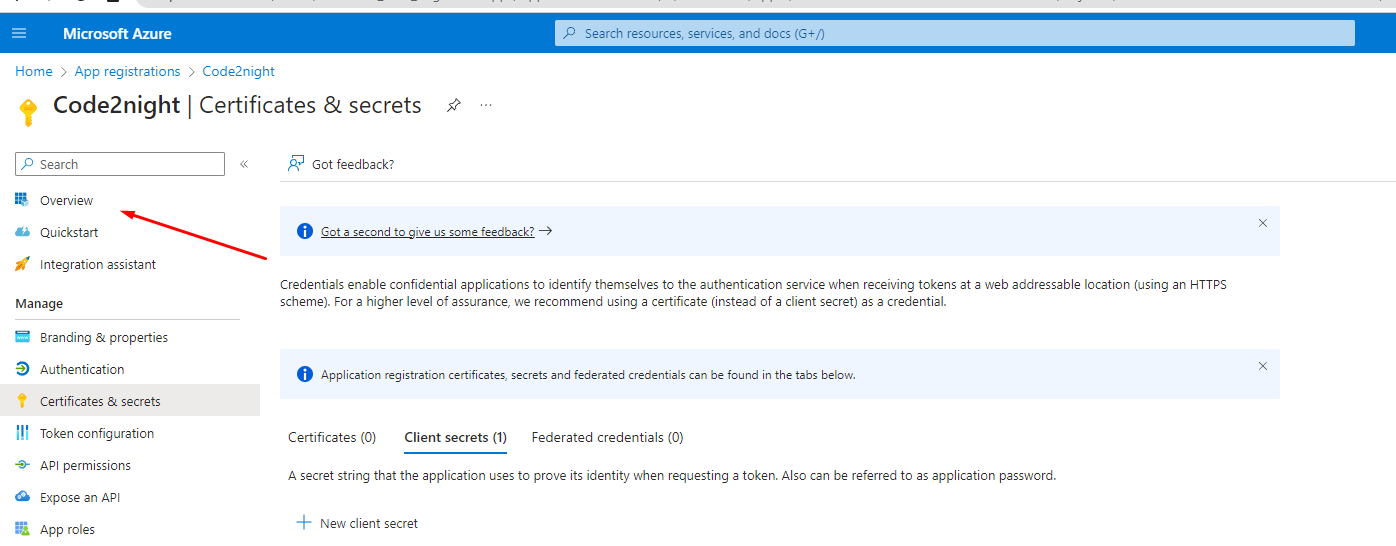
Login With Microsoft in Aspnet 7

Now you have to click on the option highlighted in the image below
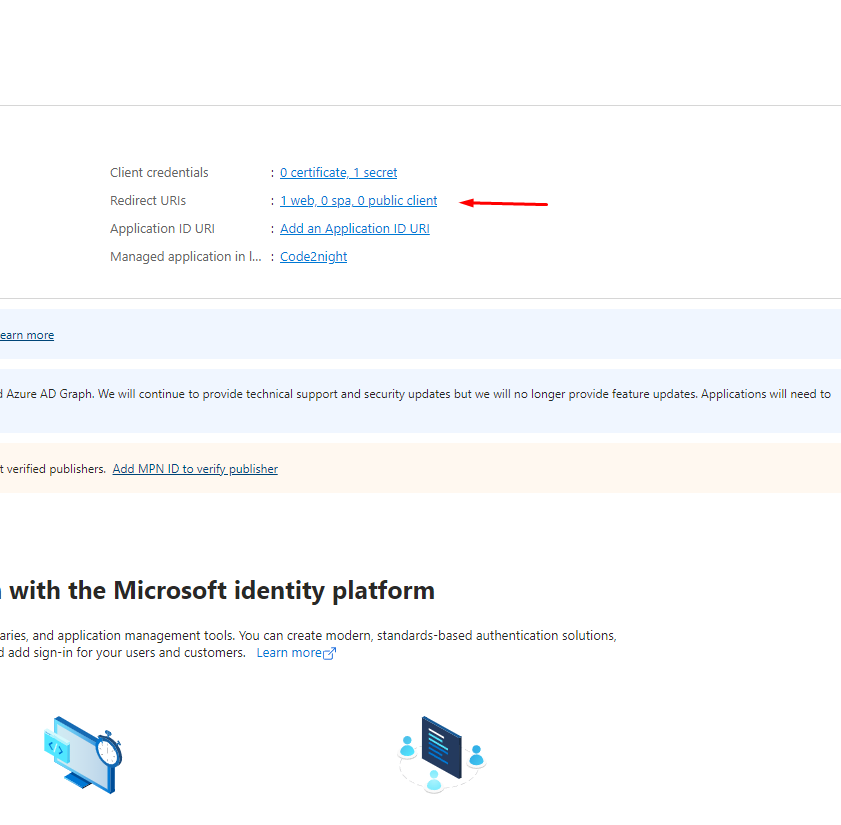
Login With Microsoft in Aspnet 8

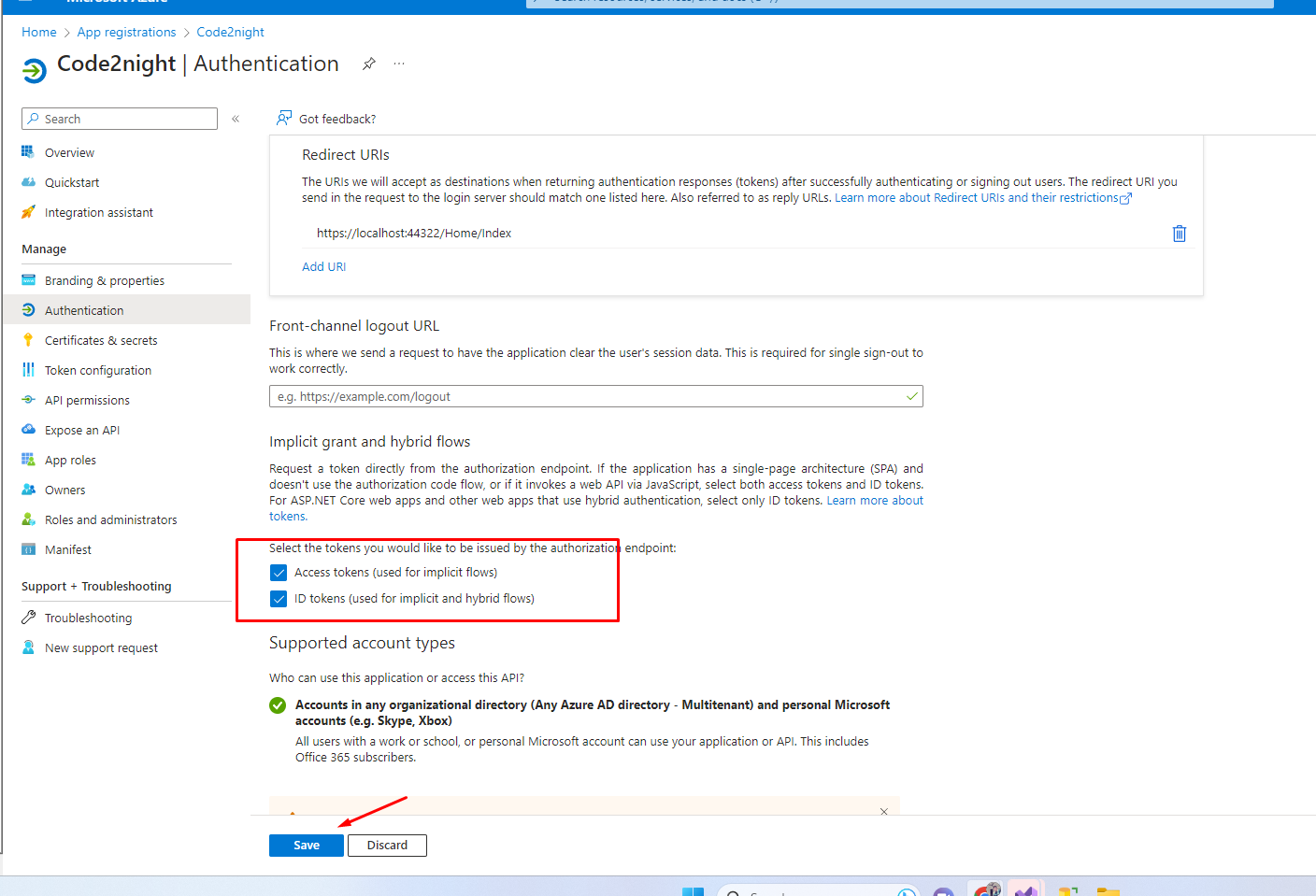
Now, on the below screen, you have to check the following checkboxes and save the page details.
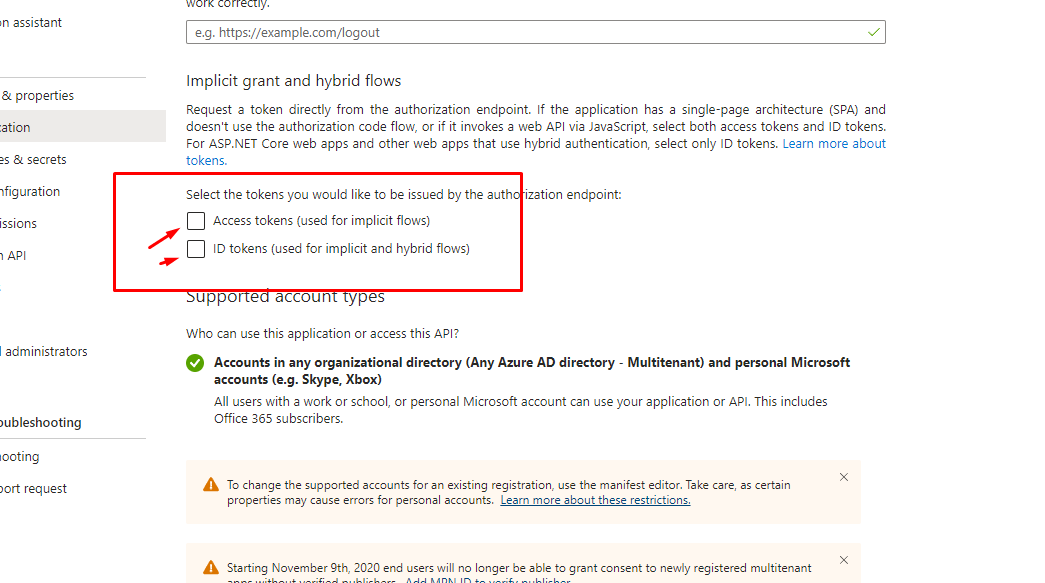
Login With Microsoft in Aspnet 9


Login With Microsoft in Aspnet 10

Now just copy the client id from the overview screen as shown below
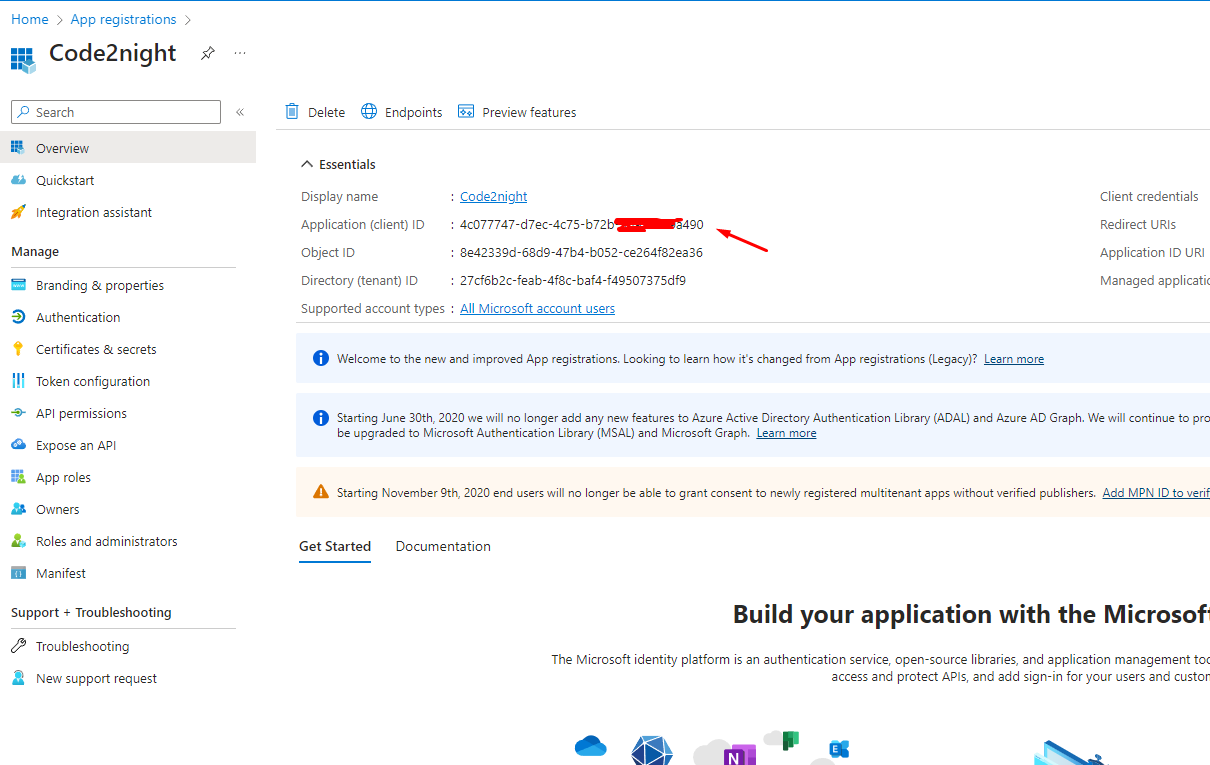
Login With Microsoft in Aspnet 11

Since now we have both client id and client secret we can move to use that in the code.

So now install the following RestSharp package in your application.
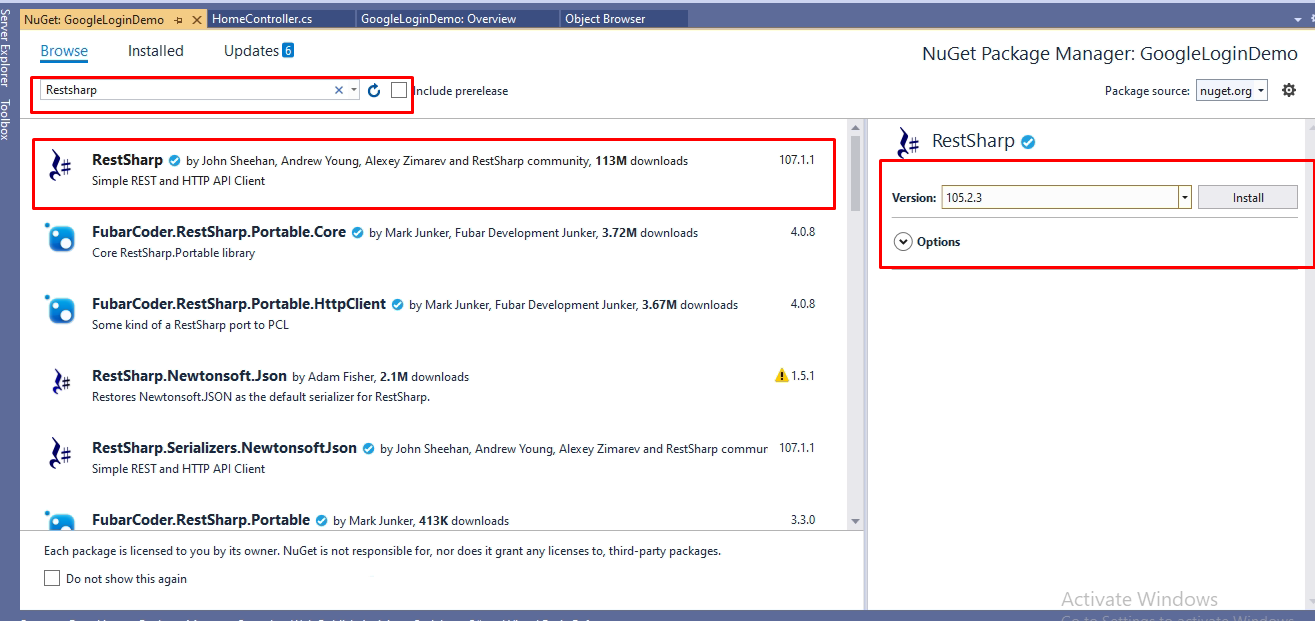
Login With Microsoft in Aspnet 12

Now, you have to go the action, it must be with the same name which you mentioned in the redirect URL while getting the client. We have to use the following code

  public IActionResult Index(string code)
        {
            if (!string.IsNullOrWhiteSpace(code))
            {
                var client = new RestClient("https://login.microsoftonline.com/common/oauth2/v2.0/token");
                var request = new RestRequest(Method.POST);
                ServicePointManager.SecurityProtocol = (SecurityProtocolType)3072;
                request.AddParameter("grant_type", "authorization_code");
                request.AddParameter("code", code);
                request.AddParameter("redirect_uri", "https://localhost:44322/Home/Index");
               
                request.AddParameter("client_id", "4c073447-d7ec-4c45-b711-3d9132a9b490");
                request.AddParameter("client_secret", "jW58Q~fPR6Tt77IzapcdF2PwsalFVc_8vrConcMQ");
                
                IRestResponse response = client.Execute(request);
                var content = response.Content;
                var res = (JObject)JsonConvert.DeserializeObject(content);
                var client2 = new RestClient("https://graph.microsoft.com/v1.0/me");
                client2.AddDefaultHeader("Authorization", "Bearer " + res["access_token"]);
                request = new RestRequest(Method.GET);
                var response2 = client2.Execute(request);
              
                var content2 = response2.Content;
                
                var useremail = (JObject)JsonConvert.DeserializeObject(content2);
            }
            return View();
        }

@{
    ViewData["Title"] = "Home Page";
}

<div class="text-center">
    <h1 class="display-4">Welcome</h1>
    <p>Learn about <a href="https://docs.microsoft.com/aspnet/core">building Web apps with ASP.NET Core</a>.</p>
</div>
<a href="https://login.microsoftonline.com/common/oauth2/v2.0/authorize?client_id=4c077747-d7ec-4c75-b72b-3d91a259a490&response_type=code&redirect_uri=https://localhost:44322/Home/Index&response_mode=query&scope=offline_access%20user.read%20mail.read&state=12345">Login With Microsoft</a>
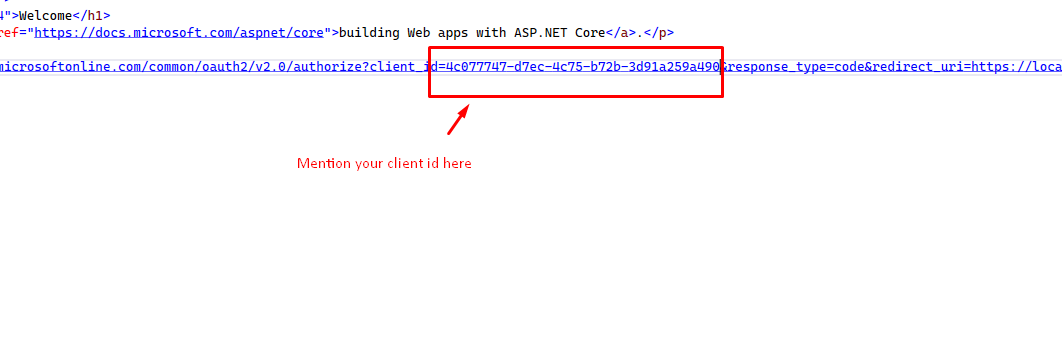
Add the following code to your page. Remember to replace the client id and The Redirect Url mentioned in the href as per your project.

Login With Microsoft in Aspnet 13


Replace this client id and redirect URL, with your created credentials
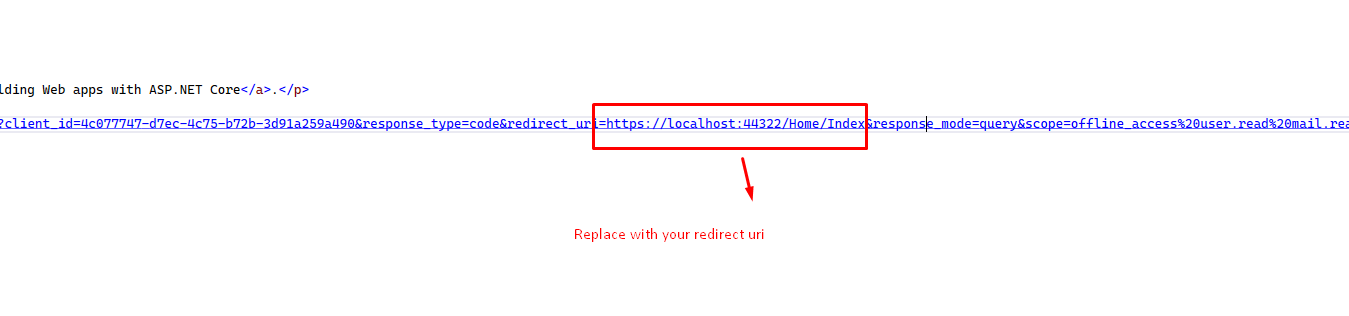
Login With Microsoft in Aspnet 14

Now you can run the project and see you will see Login with Microsoft button, now on clicking that it will go to the Google sign-in screen
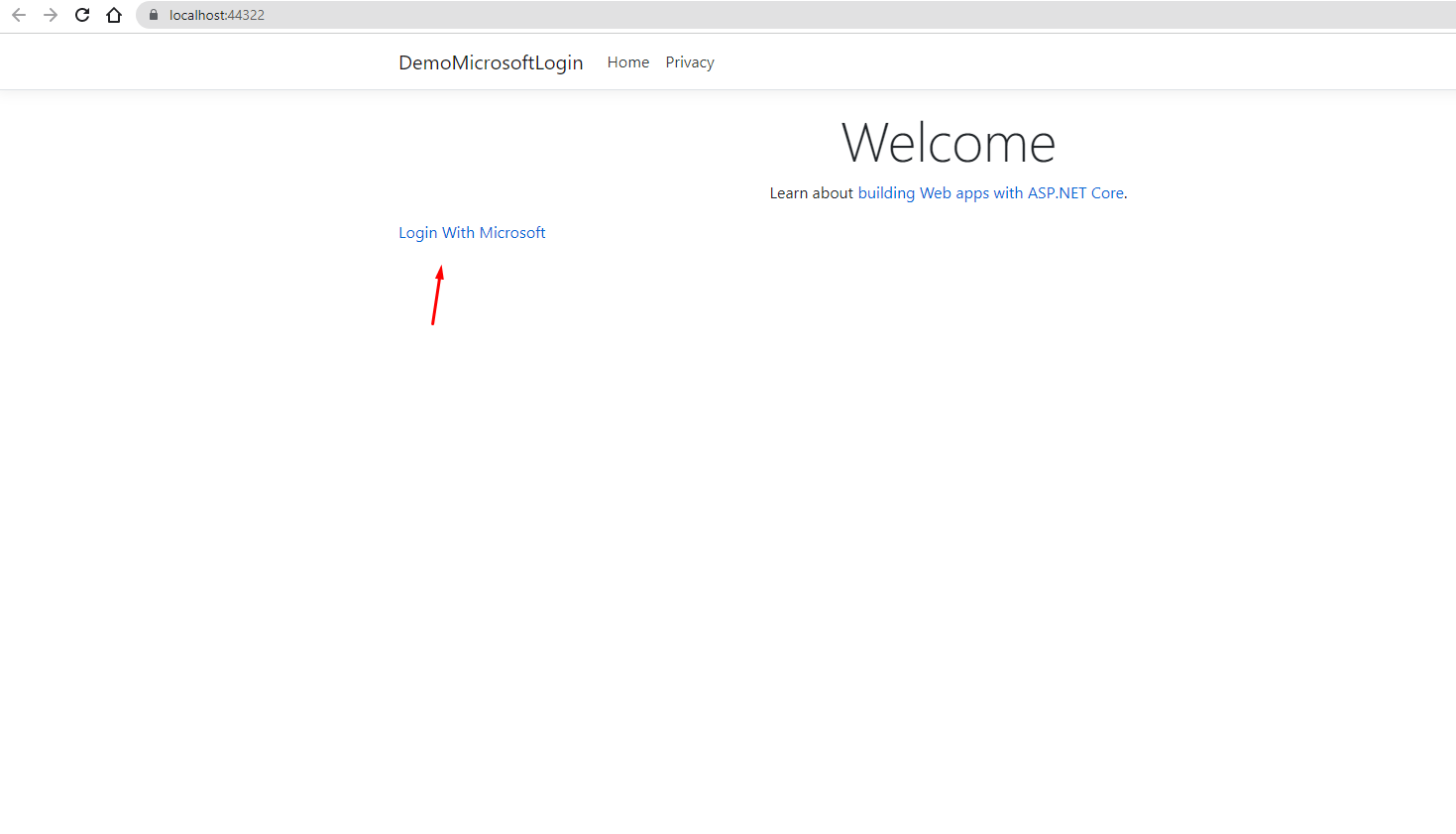
Login With Microsoft in Aspnet 15

This is what you will get after clicking on the button, you can Add a new Google account or use an existing one. On the selection, it will go to your callback method.
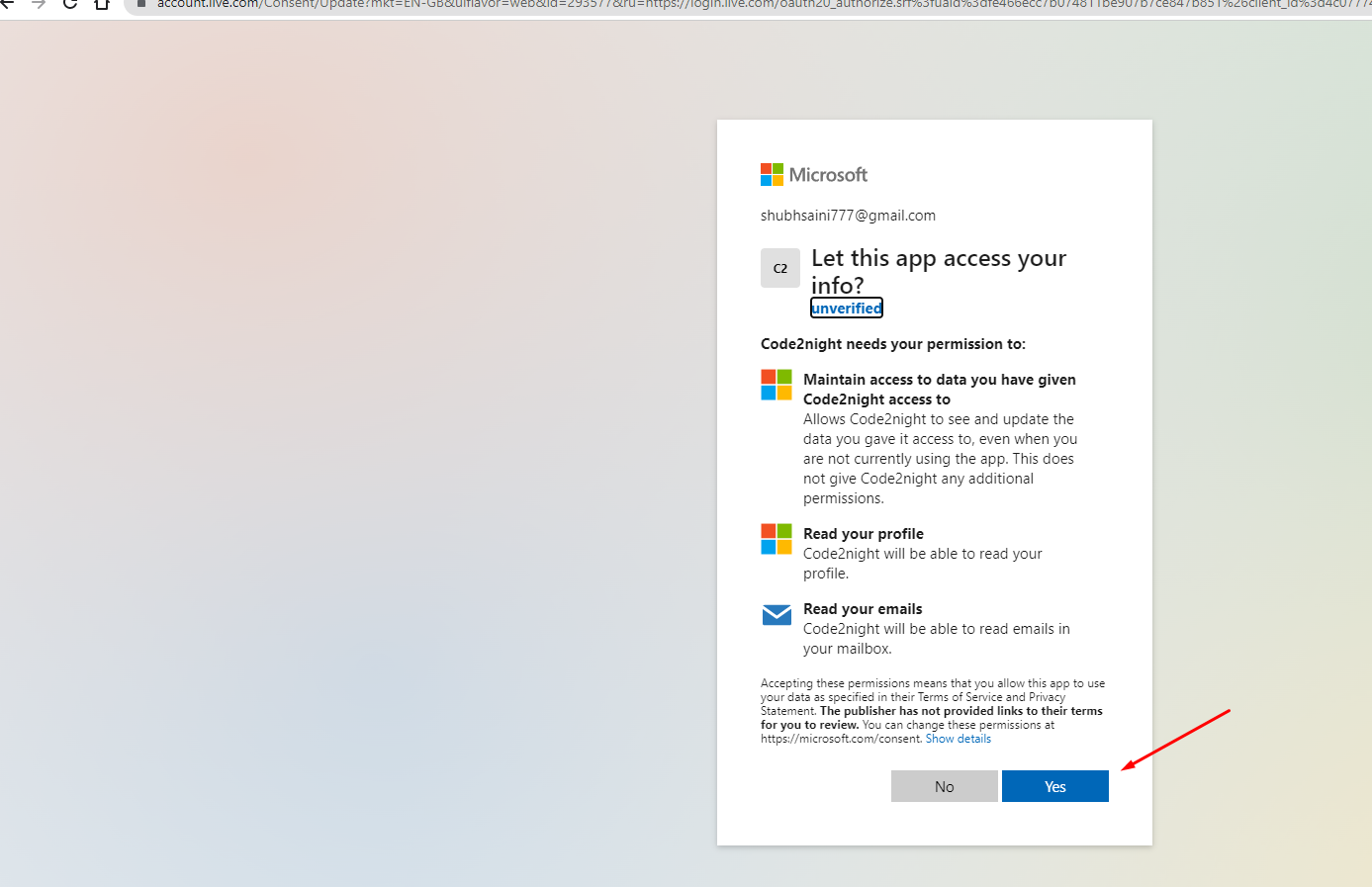
Login With Microsoft in Aspnet 16

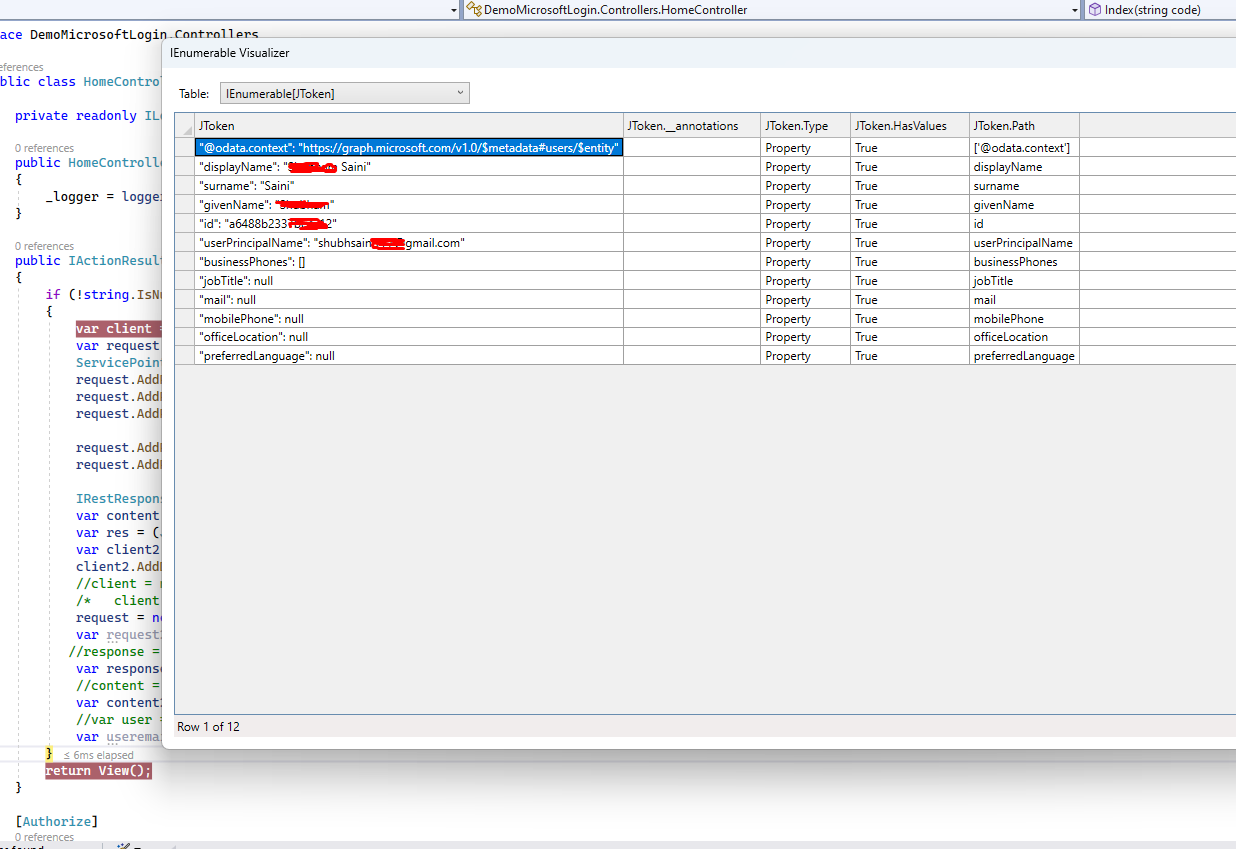
You will get the logged-in user details like this in the callback method.
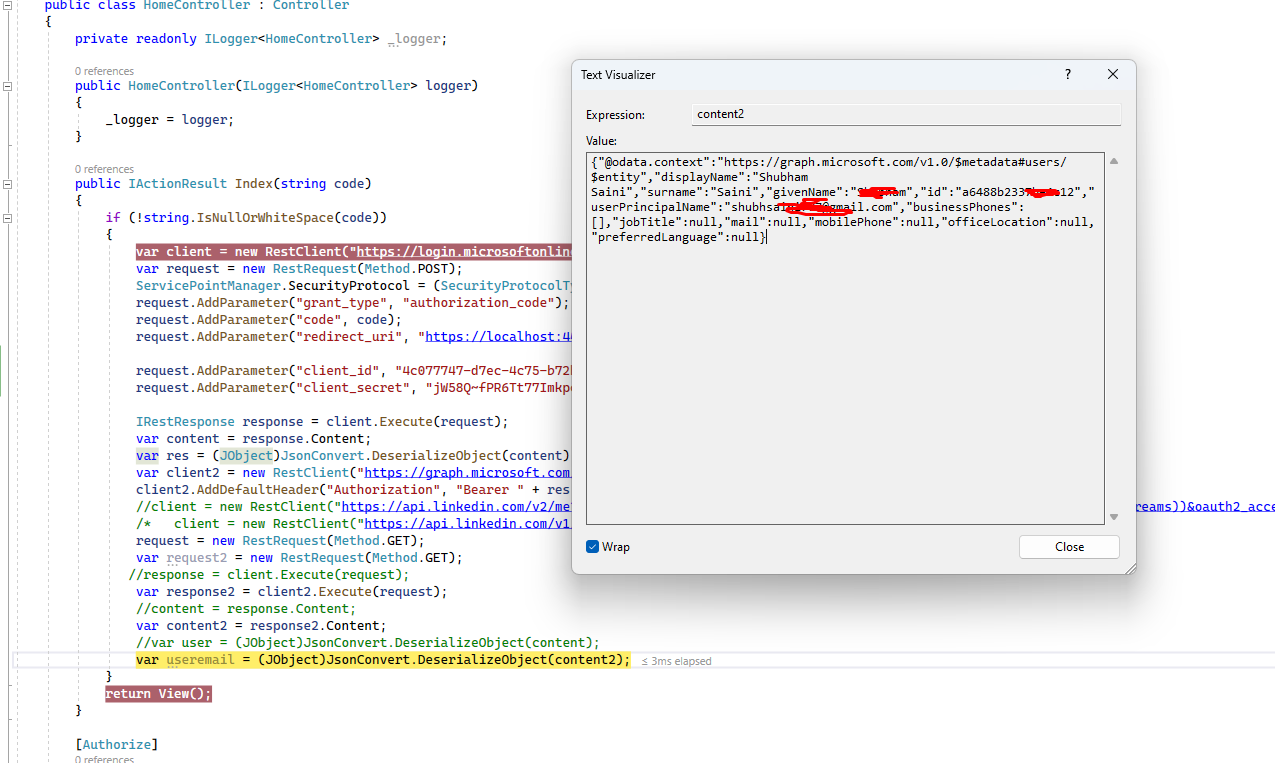
Login With Microsoft in Aspnet 17


Login With Microsoft in Aspnet 18You can get the complete code by downloading the attachment. Let us know if you face any issues.

This is how we can implement Login With Microsoft in .Net.

S
Shubham Batra
Programming author at Code2Night — sharing tutorials on ASP.NET, C#, and more.
View all posts →

Related Articles

Mastering ARIA Roles for Enhanced Accessibility in ASP.NET Applications
Apr 09, 2026
Best Practices for Secure Gemini API Integration in ASP.NET
Apr 03, 2026
How to Import CSV in ASP.NET MVC
Feb 02, 2024
How to refund payment using Paypal in Asp.Net MVC
Jan 30, 2024
Previous in ASP.NET Core
Get Channel Comments using YouTube Data Api in Asp.Net
Next in ASP.NET Core
Get Mime Type for any extension in Asp.Net
Buy me a pizza

Comments

🔥 Trending This Month

  • 1
    Complete Guide to C++ Classes: Explained with Examples 4,212 views
  • 2
    Implementing an End-to-End CI/CD Pipeline for ASP.NET Core… 368 views
  • 3
    Create Database and CRUD operation 3,388 views
  • 4
    Mastering TypeScript Utility Types: Partial, Required, Rea… 675 views
  • 5
    Responsive Slick Slider 23,373 views
  • 6
    Integrating Azure Cognitive Search into ASP.NET Core Appli… 156 views
  • 7
    Integrating Anthropic Claude API in ASP.NET Core for AI Ch… 141 views

On this page

🎯

Interview Prep

Ace your ASP.NET Core interview with curated Q&As for all levels.

View ASP.NET Core Interview Q&As

More in ASP.NET Core

  • How to Encrypt and Decrypt Password in Asp.Net 26192 views
  • Exception Handling Asp.Net Core 20938 views
  • HTTP Error 500.31 Failed to load ASP NET Core runtime 20391 views
  • How to implement Paypal in Asp.Net Core 19753 views
  • Task Scheduler in Asp.Net core 17705 views
View all ASP.NET Core posts →

Tags

AspNet C# programming AspNet MVC c programming AspNet Core C software development tutorial MVC memory management Paypal coding coding best practices data structures programming tutorial tutorials object oriented programming Slick Slider StripeNet
Free Download for Youtube Subscribers!

First click on Subscribe Now and then subscribe the channel and come back here.
Then Click on "Verify and Download" button for download link

Subscribe Now | 1770
Download
Support Us....!

Please Subscribe to support us

Thank you for Downloading....!

Please Subscribe to support us

Continue with Downloading
Be a Member
Join Us On Whatsapp
Code2Night

A community platform for sharing programming knowledge, tutorials, and blogs. Learn, write, and grow with developers worldwide.

Panipat, Haryana, India
info@code2night.com
Quick Links
  • Home
  • Blog Archive
  • Tutorials
  • About Us
  • Contact
  • Privacy Policy
  • Terms & Conditions
  • Guest Posts
  • SEO Analyzer
Dev Tools
  • JSON Beautifier
  • HTML Beautifier
  • CSS Beautifier
  • JS Beautifier
  • SQL Formatter
  • Diff Checker
  • Regex Tester
  • Markdown to HTML
  • Word Counter
More Tools
  • Password Generator
  • QR Code Generator
  • Hash Generator
  • Base64 Encoder
  • JWT Decoder
  • UUID Generator
  • Image Converter
  • PNG to ICO
  • SEO Analyzer
By Language
  • Angular
  • Angular js
  • ASP.NET
  • Asp.net Core
  • ASP.NET Core, C#
  • ASP.NET MVC
  • ASP.NET Web Forms
  • C
  • C#
  • C#, ASP.NET Core, Dapper
  • C#, ASP.NET Core, Dapper, Entity Framework
  • DotNet
  • General Web Development
  • HTML, CSS
  • HTML/CSS
  • Java
  • JavaScript
  • JavaScript, HTML, CSS
  • JavaScript, Node.js
  • Node.js
  • Python
  • Python 3.11, Pandas, SQL
  • Python 3.11, SQL
  • Python 3.11, SQLAlchemy
  • Python 3.11, SQLAlchemy, SQL
  • Python 3.11, SQLite
  • React
  • Security
  • SQL Server
  • TypeScript
© 2026 Code2Night. All Rights Reserved.
Made with for developers  |  Privacy  ·  Terms
Translate Page
We use cookies to improve your experience and analyze site traffic. By clicking Accept, you consent to our use of cookies. Privacy Policy
Accessibility
Text size
High contrast
Grayscale
Dyslexia font
Highlight links
Pause animations
Large cursor