
How to export table data in pdf using itextsharp in asp.net mvc
Creating PDF Documents with iTextSharp in ASP.NET MVC
Are you searching for a solution to improve your ASP.NET MVC application by generating dynamic PDF documents? Your search ends here with iTextSharp, a powerful library that allows developers to effortlessly integrate PDF creation features into their web applications.
In this article, we will guide you through the steps of using iTextSharp to generate PDF documents within an ASP.NET MVC project. We will break down the provided code and provide explanations for each step, ensuring you gain a thorough understanding of the implementation.
Setting Up the Project
The first step involves adding iTextSharp as a dependency to your ASP.NET MVC project. By referencing the appropriate NuGet package, you gain access to a plethora of tools for working with PDFs programmatically.
Install-Package iTextSharpOnce you have iTextSharp integrated, you're ready to dive into the world of PDF generation.
Generating a Basic PDF
The heart of your code lies in the Index action of your controller. Here, you create a new instance of Document and establish a PdfWriter to manage the output. This serves as the foundation for constructing your PDF document.
// Creating a new document
Document doc = new Document();
FileStream fs = new FileStream("F:\\example.pdf", FileMode.Create);
PdfWriter writer = PdfWriter.GetInstance(doc, fs);
doc.Open();

// Adding content to the document
doc.Add(new Paragraph("Hello, Code2night!"));
// ...
doc.Close();
fs.Close();
By following this structure, you ensure that your PDF generation process is structured and efficient.
Adding Links and Images
To make your PDF interactive and engaging, you can add links and images. The Anchor class facilitates the creation of hyperlinks within the PDF. As demonstrated in your code, you can create an anchor that directs readers to a specific URL.
// Adding an anchor (link)
Anchor anchor = new Anchor("Visit Code2night", new Font(Font.FontFamily.HELVETICA, 12, Font.UNDERLINE));
anchor.Reference = "https://www.code2night.com";
doc.Add(anchor);
In addition to links, incorporating images can visually enhance your PDF. By utilizing the Image class, you can seamlessly insert images into the document.
// Adding an image
Image image = Image.GetInstance(Server.MapPath("/Content/Image.jpg"));
image.ScaleToFit(200, 200);
doc.Add(image);
Creating Lists
Information organization is essential in any document. With iTextSharp, you can effortlessly create bulleted lists that present content in a structured manner.
// Adding a bulleted list
List list = new List(List.UNORDERED);
list.Add(new ListItem("Item 1"));
list.Add(new ListItem("Item 2"));
doc.Add(list);
Export Data from Datatable
We can display data from datatable in the pdf using PdfTable. We can use that display as many columns as we want. In this we are showing two dummy columns. However , We can modify that easily.
 DataTable dataTable = new DataTable();
            dataTable.Columns.Add("Name");
            dataTable.Columns.Add("Age");
            dataTable.Rows.Add("John Doe", 30);
            dataTable.Rows.Add("Jane Smith", 25);
            dataTable.Rows.Add("Bob Johnson", 40);
            dataTable.Rows.Add("Alice Brown", 28);
            dataTable.Rows.Add("Charlie Davis", 35);
            PdfPTable pdfTable = new PdfPTable(dataTable.Columns.Count);

            // Add headers
            foreach (DataColumn column in dataTable.Columns)
            {
                PdfPCell cell = new PdfPCell(new Phrase(column.ColumnName));
                pdfTable.AddCell(cell);
            }

            // Add data rows
            foreach (DataRow row in dataTable.Rows)
            {
                foreach (var item in row.ItemArray)
                {
                    pdfTable.AddCell(item.ToString());
                }
            }

            // Add the table to the document
            doc.Add(pdfTable);
Document Generation and File Management
An essential element to consider is the accurate generation of documents and efficient file management. Your code demonstrates a key step by illustrating the process of removing any pre-existing PDF files before creating a new one. This precautionary measure guarantees that conflicts or unintended overwrites are avoided during the generation process.
You can simply copy the entire code provided here and utilize it within your action.
using iTextSharp.text;
using iTextSharp.text.pdf;
using System;
using System.Collections.Generic;
using System.Data;
using System.IO;
using System.Linq;
using System.Web;
using System.Web.Mvc;
using System.Xml.Linq;

namespace ITextSharpWeb.Controllers
{
    public class HomeController : Controller
    {
        public ActionResult Index()
        {
            Document doc = new Document();

            if (System.IO.File.Exists("F:\\example.pdf"))
            {
                System.IO.File.Delete("F:\\example.pdf");
            }
            // Set the output file stream
            FileStream fs = new FileStream("F:\\example.pdf", FileMode.Create);
            PdfWriter writer = PdfWriter.GetInstance(doc, fs);

            // Open the document for writing
            doc.Open();

            // Add content to the document
            doc.Add(new Paragraph("Hello, Code2night!"));
            Paragraph paragraph = new Paragraph("This is a paragraph.");
            doc.Add(paragraph);

            // Adding a header
            Paragraph header = new Paragraph("Header Text", new Font(Font.FontFamily.HELVETICA, 16, Font.BOLD));
            doc.Add(header);

            // Adding an anchor (link)
            Anchor anchor = new Anchor("Visit Code2night", new Font(Font.FontFamily.HELVETICA, 12, Font.UNDERLINE));
            anchor.Reference = "https://www.code2night.com";
            doc.Add(anchor);

            Image image = Image.GetInstance(Server.MapPath("/Content/Image.jpg"));
            image.ScaleToFit(200, 200);
            doc.Add(image);

            // Create a dummy DataTable with some sample data
            DataTable dataTable = new DataTable();
            dataTable.Columns.Add("Name");
            dataTable.Columns.Add("Age");
            dataTable.Rows.Add("John Doe", 30);
            dataTable.Rows.Add("Jane Smith", 25);
            dataTable.Rows.Add("Bob Johnson", 40);
            dataTable.Rows.Add("Alice Brown", 28);
            dataTable.Rows.Add("Charlie Davis", 35);
            PdfPTable pdfTable = new PdfPTable(dataTable.Columns.Count);

            // Add headers
            foreach (DataColumn column in dataTable.Columns)
            {
                PdfPCell cell = new PdfPCell(new Phrase(column.ColumnName));
                pdfTable.AddCell(cell);
            }

            // Add data rows
            foreach (DataRow row in dataTable.Rows)
            {
                foreach (var item in row.ItemArray)
                {
                    pdfTable.AddCell(item.ToString());
                }
            }

            // Add the table to the document
            doc.Add(pdfTable);
            // Close the document
            doc.Close();

            // Close the file stream
            fs.Close();

            return View();
        }


    }
}
So, now you can run the application and you will see the pdf generated. you can check the file generated in the following format.
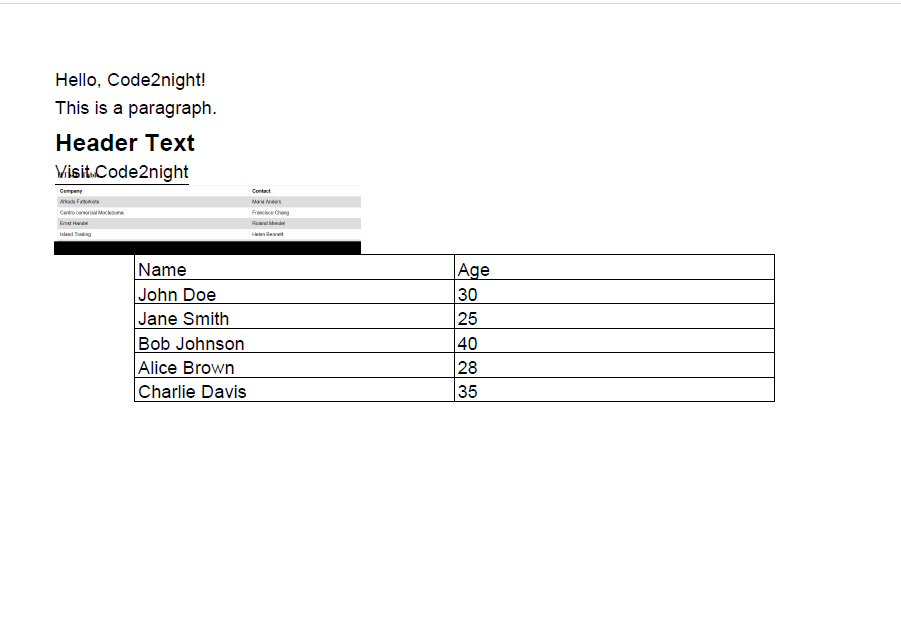
So in the attached screenshot you can see the table data exported in pdf. So this is how to export table data in pdf using itextsharp in asp.net mvc.
