
How to find all tables by column name
Understanding the Importance of Finding Tables by Column Name
In the world of database management, understanding the structure and relationships between tables is crucial. As databases grow in size and complexity, developers often encounter situations where they need to locate specific columns across various tables. This need can arise during debugging, performance optimization, or even during database design reviews. For instance, if you're tasked with removing or altering a column that exists in multiple tables, being able to quickly identify all those tables can save you hours of work.
Additionally, knowing how to find tables by column name can help in data migration tasks, where you might need to transfer data from one schema to another. It can also aid in maintaining data integrity, ensuring that changes in one part of the database do not unintentionally affect other areas.
Prerequisites
Before diving into the methods for finding tables by column name, it's essential to have a basic understanding of SQL Server and its querying capabilities. Familiarity with SQL syntax will be beneficial, as well as access to a SQL Server instance where you can run queries. Additionally, having the necessary permissions to access system views and tables will be crucial for executing the queries discussed in this post.
Using INFORMATION_SCHEMA.COLUMNS to Find Tables
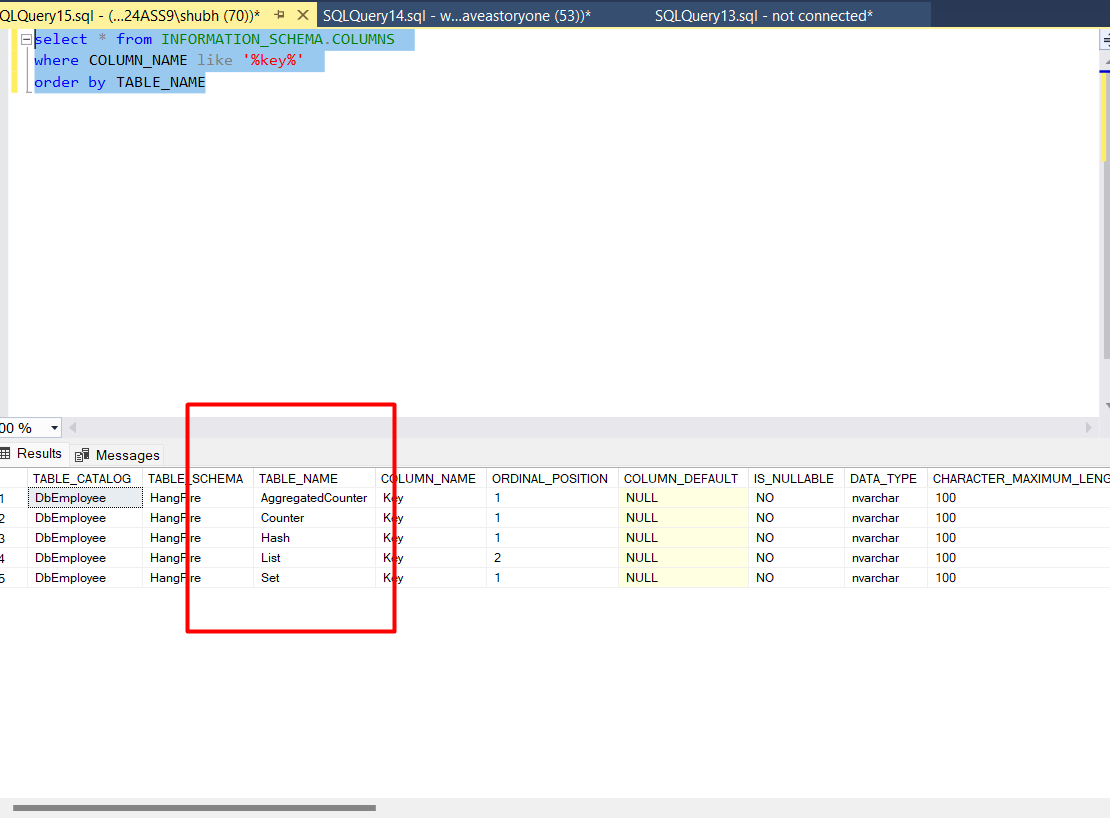
The simplest way to locate tables containing a specific column is by querying the INFORMATION_SCHEMA.COLUMNS view. This view provides metadata about the columns in all tables in the database. By using a straightforward SQL query, you can retrieve a list of tables that contain a specified column name.
SELECT * FROM INFORMATION_SCHEMA.COLUMNS WHERE COLUMN_NAME LIKE '%key%' ORDER BY TABLE_NAME;In the above query, replace 'key' with the name of the column you are interested in. The result will include all tables that contain a column with a name similar to 'key'. This method is efficient and straightforward, making it a go-to approach for many developers.
Querying System Catalog Views
Another method to find tables by column name is to query the system catalog views directly. SQL Server provides several system views, such as sys.columns and sys.tables, which can be combined to obtain detailed information about tables and their columns.
SELECT t.name AS TableName, c.name AS ColumnName
FROM sys.columns c
INNER JOIN sys.tables t ON c.object_id = t.object_id
WHERE c.name LIKE '%key%'
ORDER BY t.name;
This query joins the sys.columns view with the sys.tables view, allowing you to retrieve not just the column names but also the corresponding table names. This method can be particularly useful when you need more detailed information about each table.
Using Dynamic SQL for Advanced Searches
For more complex scenarios, such as searching for multiple columns or incorporating additional filtering criteria, you might consider using dynamic SQL. Dynamic SQL allows you to construct SQL queries programmatically and execute them at runtime, providing flexibility in how you search for tables.
DECLARE @sql NVARCHAR(MAX);
SET @sql = 'SELECT t.name AS TableName, c.name AS ColumnName
FROM sys.columns c
INNER JOIN sys.tables t ON c.object_id = t.object_id
WHERE c.name IN (' + '''key1'', ''key2'')' + '
ORDER BY t.name;';
EXEC sp_executesql @sql;
In this example, we define a dynamic SQL query to search for multiple columns ('key1' and 'key2'). This approach is particularly useful when the column names are not known in advance or when they need to be fetched from another source.
Edge Cases & Gotchas
While finding tables by column name is generally straightforward, there are some edge cases and gotchas to be aware of:
- Case Sensitivity: SQL Server's default collation is case-insensitive, but if your database uses a case-sensitive collation, ensure that your queries account for this.
- Schema Considerations: If your database has multiple schemas, be aware that columns with the same name may exist in different schemas. Always check the schema when retrieving results.
- Permissions: Ensure you have the necessary permissions to access the system views. Lack of permissions can lead to incomplete results or errors.
Performance & Best Practices
When querying for tables by column name, consider the following best practices to enhance performance:
- Limit Results: If you know the specific schema or type of table you are interested in, include those conditions in your WHERE clause to reduce the number of results returned.
- Use Indexed Views: If you frequently search for tables by column name, consider creating indexed views or materialized views to improve performance on large datasets.
- Regular Maintenance: Regularly update statistics and perform maintenance on your database to ensure optimal query performance.
Conclusion
Finding tables by column name in SQL Server is a crucial skill for developers and database administrators. By utilizing the methods outlined in this post, you can efficiently navigate your databases and make informed decisions about your data structure. Here are the key takeaways:
- Use INFORMATION_SCHEMA.COLUMNS for straightforward queries on column names.
- Query sys.columns and sys.tables for more detailed information.
- Consider dynamic SQL for advanced search scenarios.
- Be aware of case sensitivity and schema considerations.
- Implement best practices to enhance query performance.
