
Card Number Formatting using jquery
Hello guys and welcome to Code2Night.
In this blog post, we will explore how to implement the Card Number Box Format Using jQuery. jQuery is a popular and powerful JavaScript library that can simplify the process of implementing interactive features on web pages, making it an ideal choice for this task. With the help of jQuery, we can format the credit card number input box in a way that is user-friendly, aesthetically pleasing and meets industry standards.
If you have ever dealt with projects that involve implementing payment systems, you know how crucial it is to properly format the input for card numbers. The user's card number needs to be correctly displayed in the input box, and it's not as simple as it may seem. This is where the use of payment gateway controls comes in, which can be tricky to manage on custom websites.
So if you're struggling with payment system implementation, this blog post is for you. Keep reading to learn how to make the process of entering credit card numbers as smooth and hassle-free as possible.
Card Types -
So to start, there are different types of cards available around the world and some use their own format which can be different than others. Some of those Cards are these
Amex(American Express) - 371449635398431
MasterCard - 5200828282828210
VISA - 4000056655665556
So, you can see some differences in the formatting across cards and so it becomes tough to implement correct formatting when the user types the card number. So for implementing that we will take one input box and add some script on the page
 <div class="col-md-6" style="padding:50px;">

    <input type="text" id="txtcard" onkeypress="return formatCardNumber(event)" />

</div>
 <script>

 var defaultFormat = /(?:^|\s)(\d{4})$/;

   var cards = [
        {
            type: 'maestro',
            patterns: [5018, 502, 503, 506, 56, 58, 639, 6220, 67],
            format: defaultFormat,
            length: [12, 13, 14, 15, 16, 17, 18, 19],
            cvcLength: [3],
            luhn: true
        }, {
            type: 'forbrugsforeningen',
            patterns: [600],
            format: defaultFormat,
            length: [16],
            cvcLength: [3],
            luhn: true
        }, {
            type: 'dankort',
            patterns: [5019],
            format: defaultFormat,
            length: [16],
            cvcLength: [3],
            luhn: true
        }, {
            type: 'visa',
            patterns: [4],
            format: defaultFormat,
            length: [13, 16],
            cvcLength: [3],
            luhn: true
        }, {
            type: 'mastercard',
            patterns: [51, 52, 53, 54, 55, 22, 23, 24, 25, 26, 27],
            format: defaultFormat,
            length: [16],
            cvcLength: [3],
            luhn: true
        }, {
            type: 'amex',
            patterns: [34, 37],
            format: /(\d{1,4})(\d{1,6})?(\d{1,5})?/,
            length: [15],
            cvcLength: [3, 4],
            luhn: true
        }, {
            type: 'dinersclub',
            patterns: [30, 36, 38, 39],
           format: /^(\d{4}|\d{4}\s\d{6})$/,
            length: [14],
            cvcLength: [3],
            luhn: true
        }, {
            type: 'discover',
            patterns: [60, 64, 65, 622],
            format: defaultFormat,
            length: [16],
            cvcLength: [3],
            luhn: true
        }, {
            type: 'unionpay',
            patterns: [62, 88],
            format: defaultFormat,
            length: [16, 17, 18, 19],
            cvcLength: [3],
            luhn: false
        }, {
            type: 'jcb',
            patterns: [35],
            format: defaultFormat,
            length: [16],
            cvcLength: [3],
            luhn: true
        }
    ];
  var formatCardNumber = function (e) {
        var $target, card, digit, length, re, upperLength, value;
        digit = String.fromCharCode(e.which);
        if (!/^\d+$/.test(digit)) {
            return;
        }
        $target = $(e.currentTarget);
      value = $target.val();
      debugger;
        card = cardFromNumber(value + digit);
      length = (value.replace(/\D/g, '') + digit).length;
      if (length > Math.max.apply(null, card.length)) {
          return false;
      }
        upperLength = 16;
        if (card) {
            upperLength = card.length[card.length.length - 1];
        }
        if (length >= upperLength) {
            return;
        }
        if (($target.prop('selectionStart') != null) && $target.prop('selectionStart') !== value.length) {
            return;
        }
        if (card && card.type === 'amex') {
            re = /^(\d{4}|\d{4}\s\d{6})$/;
        } else {
            if (card != null && card != undefined) {
                re = card.format// /(?:^|\s)(\d{4})$/;
            }
            else {
                re =  /(?:^|\s)(\d{4})$/;
            }
        }
        if (re.test(value)) {
            e.preventDefault();
            return setTimeout(function () {
                return $target.val(value + ' ' + digit);
            });
        } else if (re.test(value + digit)) {
            e.preventDefault();
            return setTimeout(function () {
                return $target.val(value + digit + ' ');
            });
        }
    };
   var cardFromNumber = function (num) {
        var card, p, pattern, _i, _j, _len, _len1, _ref;
        num = (num + '').replace(/\D/g, '');
        for (_i = 0, _len = cards.length; _i < _len; _i++) {
            card = cards[_i];
            _ref = card.patterns;
            for (_j = 0, _len1 = _ref.length; _j < _len1; _j++) {
                pattern = _ref[_j];
                p = pattern + '';
                if (num.substr(0, p.length) === p) {
                    return card;
                }
            }
        }
    };
	</script>
So, this code is using jquery so make sure you have added the jquery reference on the page before using this. So, about this script in this, we have added some predefined card formats in the array along with their max character size. And we are calling formatCardNumber on the keypress of the input box. Which finds the card type based on starting characters and format accordingly. You can see the output with different card numbers and output format
With MasterCard

With Visa card Format

With Amex Card Format
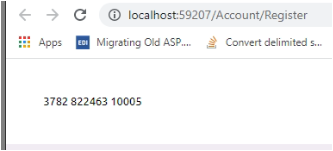
So, you can see the formatting working differently with different card types. So this is how we can implement Card Number formatting with Jquery. If you have any issues you can comment and ask.
