
Create a Music Player in HTML/CSS: Step-by-Step Guide
So, starting from the beginning we often use html audio , video tags for managing and playing music in our website. Which is bit complicated to use when it comes to user interface and easiness to use. Specially while working with songlist, it becomes hard for that to be managed in simple audio video html tags. So we need a better music player library to help us creating some better user interface for music player. So we will be using JPlayer for that purpose.
jPlayer- Html5 Music Player
So, jPlayer is a html5 audio and video music player library using jquery. So we can use that accorss multiples languages without much issue. So for implementing jplayer first of all you need to place these folder in your project. We will provide these files in attachment which you can download later.
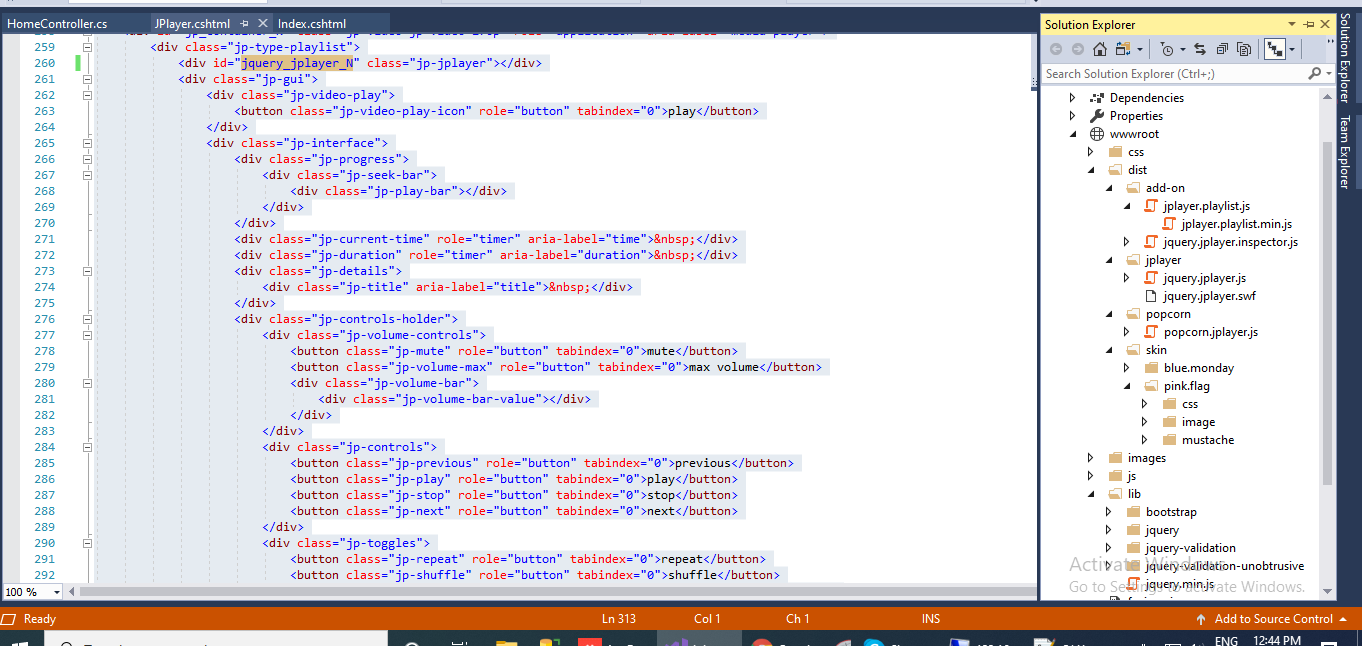
So, just have a look at the opened folder on right side, these are the needed jplayer libraries which we need to add in the project. After you have added this in you project you have to link those on your page.
     <link href="~/dist/skin/pink.flag/css/jplayer.pink.flag.min.css" rel="stylesheet" type="text/css" />
    <script type="text/javascript" src="~/lib/jquery.min.js"></script>
    <script src="~/dist/jplayer/jquery.jplayer.min.js"></script>
    <script src="~/dist/add-on/jplayer.playlist.min.js"></script>
After you have added these libraries on your webpage, we can now add rest of the code on the page.
<!DOCTYPE html>
<html>
<head>
<style>
/*.jquery_jplayer_N{
display:none;
}*/
</style>
<meta charset="utf-8" />
<!-- Website Design By: www.happyworm.com -->
<title>Demo : The jPlayerPlaylist Object</title>
<meta http-equiv="Content-Type" content="text/html; charset=iso-8859-1" />
<link href="~/dist/skin/pink.flag/css/jplayer.pink.flag.min.css" rel="stylesheet" type="text/css" />
<script type="text/javascript" src="~/lib/jquery.min.js"></script>
<script src="~/dist/jplayer/jquery.jplayer.min.js"></script>
<script src="~/dist/add-on/jplayer.playlist.min.js"></script>
<script type="text/javascript">
//<![CDATA[
$(document).ready(function () {
    var myPlaylist = new jPlayerPlaylist({
                jPlayer: "#jquery_jplayer_N",
                cssSelectorAncestor: "#jp_container_N"
            }, [
                    {
                        title: "Cro Magnon Man",
                        artist: "The Stark Palace",
                        mp3: "http://www.jplayer.org/audio/mp3/TSP-01-Cro_magnon_man.mp3",
                        poster: "http://www.jplayer.org/audio/poster/The_Stark_Palace_640x360.png"
                    },
                    {
                        title: "Your face",
                        artist: "The Stark Palace2",
                        mp3: "http://www.jplayer.org/audio/mp3/TSP-05-Your_face.mp3",
                        poster: "http://www.jplayer.org/audio/poster/The_Stark_Palace_640x360.png"
                    }
                ], {
                    playlistOptions: {
                        enableRemoveControls: true
                    },
                    swfPath: "../../dist/jplayer",
                    supplied: "webmv, ogv, m4v, oga, mp3",
                    useStateClassSkin: true,
                    autoBlur: false,
                    smoothPlayBar: true,
                    keyEnabled: true,
                    audioFullScreen: true
                });
// The remove commands
$("#playlist-remove").click(function () {
myPlaylist.remove();
});
$("#playlist-remove--2").click(function () {
myPlaylist.remove(-2);
});
$("#playlist-remove--1").click(function () {
myPlaylist.remove(-1);
});
$("#playlist-remove-0").click(function () {
myPlaylist.remove(0);
});
$("#playlist-remove-1").click(function () {
myPlaylist.remove(1);
});
$("#playlist-remove-2").click(function () {
myPlaylist.remove(2);
});
// The shuffle commands
$("#playlist-shuffle").click(function () {
myPlaylist.shuffle();
});
$("#playlist-shuffle-false").click(function () {
myPlaylist.shuffle(false);
});
$("#playlist-shuffle-true").click(function () {
myPlaylist.shuffle(true);
});
// The select commands
$("#playlist-select--2").click(function () {
myPlaylist.select(-2);
});
$("#playlist-select--1").click(function () {
myPlaylist.select(-1);
});
$("#playlist-select-0").click(function () {
myPlaylist.select(0);
});
$("#playlist-select-1").click(function () {
myPlaylist.select(1);
});
$("#playlist-select-2").click(function () {
myPlaylist.select(2);
});
// The next/previous commands
$("#playlist-next").click(function () {
myPlaylist.next();
});
$("#playlist-previous").click(function () {
myPlaylist.previous();
});
// The play commands
$("#playlist-play").click(function () {
myPlaylist.play();
});
$("#playlist-play--2").click(function () {
myPlaylist.play(-2);
});
$("#playlist-play--1").click(function () {
myPlaylist.play(-1);
});
$("#playlist-play-0").click(function () {
myPlaylist.play(0);
});
$("#playlist-play-1").click(function () {
myPlaylist.play(1);
});
$("#playlist-play-2").click(function () {
myPlaylist.play(2);
});
// The pause command
$("#playlist-pause").click(function () {
myPlaylist.pause();
});
// Changing the playlist options
// Option: autoPlay
$("#playlist-option-autoPlay-true").click(function () {
myPlaylist.option("autoPlay", true);
});
$("#playlist-option-autoPlay-false").click(function () {
myPlaylist.option("autoPlay", false);
});
// Option: enableRemoveControls
$("#playlist-option-enableRemoveControls-true").click(function () {
myPlaylist.option("enableRemoveControls", true);
});
$("#playlist-option-enableRemoveControls-false").click(function () {
myPlaylist.option("enableRemoveControls", false);
});
// Option: displayTime
$("#playlist-option-displayTime-0").click(function () {
myPlaylist.option("displayTime", 0);
});
$("#playlist-option-displayTime-fast").click(function () {
myPlaylist.option("displayTime", "fast");
});
$("#playlist-option-displayTime-slow").click(function () {
myPlaylist.option("displayTime", "slow");
});
$("#playlist-option-displayTime-2000").click(function () {
myPlaylist.option("displayTime", 2000);
});
// Option: addTime
$("#playlist-option-addTime-0").click(function () {
myPlaylist.option("addTime", 0);
});
$("#playlist-option-addTime-fast").click(function () {
myPlaylist.option("addTime", "fast");
});
$("#playlist-option-addTime-slow").click(function () {
myPlaylist.option("addTime", "slow");
});
$("#playlist-option-addTime-2000").click(function () {
myPlaylist.option("addTime", 2000);
});
// Option: removeTime
$("#playlist-option-removeTime-0").click(function () {
myPlaylist.option("removeTime", 0);
});
$("#playlist-option-removeTime-fast").click(function () {
myPlaylist.option("removeTime", "fast");
});
$("#playlist-option-removeTime-slow").click(function () {
myPlaylist.option("removeTime", "slow");
});
$("#playlist-option-removeTime-2000").click(function () {
myPlaylist.option("removeTime", 2000);
});
// Option: shuffleTime
$("#playlist-option-shuffleTime-0").click(function () {
myPlaylist.option("shuffleTime", 0);
});
$("#playlist-option-shuffleTime-fast").click(function () {
myPlaylist.option("shuffleTime", "fast");
});
$("#playlist-option-shuffleTime-slow").click(function () {
myPlaylist.option("shuffleTime", "slow");
});
$("#playlist-option-shuffleTime-2000").click(function () {
myPlaylist.option("shuffleTime", 2000);
});
// Equivalent commands
$("#playlist-equivalent-1-a").click(function () {
myPlaylist.add({
title: "Your Face",
artist: "The Stark Palace",
mp3: "http://www.jplayer.org/audio/mp3/TSP-05-Your_face.mp3",
oga: "http://www.jplayer.org/audio/ogg/TSP-05-Your_face.ogg",
poster: "http://www.jplayer.org/audio/poster/The_Stark_Palace_640x360.png"
}, true);
});
$("#playlist-equivalent-1-b").click(function () {
myPlaylist.add({
title: "Your Face",
artist: "The Stark Palace",
mp3: "http://www.jplayer.org/audio/mp3/TSP-05-Your_face.mp3",
oga: "http://www.jplayer.org/audio/ogg/TSP-05-Your_face.ogg",
poster: "http://www.jplayer.org/audio/poster/The_Stark_Palace_640x360.png"
});
myPlaylist.play(-1);
});
// AVOID COMMANDS
$("#playlist-avoid-1").click(function () {
myPlaylist.remove(2); // Removes the 3rd item
myPlaylist.remove(3); // Ignored unless removeTime=0: Where it removes the 4th item, which was originally the 5th item.
});
});
//]]></script>
</head>
<body>
<div id="jp_container_N" class="jp-video jp-video-270p" role="application" aria-label="media player">
<div class="jp-type-playlist">
<div id="jquery_jplayer_N" class="jp-jplayer"></div>
<div class="jp-gui">
<div class="jp-video-play">
<button class="jp-video-play-icon" role="button" tabindex="0">play</button>
</div>
<div class="jp-interface">
<div class="jp-progress">
<div class="jp-seek-bar">
<div class="jp-play-bar"></div>
</div>
</div>
<div class="jp-current-time" role="timer" aria-label="time"> </div>
<div class="jp-duration" role="timer" aria-label="duration"> </div>
<div class="jp-details">
<div class="jp-title" aria-label="title"> </div>
</div>
<div class="jp-controls-holder">
<div class="jp-volume-controls">
<button class="jp-mute" role="button" tabindex="0">mute</button>
<button class="jp-volume-max" role="button" tabindex="0">max volume</button>
<div class="jp-volume-bar">
<div class="jp-volume-bar-value"></div>
</div>
</div>
<div class="jp-controls">
<button class="jp-previous" role="button" tabindex="0">previous</button>
<button class="jp-play" role="button" tabindex="0">play</button>
<button class="jp-stop" role="button" tabindex="0">stop</button>
<button class="jp-next" role="button" tabindex="0">next</button>
</div>
<div class="jp-toggles">
<button class="jp-repeat" role="button" tabindex="0">repeat</button>
<button class="jp-shuffle" role="button" tabindex="0">shuffle</button>
<button class="jp-full-screen" role="button" tabindex="0">full screen</button>
</div>
</div>
</div>
</div>
<div class="jp-playlist" >
<ul>
<!-- The method Playlist.displayPlaylist() uses this unordered list -->
<li></li>
</ul>
</div>
@*<div class="jp-no-solution">
<span>Update Required</span>
To play the media you will need to either update your browser to a recent version or update your <a href="http://get.adobe.com/flashplayer/" target="_blank">Flash plugin</a>.
</div>*@
</div>
</div>
</body>
</html>
Now, this is your complete webpage code which we need, have a look at this html
<div id="jp_container_N" class="jp-video jp-video-270p" role="application" aria-label="media player">
<div class="jp-type-playlist">
<div id="jquery_jplayer_N" class="jp-jplayer"></div>
<div class="jp-gui">
<div class="jp-video-play">
<button class="jp-video-play-icon" role="button" tabindex="0">play</button>
</div>
<div class="jp-interface">
<div class="jp-progress">
<div class="jp-seek-bar">
<div class="jp-play-bar"></div>
</div>
</div>
<div class="jp-current-time" role="timer" aria-label="time"> </div>
<div class="jp-duration" role="timer" aria-label="duration"> </div>
<div class="jp-details">
<div class="jp-title" aria-label="title"> </div>
</div>
<div class="jp-controls-holder">
<div class="jp-volume-controls">
<button class="jp-mute" role="button" tabindex="0">mute</button>
<button class="jp-volume-max" role="button" tabindex="0">max volume</button>
<div class="jp-volume-bar">
<div class="jp-volume-bar-value"></div>
</div>
</div>
<div class="jp-controls">
<button class="jp-previous" role="button" tabindex="0">previous</button>
<button class="jp-play" role="button" tabindex="0">play</button>
<button class="jp-stop" role="button" tabindex="0">stop</button>
<button class="jp-next" role="button" tabindex="0">next</button>
</div>
<div class="jp-toggles">
<button class="jp-repeat" role="button" tabindex="0">repeat</button>
<button class="jp-shuffle" role="button" tabindex="0">shuffle</button>
<button class="jp-full-screen" role="button" tabindex="0">full screen</button>
</div>
</div>
</div>
</div>
<div class="jp-playlist" >
<ul>
<!-- The method Playlist.displayPlaylist() uses this unordered list -->
<li></li>
</ul>
</div>
@*<div class="jp-no-solution">
<span>Update Required</span>
To play the media you will need to either update your browser to a recent version or update your <a href="http://get.adobe.com/flashplayer/" target="_blank">Flash plugin</a>.
</div>*@
</div>
</div>We have to use this html in same way, because jplayer uses specific classes for it's working. So make sure we don't change anything in the html above and use the same. That will help us getting our music player ready.
var myPlaylist = new jPlayerPlaylist({
jPlayer: "#jquery_jplayer_N",
cssSelectorAncestor: "#jp_container_N"
}, [
{
title: "Cro Magnon Man",
artist: "The Stark Palace",
mp3: "http://www.jplayer.org/audio/mp3/TSP-01-Cro_magnon_man.mp3",
poster: "http://www.jplayer.org/audio/poster/The_Stark_Palace_640x360.png"
},
{
title: "Your face",
artist: "The Stark Palace2",
mp3: "http://www.jplayer.org/audio/mp3/TSP-05-Your_face.mp3",
poster: "http://www.jplayer.org/audio/poster/The_Stark_Palace_640x360.png"
}
], {
playlistOptions: {
enableRemoveControls: true
},
swfPath: "../../dist/jplayer",
supplied: "webmv, ogv, m4v, oga, mp3",
useStateClassSkin: true,
autoBlur: false,
smoothPlayBar: true,
keyEnabled: true,
audioFullScreen: true
});So , this is the method we use of initializing our jPlayer. Remember we can change the song list from
[
                    {
                        title: "Cro Magnon Man",
                        artist: "The Stark Palace",
                        mp3: "http://www.jplayer.org/audio/mp3/TSP-01-Cro_magnon_man.mp3",
                        poster: "http://www.jplayer.org/audio/poster/The_Stark_Palace_640x360.png"
                    },
                    {
                        title: "Your face",
                        artist: "The Stark Palace2",
                        mp3: "http://www.jplayer.org/audio/mp3/TSP-05-Your_face.mp3",
                        poster: "http://www.jplayer.org/audio/poster/The_Stark_Palace_640x360.png"
                    }
                ]
So, this array is used as the playlist with all the songs and their paths. So you can change that or create that dynamically to get your jPlayer-music player ready with dynamic songs. Finally , we will see this output
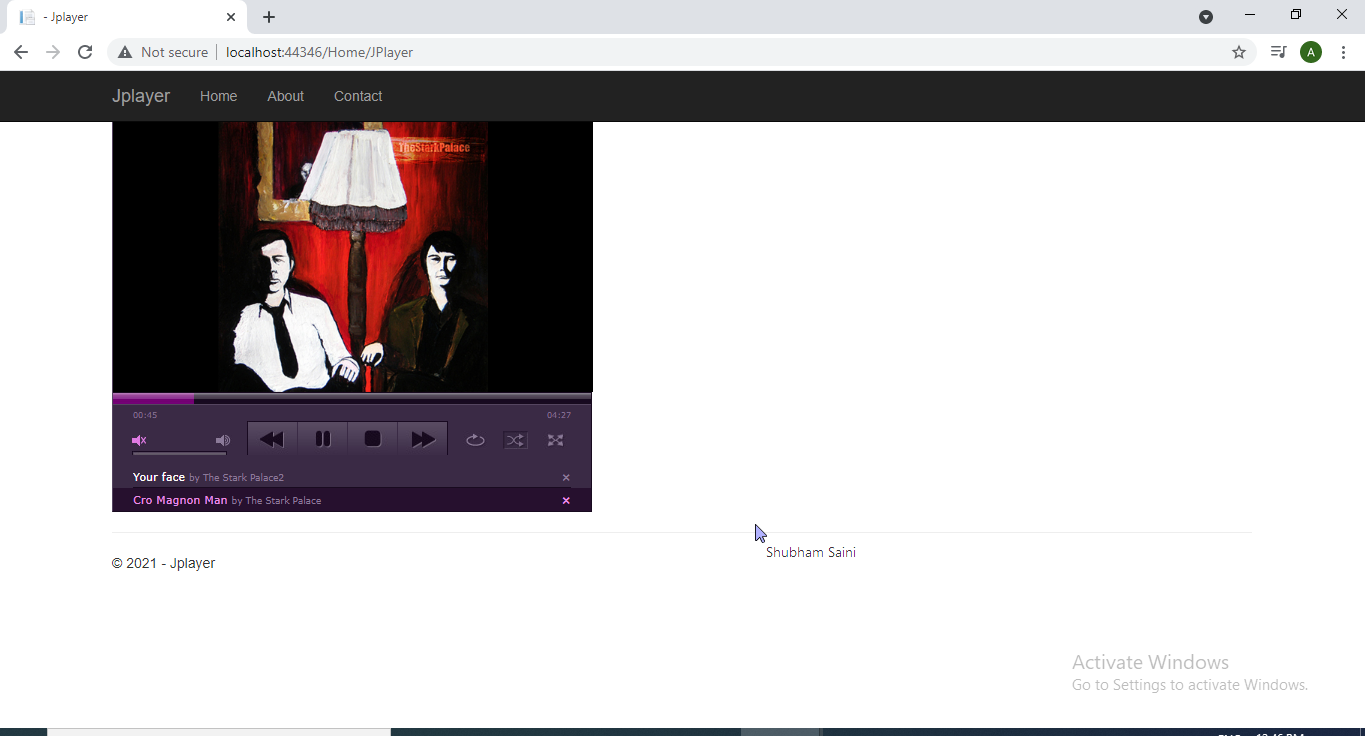
So this is how it will look, Now you can enjoy music player with great interface accross your website, supporting multiple songs list. For the code sample you can download the attachments
