
How to reload child components in vue.js
Vue.js Child Components
Vue.js child components are reusable pieces of code designed to encapsulate specific functionality or UI elements. They allow developers to create modular applications by breaking down complex interfaces into smaller, manageable parts. This modularity not only enhances code organization but also promotes reusability across different parts of the application.
As a beginner, resetting fields inside Vue.js child components can be challenging, especially when relying on prop-based methods. In this guide, we will explore a straightforward approach to reloading child components without the complications of props, focusing on the effective use of the :key attribute.

Re-Render Vue.js Child Component
The most effective way to re-render a child component in Vue.js is by utilizing the :key attribute. This attribute helps Vue identify and track elements, allowing it to re-render components whenever the key changes. To implement this, you will need to add a :key attribute to your child component as shown below:
<template>
  <child-component-name :key="componentKey"></child-component-name>
</template>
In the example above, the componentKey variable must be declared in the data method of your Vue instance. The core idea is that Vue will re-render the child component each time the value of :key changes. This means that if you modify the componentKey, the child component will be reloaded, allowing you to reset its state.
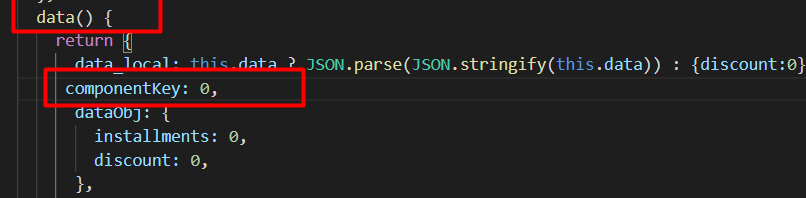
For instance, you can increment the value of componentKey through a button click or within any method. This approach effectively resets the child component to its new state, making it a versatile solution for various scenarios.
<script>
export default {
  data() {
    return {
      componentKey: 0
    };
  },
  methods: {
    reloadChild() {
      this.componentKey++;
    }
  }
};
</script>
When to Reload Child Components
Reloading child components can be particularly useful in scenarios where the child component holds dynamic data or user input that needs to be reset. For example, in a form submission, once the data is successfully submitted, you might want to clear the form fields and reset the state of the child component that contains these fields.
Another common use case is when the parent component's state changes significantly, and you want to ensure that the child components reflect these changes appropriately. By reloading the child components, you can avoid stale data and ensure that the user interface remains consistent with the application's state.
Using v-if for Conditional Rendering
Another method to reload child components in Vue.js is by utilizing the v-if directive. This directive conditionally renders components based on boolean expressions. When the condition changes, Vue will destroy and re-create the component, effectively reloading it.
<template>
  <div>
    <button @click="showChild = !showChild">Toggle Child Component</button>
    <child-component-name v-if="showChild"></child-component-name>
  </div>
</template>
In this example, clicking the button toggles the showChild variable, which controls whether the child component is rendered. Each time the button is clicked, the child component is destroyed and re-created, thus resetting its state. This method is particularly useful for components that should only be visible under certain conditions.
Edge Cases & Gotchas
While reloading child components can be straightforward, there are some edge cases to be aware of. One common issue arises when the component relies on external state or data that may not be reset when the component is reloaded. For example, if the child component makes API calls or depends on Vuex state, simply changing the :key or using v-if may not suffice to reset the component's internal state.
Additionally, if your child component has local state that is not properly managed, you may encounter unexpected behavior upon reloading. It's essential to ensure that all stateful data is reset or re-initialized in the component's lifecycle hooks, such as mounted or created.
Performance & Best Practices
When reloading child components, it's crucial to consider performance implications. Frequent re-renders can lead to performance issues, especially in large applications with many components. To mitigate this, you can implement caching strategies or optimize your component structures to minimize unnecessary re-renders.
Here are some best practices to follow:
- Use :key judiciously: Ensure that the key values are unique and meaningful to prevent unnecessary re-renders.
- Leverage computed properties: Use computed properties to manage derived state instead of relying solely on reloading components.
- Optimize rendering: Use v-if for components that are not frequently needed, and consider using v-show for components that are toggled frequently.
- Monitor performance: Use Vue's devtools to analyze component rendering performance and identify bottlenecks.
Conclusion
In conclusion, reloading child components in Vue.js can be achieved through various methods, each with its use cases and considerations. By understanding how to effectively reset components, you can create more dynamic and responsive applications.
Key Takeaways:
- Child components promote reusability and modularity in Vue.js applications.
- The :key attribute is a powerful tool for re-rendering components.
- Conditional rendering with v-if can also be used to reload components effectively.
- Be mindful of edge cases and performance implications when reloading components.

