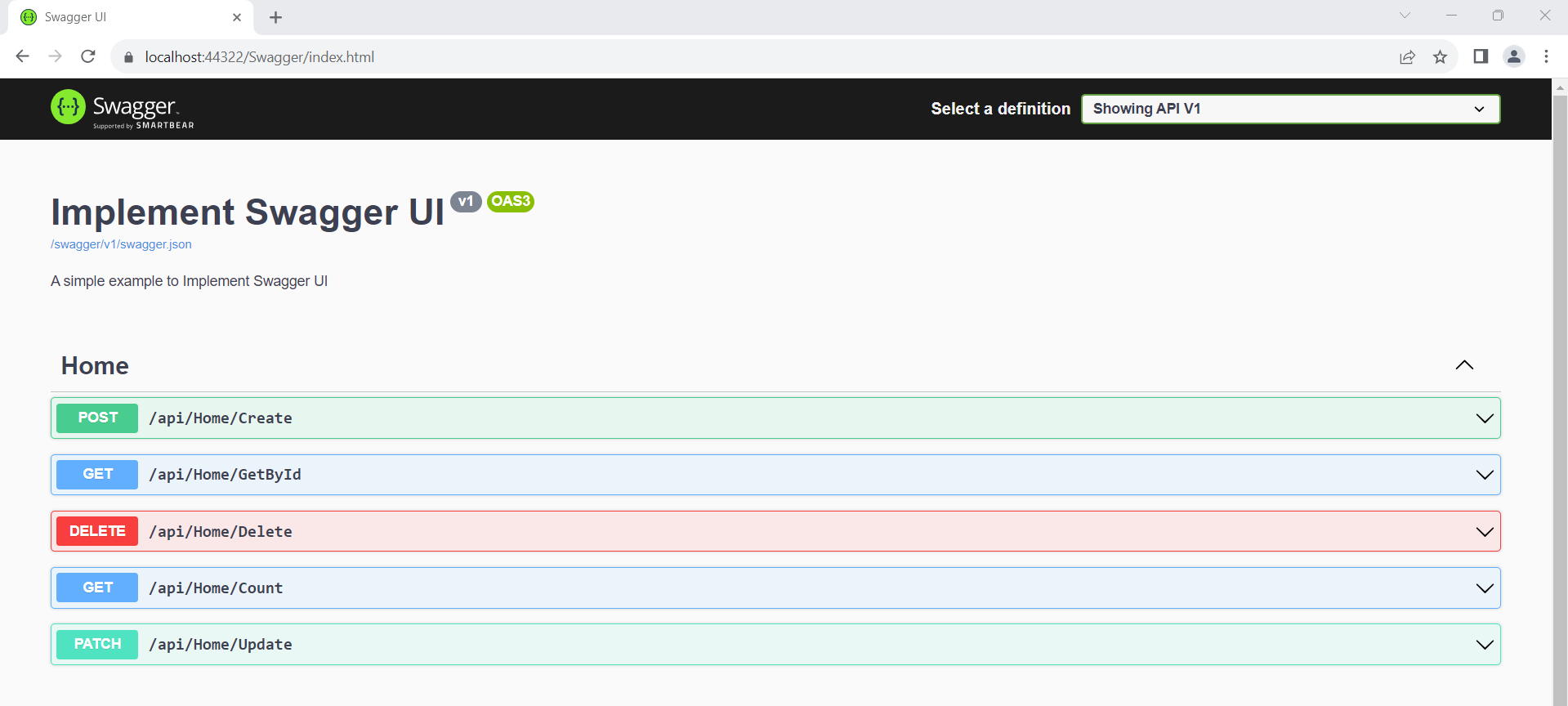
CRUD Operations Using Dapper In ASP.NET Core Web API
Create an ASP.NET Core project
Create an empty API Controller with any name (Home)
Now Create the Services folder and add one Interface(IDapper.cs) and one Class(Dapperr.cs) to it.
Now add the ASP.NET Core Libraries to set up the database and also Dapper library into our project from the Nuget Package Manager.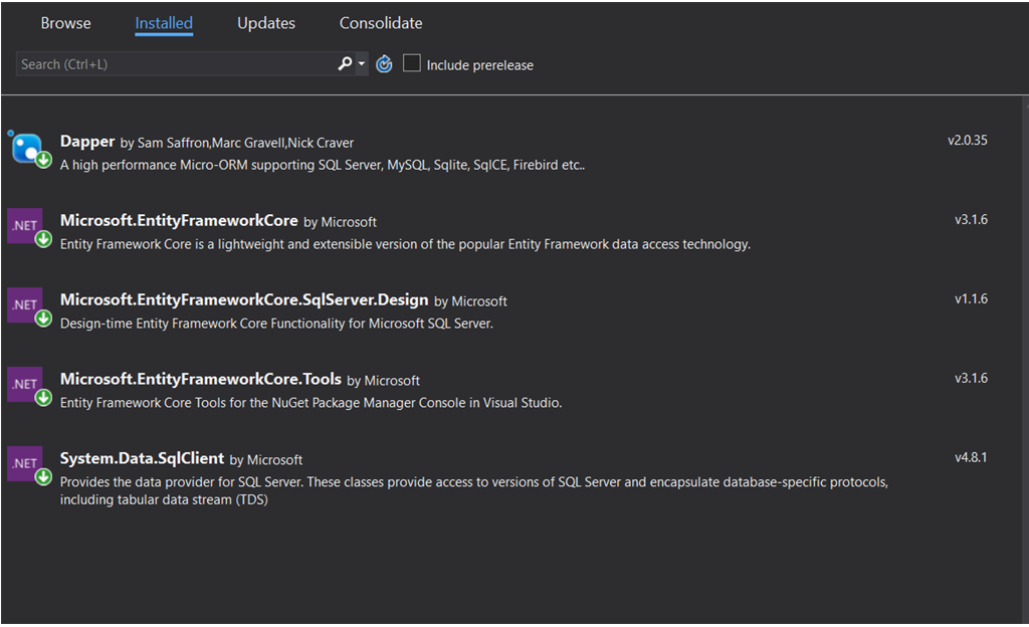 Add the below code in IDapper.cs interface to where to perform the Crud Operations in our project.
using Dapper;
using System;
using System.Collections.Generic;
using System.Data;
using System.Data.Common;
using System.Linq;
using System.Threading.Tasks;

namespace Dapper_ORM.Services
{
    public interface IDapper : IDisposable
    {
        DbConnection GetDbconnection();
        T Get<T>(string sp, DynamicParameters parms, CommandType commandType = CommandType.StoredProcedure);
        List<T> GetAll<T>(string sp, DynamicParameters parms, CommandType commandType = CommandType.StoredProcedure);
        int Execute(string sp, DynamicParameters parms, CommandType commandType = CommandType.StoredProcedure);
        T Insert<T>(string sp, DynamicParameters parms, CommandType commandType = CommandType.StoredProcedure);
        T Update<T>(string sp, DynamicParameters parms, CommandType commandType = CommandType.StoredProcedure);
    }
}
Add the code in Dapperr.cs File where the actual method implementation takes place in it for each and every method which we already declared in Interface
using Dapper;
using Microsoft.Extensions.Configuration;
using System;
using System.Collections.Generic;
using System.Data;
using System.Data.Common;
using System.Data.SqlClient;
using System.Linq;
using System.Threading.Tasks;

namespace Dapper_ORM.Services
{
    public class Dapperr : IDapper
    {
        private readonly IConfiguration _config;
        private string Connectionstring = "DefaultConnection";

        public  Dapperr(IConfiguration config)
        {
            _config = config;
        }
        public void Dispose()
        {

        }

        public int Execute(string sp, DynamicParameters parms, CommandType commandType = CommandType.StoredProcedure)
        {
            throw new NotImplementedException();
        }

        public T Get<T>(string sp, DynamicParameters parms, CommandType commandType = CommandType.Text)
        {
            using IDbConnection db = new SqlConnection(_config.GetConnectionString(Connectionstring));
            return db.Query<T>(sp, parms, commandType: commandType).FirstOrDefault();
        }

        public List<T> GetAll<T>(string sp, DynamicParameters parms, CommandType commandType = CommandType.StoredProcedure)
        {
            using IDbConnection db = new SqlConnection(_config.GetConnectionString(Connectionstring));
            return db.Query<T>(sp, parms, commandType: commandType).ToList();
        }

        public DbConnection GetDbconnection()
        {
            return new SqlConnection(_config.GetConnectionString(Connectionstring));
        }

        public T Insert<T>(string sp, DynamicParameters parms, CommandType commandType = CommandType.StoredProcedure)
        {
            T result;
            using IDbConnection db = new SqlConnection(_config.GetConnectionString(Connectionstring));
            try
            {
                if (db.State == ConnectionState.Closed)
                    db.Open();

                using var tran = db.BeginTransaction();
                try
                {
                    result = db.Query<T>(sp, parms, commandType: commandType, transaction: tran).FirstOrDefault();
                    tran.Commit();
                }
                catch (Exception ex)
                {
                    tran.Rollback();
                    throw ex;
                }
            }
            catch (Exception ex)
            {
                throw ex;
            }
            finally
            {
                if (db.State == ConnectionState.Open)
                    db.Close();
            }

            return result;
        }

        public T Update<T>(string sp, DynamicParameters parms, CommandType commandType = CommandType.StoredProcedure)
        {
            T result;
            using IDbConnection db = new SqlConnection(_config.GetConnectionString(Connectionstring));
            try
            {
                if (db.State == ConnectionState.Closed)
                    db.Open();

                using var tran = db.BeginTransaction();
                try
                {
                    result = db.Query<T>(sp, parms, commandType: commandType, transaction: tran).FirstOrDefault();
                    tran.Commit();
                }
                catch (Exception ex)
                {
                    tran.Rollback();
                    throw ex;
                }
            }
            catch (Exception ex)
            {
                throw ex;
            }
            finally
            {
                if (db.State == ConnectionState.Open)
                    db.Close();
            }

            return result;
        }
    }
}
Create a DataContext Folder and Add AppContext Class in it.
using Microsoft.EntityFrameworkCore;
using System;
using System.Collections.Generic;
using System.Linq;
using System.Threading.Tasks;

namespace Dapper_ORM.DataContext
{
    public class AppContext : DbContext
    {
        public AppContext() { }
        public AppContext(DbContextOptions<AppContext> options) : base(options) { }
    }
}
Add the Connection String in the appsettings.json File:
{
  "Logging": {
    "LogLevel": {
      "Default": "Information",
      "Microsoft": "Warning",
      "Microsoft.Hosting.Lifetime": "Information"
    }
  },
  "AllowedHosts": "*",
  "ConnectionStrings": {
    "DefaultConnection": "Server=.;Database=DbEmployee;Trusted_Connection=True;"
  }
}
using System;
using System.Collections.Generic;
using System.Linq;
using System.Threading.Tasks;
using Microsoft.AspNetCore.Builder;
using Microsoft.AspNetCore.Hosting;
using Microsoft.AspNetCore.HttpsPolicy;
using Microsoft.AspNetCore.Mvc;
using Microsoft.Extensions.Configuration;
using Microsoft.Extensions.DependencyInjection;
using Microsoft.Extensions.Hosting;
using Microsoft.Extensions.Logging;
using Microsoft.EntityFrameworkCore;
using Dapper_ORM.Services;
using Microsoft.OpenApi.Models;

namespace Dapper_ORM
{
    public class Startup
    {
        public Startup(IConfiguration configuration)
        {
            Configuration = configuration;
        }

        public IConfiguration Configuration { get; }

        // This method gets called by the runtime. Use this method to add services to the container.
        public void ConfigureServices(IServiceCollection services)
        {
            services.AddControllers();
                services.AddDbContext<DataContext.AppContext>(options =>
                          options.UseSqlServer(
                              Configuration.GetConnectionString("DefaultConnection")));
            //Register dapper in scope
            services.AddScoped<IDapper, Dapperr>();

            services.AddSwaggerGen();
            services.AddSwaggerGen(c =>
            {
                c.SwaggerDoc("v1", new OpenApiInfo
                {
                    Version = "v1",
                    Title = "Implement Swagger UI",
                    Description = "A simple example to Implement Swagger UI",
                });
            });

        }

        // This method gets called by the runtime. Use this method to configure the HTTP request pipeline.
        public void Configure(IApplicationBuilder app, IWebHostEnvironment env)
        {
            if (env.IsDevelopment())
            {
                app.UseDeveloperExceptionPage();
            }

            app.UseSwagger();
            app.UseSwaggerUI(c => {
                c.SwaggerEndpoint("/swagger/v1/swagger.json", "Showing API V1");
            });

            app.UseHttpsRedirection();

            app.UseRouting();

            app.UseAuthorization();

            app.UseEndpoints(endpoints =>
            {
                endpoints.MapControllers();
            });
        }
    }
}
using System;
using System.Collections.Generic;
using System.Linq;
using System.Threading.Tasks;

namespace Dapper_ORM.Models
{
    public class Parameters
    {
        public int Id { get; set; }
        public string Name { get; set; }
        public int Age { get; set; }
    }
}
Create a table in SQL DB to access the table data using Dapper from this Core API, so I have created a table name with a dummy in the database.
USE [DbEmployee]
GO

/****** Object:  Table [dbo].[Dummy]    Script Date: 1/18/2024 10:46:15 PM ******/
SET ANSI_NULLS ON
GO

SET QUOTED_IDENTIFIER ON
GO

CREATE TABLE [dbo].[Dummy](
	[Id] [int] NULL,
	[Name] [nchar](100) NULL,
	[Age] [int] NULL
) ON [PRIMARY]
GO
Create store procedure [dbo].[SP_Add_Article]
USE [DbEmployee]
GO
/****** Object:  StoredProcedure [dbo].[SP_Add_Article]    Script Date: 1/18/2024 10:48:18 PM ******/
SET ANSI_NULLS ON
GO
SET QUOTED_IDENTIFIER ON
GO
-- =============================================
-- Author:		<Author,,Name>
-- Create date: <Create Date,,>
-- Description:	<Description,,>
-- =============================================
ALTER PROCEDURE [dbo].[SP_Add_Article]
@Id int ,
@Name nvarchar(100),
@Age int
AS
BEGIN
	Insert into Dummy values (@Id,@Name,@Age)
END
Create store procedure [dbo].[SP_Update_Article]
USE [DbEmployee]
GO
/****** Object:  StoredProcedure [dbo].[SP_Update_Article]    Script Date: 1/18/2024 10:50:23 PM ******/
SET ANSI_NULLS ON
GO
SET QUOTED_IDENTIFIER ON
GO
-- =============================================
-- Author:		<Author,,Name>
-- Create date: <Create Date,,>
-- Description:	<Description,,>
-- =============================================
ALTER  PROCEDURE [dbo].[SP_Update_Article]
@Id int ,
@Name nvarchar(100),
@Age int
AS
BEGIN
	update Dummy set Name=@Name,Age=@Age where Id=@Id
END
using System;
using System.Collections.Generic;
using System.Data;
using System.Data.SqlClient;
using System.Linq;
using System.Threading.Tasks;
using Dapper;
using Dapper_ORM.Models;
using Dapper_ORM.Services;
using Microsoft.AspNetCore.Http;
using Microsoft.AspNetCore.Mvc;
using Microsoft.EntityFrameworkCore;

namespace Dapper_ORM.Controllers
{
    [Route("api/[controller]")]
    [ApiController]
    public class HomeController : ControllerBase
    {
        private readonly IDapper _dapper;
        public HomeController(IDapper dapper)
        {
            _dapper = dapper;
        }
        [HttpPost(nameof(Create))]
        public async Task<int> Create(Parameters data)
        {
            var dbparams = new DynamicParameters();
            dbparams.Add("Id", data.Id, DbType.Int32);
            dbparams.Add("Name", data.Name, DbType.String);
            dbparams.Add("Age", data.Age, DbType.Int32);
            var result = await Task.FromResult(_dapper.Insert<int>("[dbo].[SP_Add_Article]"
                , dbparams,
                commandType: CommandType.StoredProcedure));
            return result;
        }
        [HttpGet(nameof(GetById))]
        public async Task<Parameters> GetById(int Id)
        {
            var result = await Task.FromResult(_dapper.Get<Parameters>($"Select * from [Dummy] where Id = {Id}", null, commandType: CommandType.Text));
            return result;
        }
        [HttpDelete(nameof(Delete))]
        public async Task Delete(int Id)
        {

            var query = "DELETE FROM Dummy WHERE Id = @Id";
            using (var connection = _dapper.GetDbconnection())
            {
                await connection.ExecuteAsync(query, new { Id });
            }

        }
        [HttpGet(nameof(Count))]
        public Task<int> Count(int num)
        {
            var totalcount = Task.FromResult(_dapper.Get<int>($"select COUNT(*) from [Dummy] WHERE Age like '%{num}%'", null,
                    commandType: CommandType.Text));
            return totalcount;
        }
        [HttpPatch(nameof(Update))]
        public Task<int> Update(Parameters data)
        {
            var dbPara = new DynamicParameters();
            dbPara.Add("Id", data.Id);
            dbPara.Add("Name", data.Name, DbType.String);
            dbPara.Add("Age", data.Age, DbType.String);

            var updateArticle = Task.FromResult(_dapper.Update<int>("[dbo].[SP_Update_Article]",
                            dbPara,
                            commandType: CommandType.StoredProcedure));
            return updateArticle;
        }
    }
}