
Code2night
  • Home
  • Guest Posts
  • Tutorial
  • Languages
  • Post Blog
  • Tools
    • JSON Beautifier
    • HTML Beautifier
    • XML Beautifier
    • CSS Beautifier
    • JS Beautifier
    • PDF Editor
    • Word Counter
    • Base64 Encode/Decode
    • Diff Checker
    • JSON to CSV
    • Password Generator
  • Register
  • Login
  1. Home
  2. Blogpost

How to rename table column in sql server

Date- Jan 13,2023

5718

Sql server T Sql

Hello guys and welcome to Code2Night! In the world of SQL Server, creating tables is a common task that every database developer encounters. However, there are instances when we realize that we've made a mistake in naming the columns of a table, or we simply need to modify them to better align with our evolving data requirements. In such situations, it becomes essential to know how to rename table columns in SQL Server.

Renaming table columns may seem like a daunting task, especially for those who are new to SQL Server or have limited experience with database management systems. But fear not! In this blog post, we will guide you through the process of renaming table columns step by step, empowering you to make changes to your database structure with ease and confidence.

Whether you're an aspiring SQL developer, a seasoned database administrator, or someone who simply wants to expand your skills, this guide will provide you with the necessary knowledge and techniques to rename table columns effectively. By the end, you'll have the expertise to modify column names and adapt your database to meet changing business needs.

So, let's dive in and explore how to rename table columns in SQL Server!

SQL Column Rename

So, in SQL servers we often have to rename incorrectly named columns or old columns. So for that purpose, we can use the following query. 

EXEC sp_rename 'TableName.OldColumnName', 'NewColumnName', 'COLUMN';

In this, we have to replace TableName and Oldcolumn name as mentioned and We have to put a new column name at place of "NewColumnName".rename table column
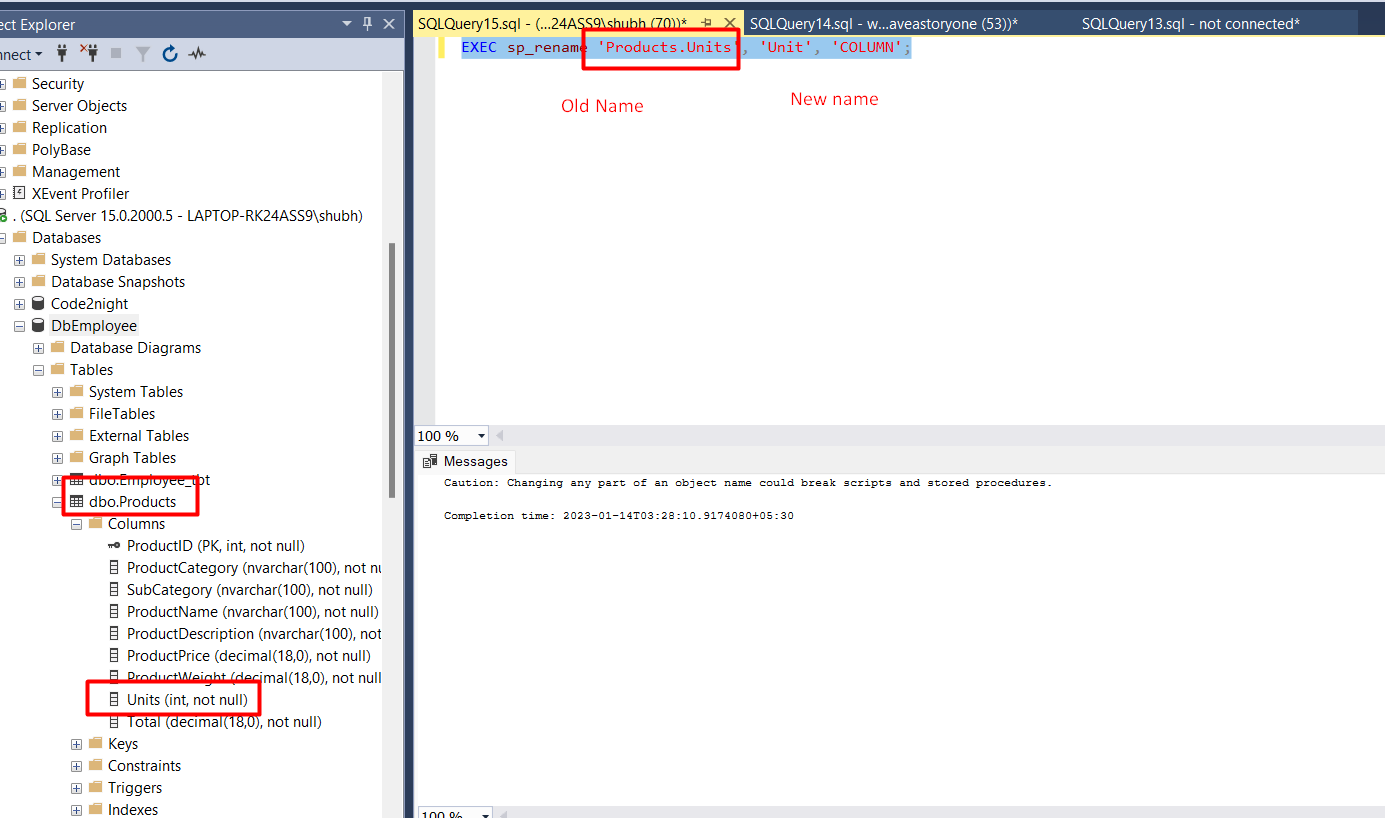

So you can modify your table name and column name accordingly and execute the query. After that refresh the database and you will see the new column name updated.
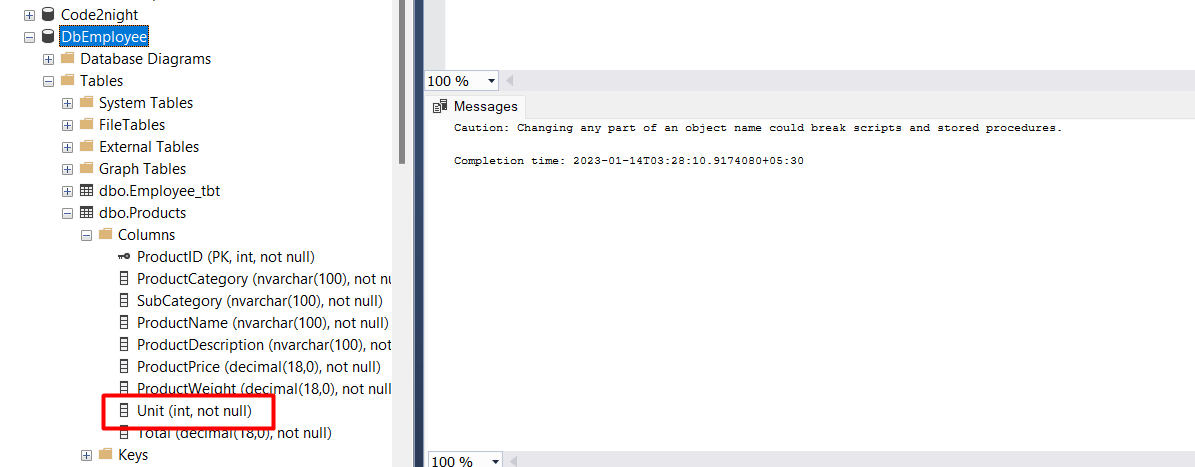
So, This is how to rename the column in the Sql server.

S
Shubham Batra
Programming author at Code2Night โ€” sharing tutorials on ASP.NET, C#, and more.
View all posts โ†’

Related Articles

How to find all procedures having table reference in Sql server
Jan 13, 2023
How to find all tables by column name
Jan 13, 2023
How to read json in Sql Server
Aug 10, 2022

Comments

Tags

AspNet
C#
programming
AspNet MVC
c programming
AspNet Core
C
software development
tutorial
MVC
memory management
Paypal
coding
coding best practices
data structures
programming tutorial
tutorials
object oriented programming
Slick Slider
StripeNet
Free Download for Youtube Subscribers!

First click on Subscribe Now and then subscribe the channel and come back here.
Then Click on "Verify and Download" button for download link

Subscribe Now | 1760
Download
Support Us....!

Please Subscribe to support us

Thank you for Downloading....!

Please Subscribe to support us

Continue with Downloading
Be a Member
Join Us On Whatsapp Join Us On Facebook
Code2Night

A community platform for sharing programming knowledge, tutorials, and blogs. Learn, write, and grow with developers worldwide.

Panipat, Haryana, India
info@code2night.com
Quick Links
  • Home
  • Blogs
  • Tutorials
  • About Us
  • Contact
  • Privacy Policy
  • Terms & Conditions
  • Guest Posts
Free Dev Tools
  • JSON Beautifier
  • HTML Beautifier
  • CSS Beautifier
  • JS Beautifier
  • Password Generator
  • QR Code Generator
  • Hash Generator
  • Diff Checker
  • Base64 Encode/Decode
  • Word Counter
By Language
© 2026 Code2Night. All Rights Reserved.
Made with for developers  |  Privacy  ยท  Terms
Translate Page