
How to Convert DataTable to List
Convert DataTable to List
For converting datatable to list we will create a extension method which we can use easily anywhere in the project.
so, first of all add this class in your project
   public static class DataReaderExtensions
    {
        #region "-- Public -- "

        #region "-- Methods --"

        /// <summary>
        ///
        /// </summary>
        /// <typeparam name="T"></typeparam>
        /// <param name="dr"></param>
        /// <returns></returns>
        public static List<T> MapToList<T>(this DbDataReader dr) where T : new()
        {
            List<T> RetVal = null;
            var Entity = typeof(T);
            var PropDict = new Dictionary<string, PropertyInfo>();
            string Name = string.Empty;
            try
            {

                if (dr != null && dr.HasRows)
                {
                    RetVal = new List<T>();
                    var Props = Entity.GetProperties(BindingFlags.Instance | BindingFlags.Public);
                    PropDict = Props.ToDictionary(p => p.Name.ToUpper(), p => p);

                    while (dr.Read())
                    {
                        T newObject = new T();
                        for (int Index = 0; Index < dr.FieldCount; Index++)
                        {
                            Name = dr.GetName(Index).ToUpper();
                            if (PropDict.ContainsKey(dr.GetName(Index).ToUpper()))
                            {
                                var Info = PropDict[dr.GetName(Index).ToUpper()];
                                if ((Info != null) && Info.CanWrite)
                                {
                                    var Val = dr.GetValue(Index);
                                    Info.SetValue(newObject, (Val == DBNull.Value) ? null : Val, null);
                                }
                            }
                        }
                        RetVal.Add(newObject);
                    }
                }
            }
            catch (Exception)
            {
                throw;
            }

            return RetVal;
        }


        /// <summary>
        ///
        /// </summary>
        /// <typeparam name="T"></typeparam>
        /// <param name="dr"></param>
        /// <returns></returns>

        public static List<T> DataTableToList<T>(this DataTable table) where T : class, new()
        {
            try
            {
                List<T> list = new List<T>();

                foreach (var row in table.AsEnumerable())
                {
                    T obj = new T();

                    foreach (var prop in obj.GetType().GetProperties())
                    {
                        try
                        {
                            PropertyInfo propertyInfo = obj.GetType().GetProperty(prop.Name);
                            if (propertyInfo.PropertyType.IsEnum)
                            {
                                propertyInfo.SetValue(obj, Enum.Parse(propertyInfo.PropertyType, row[prop.Name].ToString()));
                            }
                            else
                            {
                                Type t = Nullable.GetUnderlyingType(propertyInfo.PropertyType) ?? propertyInfo.PropertyType;
                                if (row.Table.Columns.Contains(prop.Name))
                                {
                                    if (propertyInfo.PropertyType == typeof(Int32))
                                    {
                                        int value = 0;
                                        var isvalid = Int32.TryParse(Convert.ToString(row[prop.Name]), out value);
                                        if (isvalid)
                                            propertyInfo.SetValue(obj, value, null);
                                    }
                                    else if (propertyInfo.PropertyType == typeof(bool))
                                    {
                                        var safevalue = string.IsNullOrEmpty(Convert.ToString(row[prop.Name])) ? false : Convert.ToBoolean(row[prop.Name]);
                                        propertyInfo.SetValue(obj, safevalue, null);
                                    }
                                    else if (propertyInfo.PropertyType == typeof(int?))
                                    {
                                        int value = 0;
                                        var isvalid = Int32.TryParse(Convert.ToString(row[prop.Name]), out value);
                                        if (isvalid)
                                            propertyInfo.SetValue(obj, value, null);
                                        else
                                            propertyInfo.SetValue(obj, 0, null);
                                    }
                                    else if (propertyInfo.PropertyType == typeof(DateTime?))
                                    {
                                        DateTime value;
                                        var isvalid = DateTime.TryParse(Convert.ToString(row[prop.Name]), out value);
                                        if (isvalid)
                                            propertyInfo.SetValue(obj, value, null);
                                        else
                                            propertyInfo.SetValue(obj, null, null);
                                    }
                                    else if (propertyInfo.PropertyType == typeof(DateTime))
                                    {
                                        DateTime value;
                                        var isvalid = DateTime.TryParse(Convert.ToString(row[prop.Name]), out value);
                                        if (isvalid)
                                            propertyInfo.SetValue(obj, value, null);
                                    }
                                    else if (propertyInfo.PropertyType == typeof(Decimal))
                                    {
                                        var safevalue = string.IsNullOrEmpty(Convert.ToString(row[prop.Name])) ? 0 : Convert.ToDecimal(row[prop.Name]);
                                        propertyInfo.SetValue(obj, safevalue, null);
                                    }
                                    else
                                    {
                                        propertyInfo.SetValue(obj, Convert.ChangeType(row[prop.Name], propertyInfo.PropertyType), null);
                                    }


                                    // propertyInfo.SetValue(obj, Convert.ChangeType(row[prop.Name], propertyInfo.PropertyType), null);

                                }
                            }
                        }
                        catch (Exception ex)
                        {
                            continue;
                        }
                    }

                    list.Add(obj);
                }

                return list;
            }
            catch
            {
                return null;
            }
        }

        private static T GetItem<T>(DataRow dr)
        {
            Type temp = typeof(T);
            T obj = Activator.CreateInstance<T>();

            foreach (DataColumn column in dr.Table.Columns)
            {
                foreach (PropertyInfo pro in temp.GetProperties())
                {
                    if (pro.Name == column.ColumnName)
                        pro.SetValue(obj, dr[column.ColumnName], null);
                    else
                        continue;
                }
            }
            return obj;
        }

    }
    #endregion "-- Methods --"

    #endregion "-- Public -- "
    public static class TConverter
    {
        public static T ChangeType<T>(object value)
        {
            return (T)ChangeType(typeof(T), value);
        }
        public static object ChangeType(Type t, object value)
        {
            TypeConverter tc = TypeDescriptor.GetConverter(t);
            return tc.ConvertFrom(value);
        }

    }
After adding these two classes now we can use our extension method in controller, For using this we have to do this
   public class HomeController : Controller
    {
        public ActionResult Index()
        {
            DataTable table = DummyDataTableSource();
            var list= table.DataTableToList<Employee>();
            return View();
        }

         private static DataTable DummyDataTableSource()
        {
            DataTable table = new DataTable();
            table.Columns.Add("Name");
            table.Columns.Add("Number");
            table.Columns.Add("Address");
            table.Columns.Add("City");


            for (int i = 0; i < 10; i++)
            {
                DataRow dr = table.NewRow();
                dr["Name"] = "Name " + i;
                dr["Number"] = "Number " + i;
                dr["Address"] = "Address " + i;
                dr["City"] = "City " + i;
                table.Rows.Add(dr);
            }

            return table;
        }
    }
You have to add this class in the project which we will use while converting datatable to list .
public class Employee
    {
        public string Name { get; set; }
        public string Number { get; set; }
        public string Address { get; set; }
        public string City { get; set; }
    }
For converting datatable to list we have to do this. This will convert datatable to list of type Employee.
DataTable table = DummyDataTableSource();
var list= table.DataTableToList<Employee>();
You can check the converted list in the image
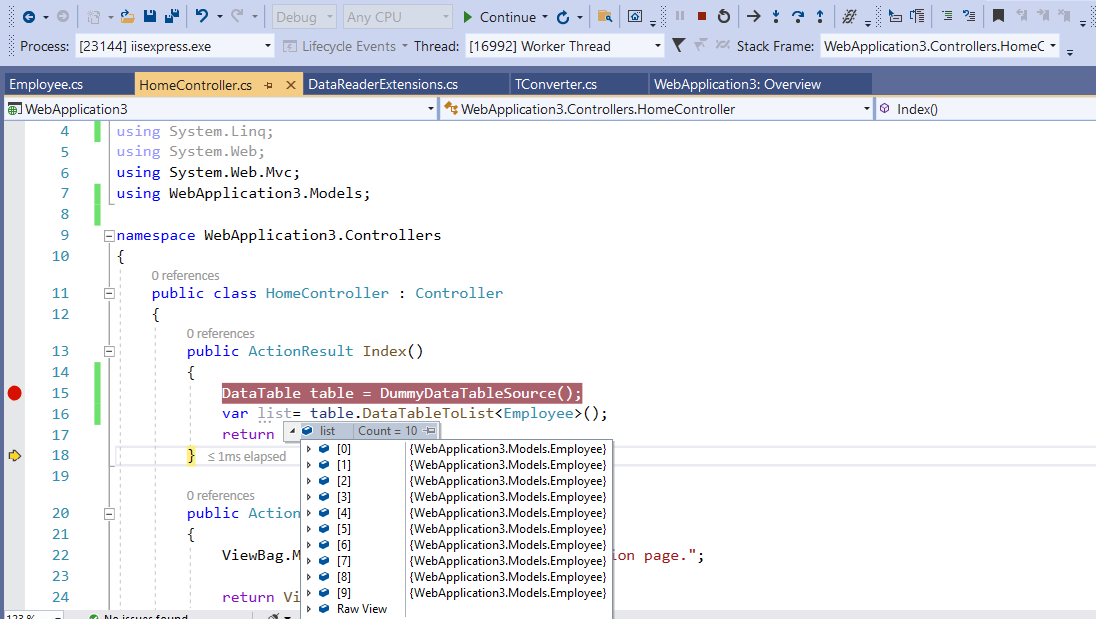
This is how we can convert datatable to list in Asp.Net.
