
Convert HTML String To Image In C#
Hello, guys, and welcome to Code2Night! In this article, we will see how to Convert HTML String To Image In C#
Have you ever found yourself working on an ASP.NET web project and encountered the need to convert your HTML output into an image? Perhaps you wanted to save the rendered HTML as an image file on your system. If so, you're in the right place! In this introductory guide, we will explore how to convert an HTML string to an image using C# in ASP.NET.
Converting HTML to an image can be quite beneficial in a variety of situations. It allows you to capture the visual representation of your web page or HTML content and save it as an image file, which is useful for making reports, thumbnails, and sharing visual representations of your HTML output.
In the context of ASP.NET, C# provides a powerful set of tools and libraries that enable us to accomplish this task efficiently. By leveraging the capabilities of these tools, we can transform HTML code into image files effortlessly.
Throughout this tutorial, we will walk you through the process step by step. We will start by exploring the different approaches available for converting HTML to an image in C# and then delve into a specific method using ASP.NET. By the end of this tutorial, you'll have a solid understanding of how to convert an HTML string to an image in your ASP.NET web project using C#.
So, let's dive right in and unlock the secrets of converting HTML to an image in C# ASP.NET!
using System;
using System.Drawing;
using System.Windows.Forms;
using System.Threading;
 public void CreateHtmlToImage()
        {
            var source = @"<!DOCTYPE html>
                                            <html>
                                            <head><meta http-equiv='X-UA-Compatible' content='IE=Edge' />
                                            <style>
                                            table {
                                              font-family: arial, sans-serif;
                                              border-collapse: collapse;
                                              width: 100%;
                                            }

                                            td, th {
                                              border: 1px solid #dddddd;
                                              text-align: left;
                                              padding: 8px;
                                            }

                                            tr:nth-child(even) {
                                              background-color: #dddddd;
                                            }
                                            </style>
                                            </head>
                                            <body style='width:1000px'>

                                            <h2>HTML Table</h2>

                                                <table style='width:1000px'>
                                                  <tr>
                                                    <th>Company</th>
                                                    <th>Contact</th>
                                                  </tr>
                                                  <tr>
                                                    <td>Alfreds Futterkiste</td>
                                                    <td>Maria Anders</td>
                                                  </tr>
                                                  <tr>
                                                    <td>Centro comercial Moctezuma</td>
                                                    <td>Francisco Chang</td>
                                                  </tr>
                                                  <tr>
                                                    <td>Ernst Handel</td>
                                                    <td>Roland Mendel</td>
                                                  </tr>
                                                  <tr>
                                                    <td>Island Trading</td>
                                                    <td>Helen Bennett</td>
                                                  </tr>
                                                  <tr>
                                                    <td>Laughing Bacchus Winecellars</td>
                                                    <td>Yoshi Tannamuri</td>
                                                  </tr>
                                                  <tr>
                                                    <td>Magazzini Alimentari Riuniti</td>
                                                    <td>Giovanni Rovelli</td>
                                                  </tr>
                                                </table>

                                            </body>
                                            </html>";
            var filename = @"F://Image.jpg";
            var th = new Thread(() =>
            {
                var webBrowser = new WebBrowser();
                webBrowser.ScrollBarsEnabled = false;
                webBrowser.IsWebBrowserContextMenuEnabled = true;
                webBrowser.AllowNavigation = true;

                webBrowser.DocumentCompleted += webBrowserDocumentCompleted;
                webBrowser.DocumentText = source;
                webBrowser.Name = filename;
                webBrowser.Width = 1000;
                Application.Run();
            });
            th.SetApartmentState(ApartmentState.STA);
            th.Start();

            Task.Run(() => th);
            Task.WaitAll();
        }
So, after you use this on your controller, you have to add this Completed event, which will be fired once your HTML output is ready to be saved as an image. It will save the bitmap image to the location specified by the filename parameter. Now, execute the code, and you will see that your HTML is saved as an image in the specified location. This functionality ensures that you can easily convert your HTML content into visual representations, allowing for convenient sharing or further manipulation if needed. By incorporating this feature into your controller, you enhance the versatility and usability of your application. Feel free to explore the various possibilities and creative applications enabled by this capability.
static void webBrowserDocumentCompleted(object sender, WebBrowserDocumentCompletedEventArgs e)
        {
            var webBrowser = (WebBrowser)sender;
            int scrollWidth = webBrowser.Document.Body.ScrollRectangle.Width;
            int scrollHeight = webBrowser.Document.Body.ScrollRectangle.Height;
            using (Bitmap bitmap = new Bitmap(scrollWidth, scrollHeight))
            {
                webBrowser.DrawToBitmap(bitmap, new System.Drawing.Rectangle(0, 0, bitmap.Width, bitmap.Height));
                bitmap.Save(webBrowser.Name, System.Drawing.Imaging.ImageFormat.Jpeg);
            }
        }
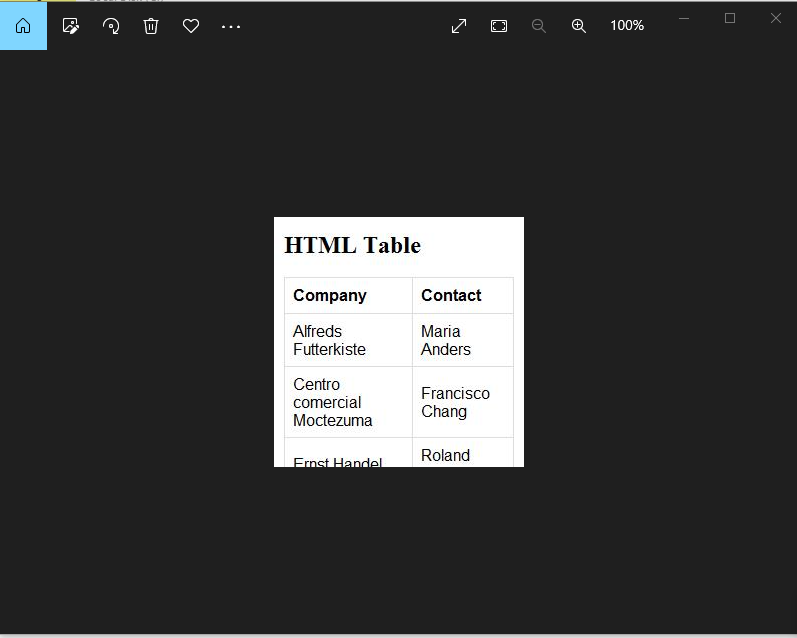
This is the image output that we got in our case. So this is how you can convert html string to the image in c# asp.net.
