Login Register
Code2night
  • Home
  • Blog Archive
  • Learn
    • Tutorials
    • Videos
  • Interview Q&A
  • Resources
    • Cheatsheets
    • Tech Comparisons
  • Languages
    • Angular Angular js ASP.NET Asp.net Core ASP.NET Core, C# ASP.NET MVC ASP.NET Web Forms C C# C#, ASP.NET Core, Dapper
      C#, ASP.NET Core, Dapper, Entity Framework DotNet General Web Development HTML, CSS HTML/CSS Java JavaScript JavaScript, HTML, CSS JavaScript, Node.js Node.js
      Python Python 3.11, Pandas, SQL Python 3.11, SQL Python 3.11, SQLAlchemy Python 3.11, SQLAlchemy, SQL Python 3.11, SQLite React Security SQL Server TypeScript
  • Post Blog
  • Tools
    • Beautifiers
      JSON Beautifier HTML Beautifier XML Beautifier CSS Beautifier JS Beautifier SQL Formatter
      Dev Utilities
      JWT Decoder Regex Tester Diff Checker Cron Explainer String Escape Hash Generator Password Generator
      Converters
      Base64 Encode/Decode URL Encoder/Decoder JSON to CSV CSV to JSON JSON to TypeScript Markdown to HTML Number Base Converter Timestamp Converter Case Converter
      Generators
      UUID / GUID Generator Lorem Ipsum QR Code Generator Meta Tag Generator
      Image Tools
      Image Converter Image Resizer Image Compressor Image to Base64 PNG to ICO Background Remover Color Picker
      Text & Content
      Word Counter PDF Editor
      SEO & Web
      SEO Analyzer URL Checker World Clock
  1. Home
  2. Blog
  3. ASP.NET MVC
  4. Creating Zoom Meetings in ASP.NET MVC using Zoom Api

Creating Zoom Meetings in ASP.NET MVC using Zoom Api

Date- Jun 25,2023 Updated Jan 2026 9989 Free Download
Zoom Api Zoom in c#

Zoom Api Integration

We can easily use Zoom Api's in our Asp.Net application which gives us power to create/Update and delete zoom meetings from our application. So for achieving that in asp.net mvc we have to follow these steps :

1. Create a new Asp.Net MVC project in visual studio

2. Now Add following namespaces on the controller


  • using System.Net.Http; using System.Net.Http.Headers;
  • using Newtonsoft.Json;

So now on the controller add following code to create meeting

 public ActionResult Index()
        {
            return View();
        }

        private const string ZoomApiKey = "YOUR_ZOOM_API_KEY";
        private const string ZoomApiSecret = "YOUR_ZOOM_API_SECRET";

        public async Task<ActionResult> CreateMeeting()
        {
            string meetingTopic = "My ASP.NET MVC Zoom Meeting";
            string meetingStartTime = DateTime.UtcNow.AddMinutes(10).ToString("yyyy-MM-ddTHH:mm:ssZ");
            int meetingDuration = 60; // Meeting duration in minutes

            HttpClient httpClient = new HttpClient();
            httpClient.DefaultRequestHeaders.Accept.Add(new MediaTypeWithQualityHeaderValue("application/json"));

            // Generate JWT Token
            var jwtToken = GenerateJWTToken(ZoomApiKey, ZoomApiSecret);

            // Create Zoom Meeting
            string apiUrl = "https://api.zoom.us/v2/users/me/meetings";
            httpClient.DefaultRequestHeaders.Authorization = new AuthenticationHeaderValue("Bearer", jwtToken);

            var requestBody = new
            {
                topic = meetingTopic,
                type = 2, // Scheduled Meeting
                start_time = meetingStartTime,
                duration = meetingDuration,
                timezone = "UTC",
                settings = new
                {
                    host_video = true,
                    participant_video = true
                }
            };

            var requestContent = new StringContent(Newtonsoft.Json.JsonConvert.SerializeObject(requestBody), Encoding.UTF8, "application/json");
            var response = await httpClient.PostAsync(apiUrl, requestContent);
            var responseContent = await response.Content.ReadAsStringAsync();

            if (response.IsSuccessStatusCode)
            {
            
                ViewBag.Message = "Zoom meeting created successfully.";
                ViewBag.Response = responseContent;
            }
            else
            {
               
                ViewBag.Message = "Failed to create Zoom meeting.";
                ViewBag.Response = responseContent;
            }

            return View("Index");
        }

        private static string GenerateJWTToken(string apiKey, string apiSecret)
        {
            var payload = new
            {
                iss = apiKey,
                exp = DateTimeOffset.UtcNow.AddMinutes(10).ToUnixTimeSeconds()
            };

            var header = new { alg = "HS256", typ = "JWT" };
            string base64UrlEncodedHeader = Base64UrlEncode(Newtonsoft.Json.JsonConvert.SerializeObject(header));
            string base64UrlEncodedPayload = Base64UrlEncode(Newtonsoft.Json.JsonConvert.SerializeObject(payload));

            string signature = ComputeHMACSHA256($"{base64UrlEncodedHeader}.{base64UrlEncodedPayload}", apiSecret);

            return $"{base64UrlEncodedHeader}.{base64UrlEncodedPayload}.{signature}";
        }

        private static string Base64UrlEncode(string input)
        {
            byte[] inputBytes = Encoding.UTF8.GetBytes(input);
            string base64String = Convert.ToBase64String(inputBytes);
            return base64String.TrimEnd('=').Replace('+', '-').Replace('/', '_');
        }

        private static string ComputeHMACSHA256(string input, string key)
        {
            byte[] keyBytes = Encoding.UTF8.GetBytes(key);
            using (var hmac = new System.Security.Cryptography.HMACSHA256(keyBytes))
            {
                byte[] inputBytes = Encoding.UTF8.GetBytes(input);
                byte[] hashBytes = hmac.ComputeHash(inputBytes);
                return Convert.ToBase64String(hashBytes).TrimEnd('=').Replace('+', '-').Replace('/', '_');
            }
        }

In the above code we have one Index action and then we have one Create meeting method which will call the Zoom API

Now add following code on the View side

@{
    ViewBag.Title = "Create Meeting";
}

<div class="jumbotron">
    <h1>ASP.NET</h1>
    <p class="lead">ASP.NET is a free web framework for building great Web sites and Web applications using HTML, CSS and JavaScript.</p>
    <p><a href="https://asp.net" class="btn btn-primary btn-lg">Learn more &raquo;</a></p>
</div>


<a href="/Home/CreateMeeting">Create meeting</a>

@if (!string.IsNullOrEmpty(ViewBag.Message))
{
    <p>@ViewBag.Message</p>
}

@if (!string.IsNullOrEmpty(ViewBag.Response))
{
    <pre>@ViewBag.Response</pre>
}

Now since we have UI and backend code ready , you have to replace the Zoom api key and the Zoom secret key with your keys. And run the application
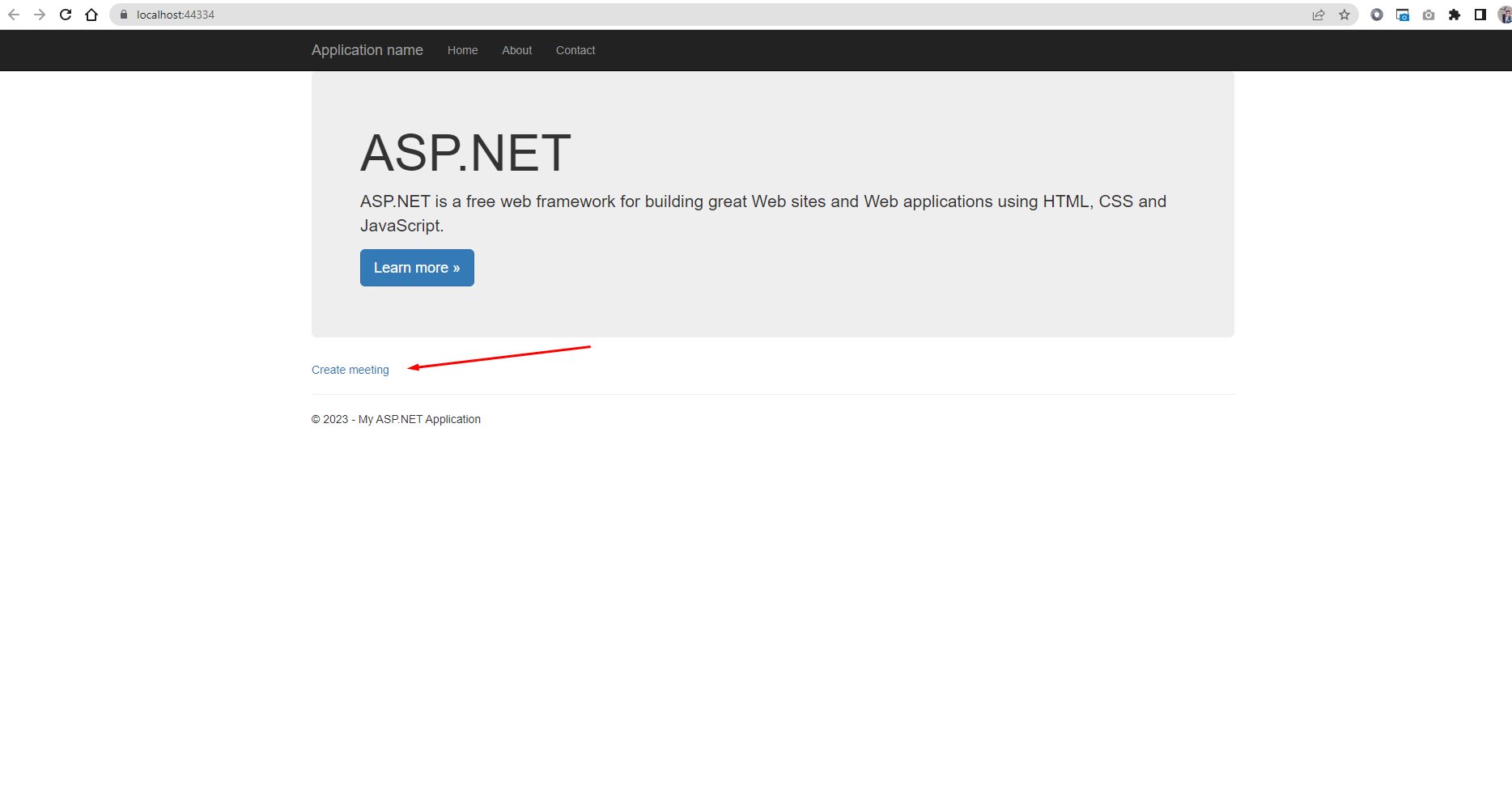
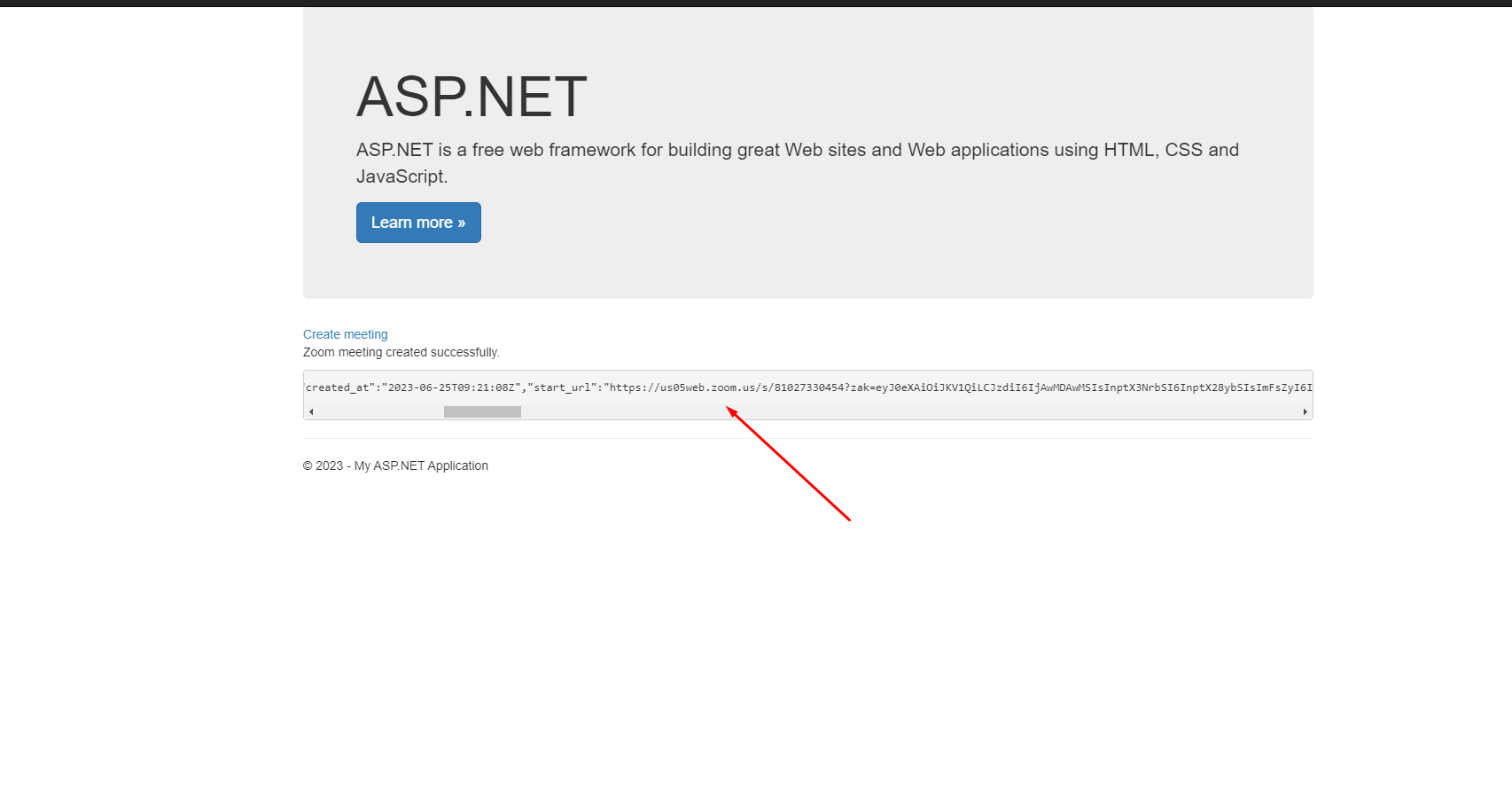
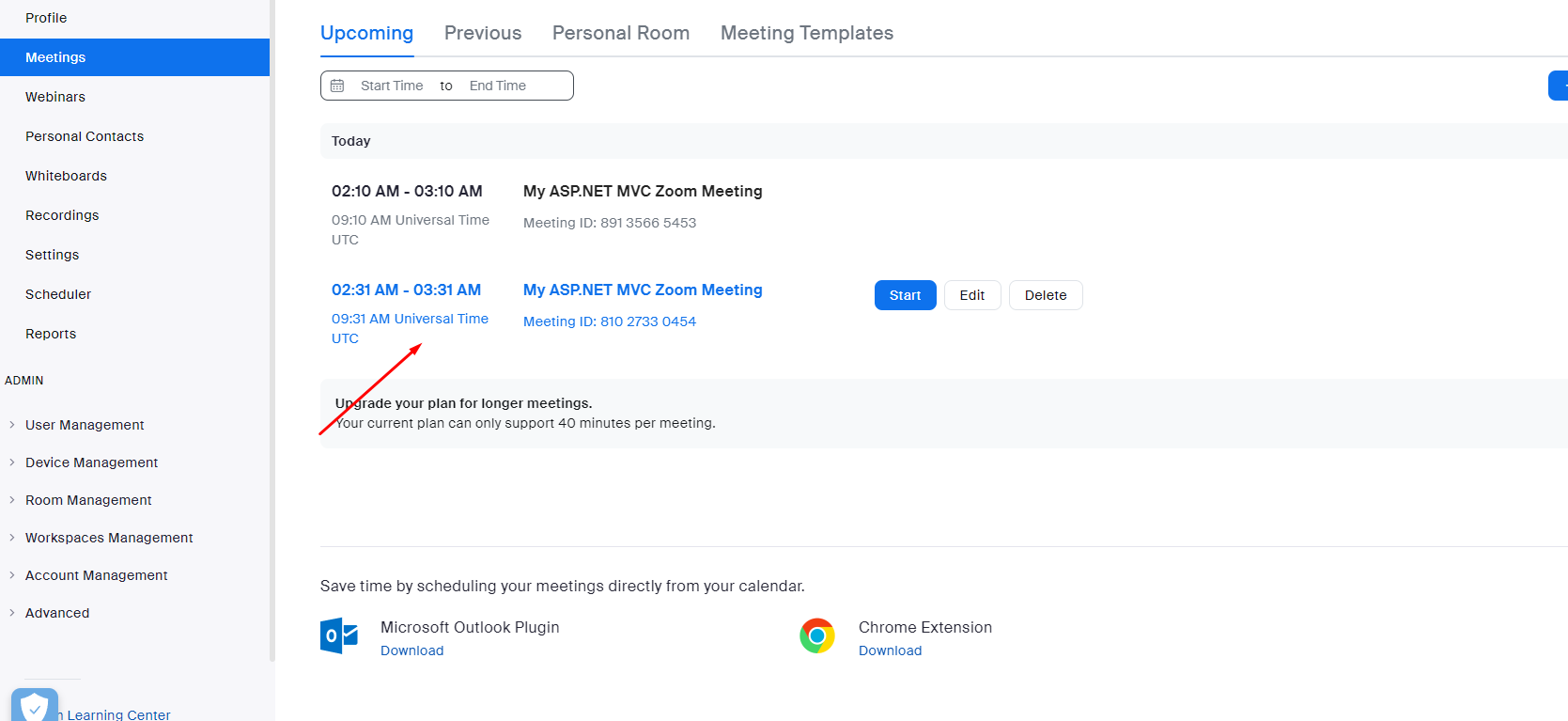
Creating Zoom Meetings in ASPNET MVC using Zoom ApiCreating Zoom Meetings in ASPNET MVC using Zoom Api 2Creating Zoom Meetings in ASPNET MVC using Zoom Api 3

So this is how you can integrate zoom api in asp.net and we can using this for creating zoom meetings in asp.net mvc using zoom api.

S
Shubham Batra
Programming author at Code2Night — sharing tutorials on ASP.NET, C#, and more.
View all posts →

Related Articles

Mastering ARIA Roles for Enhanced Accessibility in ASP.NET Applications
Apr 09, 2026
Best Practices for Secure Gemini API Integration in ASP.NET
Apr 03, 2026
How to Import CSV in ASP.NET MVC
Feb 02, 2024
How to refund payment using Paypal in Asp.Net MVC
Jan 30, 2024
Previous in ASP.NET MVC
Using Ajax Beginform in Asp.Net MVC
Next in ASP.NET MVC
Status Code 413 Request Entity Too Large
Buy me a pizza

Comments

🔥 Trending This Month

  • 1
    HTTP Error 500.32 Failed to load ASP NET Core runtime 6,938 views
  • 2
    Error-An error occurred while processing your request in .… 11,272 views
  • 3
    Comprehensive Guide to Error Handling in Express.js 235 views
  • 4
    ConfigurationBuilder does not contain a definition for Set… 19,459 views
  • 5
    Mastering JavaScript Error Handling with Try, Catch, and F… 161 views
  • 6
    Mastering Unconditional Statements in C: A Complete Guide … 21,497 views
  • 7
    Unable to connect to any of the specified MySQL hosts 6,232 views

On this page

🎯

Interview Prep

Ace your ASP.NET MVC interview with curated Q&As for all levels.

View ASP.NET MVC Interview Q&As

More in ASP.NET MVC

  • Implement Stripe Payment Gateway In ASP.NET 58743 views
  • Jquery Full Calender Integrated With ASP.NET 39657 views
  • Microsoft Outlook Add Appointment and Get Appointment using … 27583 views
  • How to implement JWT Token Authentication and Validate JWT T… 25286 views
  • Payumoney Integration With Asp.Net MVC 23231 views
View all ASP.NET MVC posts →

Tags

AspNet C# programming AspNet MVC c programming AspNet Core C software development tutorial MVC memory management Paypal coding coding best practices data structures programming tutorial tutorials object oriented programming Slick Slider StripeNet
Free Download for Youtube Subscribers!

First click on Subscribe Now and then subscribe the channel and come back here.
Then Click on "Verify and Download" button for download link

Subscribe Now | 1770
Download
Support Us....!

Please Subscribe to support us

Thank you for Downloading....!

Please Subscribe to support us

Continue with Downloading
Be a Member
Join Us On Whatsapp
Code2Night

A community platform for sharing programming knowledge, tutorials, and blogs. Learn, write, and grow with developers worldwide.

Panipat, Haryana, India
info@code2night.com
Quick Links
  • Home
  • Blog Archive
  • Tutorials
  • About Us
  • Contact
  • Privacy Policy
  • Terms & Conditions
  • Guest Posts
  • SEO Analyzer
Dev Tools
  • JSON Beautifier
  • HTML Beautifier
  • CSS Beautifier
  • JS Beautifier
  • SQL Formatter
  • Diff Checker
  • Regex Tester
  • Markdown to HTML
  • Word Counter
More Tools
  • Password Generator
  • QR Code Generator
  • Hash Generator
  • Base64 Encoder
  • JWT Decoder
  • UUID Generator
  • Image Converter
  • PNG to ICO
  • SEO Analyzer
By Language
  • Angular
  • Angular js
  • ASP.NET
  • Asp.net Core
  • ASP.NET Core, C#
  • ASP.NET MVC
  • ASP.NET Web Forms
  • C
  • C#
  • C#, ASP.NET Core, Dapper
  • C#, ASP.NET Core, Dapper, Entity Framework
  • DotNet
  • General Web Development
  • HTML, CSS
  • HTML/CSS
  • Java
  • JavaScript
  • JavaScript, HTML, CSS
  • JavaScript, Node.js
  • Node.js
  • Python
  • Python 3.11, Pandas, SQL
  • Python 3.11, SQL
  • Python 3.11, SQLAlchemy
  • Python 3.11, SQLAlchemy, SQL
  • Python 3.11, SQLite
  • React
  • Security
  • SQL Server
  • TypeScript
© 2026 Code2Night. All Rights Reserved.
Made with for developers  |  Privacy  ·  Terms
Translate Page
We use cookies to improve your experience and analyze site traffic. By clicking Accept, you consent to our use of cookies. Privacy Policy
Accessibility
Text size
High contrast
Grayscale
Dyslexia font
Highlight links
Pause animations
Large cursor