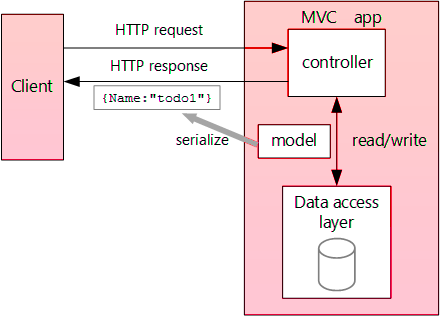
Calling Web api from Server Side using Asp.Net Core
What is HttpClient?
The HttpClient class in ASP.NET Core is a powerful tool designed for sending HTTP requests and receiving HTTP responses. It is part of the System.Net.Http namespace and provides a simple way to interact with web APIs. Developers often use HttpClient to perform operations such as GET, POST, PUT, and DELETE, making it an essential component for consuming web services.
HttpClient is designed to be reused throughout the life of an application. Creating a new instance for each request can lead to socket exhaustion due to the underlying connection pooling mechanism. Therefore, it is recommended to use a single instance of HttpClient for the entire application or use dependency injection to manage its lifecycle efficiently.
public class MyService {
    private readonly HttpClient _httpClient;

    public MyService(HttpClient httpClient) {
        _httpClient = httpClient;
    }

    public async Task GetDataAsync(string url) {
        HttpResponseMessage response = await _httpClient.GetAsync(url);
        response.EnsureSuccessStatusCode();
        return await response.Content.ReadAsStringAsync();
    }
}
Setting Up Your Project
Before you start calling web APIs, make sure to set up your ASP.NET Core project correctly. First, ensure that you have the necessary packages installed. You can install the Newtonsoft.Json package via NuGet, which is commonly used for JSON serialization and deserialization.
To install the package, you can use the following command in the Package Manager Console:
Install-Package Newtonsoft.JsonOnce you have the package installed, you can start configuring your HttpClient instance. If you are using dependency injection, you can register HttpClient in your Startup.cs file:
public void ConfigureServices(IServiceCollection services) {
    services.AddHttpClient();
}
Making API Calls
To make API calls, you can create a service class that utilizes the HttpClient instance. Below is a simple example of how to perform a GET request to fetch data from a web API:
public async Task GetDepartment() {
    try {
        using (var client = new HttpClient()) {
            client.BaseAddress = new Uri("https://localhost:44347");
            HttpResponseMessage response = await client.GetAsync("api/Department/GetDepartment?id=1");
            if (response.IsSuccessStatusCode) {
                var result = await response.Content.ReadAsStringAsync();
                var department = JsonConvert.DeserializeObject(result);
                return View(department);
            }
            return View("Error");
        }
    } catch (Exception ex) {
        // Log the exception
        return View("Error");
    }
}
Handling Responses
When you receive a response from an API, it's crucial to handle it properly. The response can indicate success or failure. You should check the StatusCode property of the HttpResponseMessage to determine the outcome of your request.
In the example above, if the response is successful, we deserialize the JSON content into a C# object. If it fails, we can return an error view or handle the error based on your application's requirements. Additionally, consider implementing logging to capture any exceptions that occur during the API call.
if (response.IsSuccessStatusCode) {
    var result = await response.Content.ReadAsStringAsync();
    // Deserialize response content
} else {
    // Handle error
    var error = await response.Content.ReadAsStringAsync();
    // Log error
}
Edge Cases & Gotchas
When working with HttpClient, there are several edge cases and gotchas to be aware of:
- Timeouts: Be mindful of request timeouts. You can set the Timeout property of HttpClient to avoid waiting indefinitely for a response.
- Exception Handling: Network issues can result in exceptions. Always implement try-catch blocks around your API calls to handle potential errors gracefully.
- Cancellation Tokens: Use cancellation tokens to allow the user to cancel long-running requests if necessary.
Performance & Best Practices
To optimize the performance of your API calls and ensure best practices, consider the following:
- Reuse HttpClient: As mentioned earlier, reuse the HttpClient instance to take advantage of connection pooling.
- Asynchronous Calls: Use asynchronous programming to prevent blocking the main thread, keeping your application responsive.
- Handle Rate Limiting: Some APIs impose rate limits. Implement logic to handle rate limiting by retrying requests after a delay.
Conclusion
In this blog post, we have covered how to call web APIs from server-side applications using ASP.NET Core and the HttpClient class. Here are the key takeaways:
- HttpClient is essential for making HTTP requests in ASP.NET Core.
- Proper setup and configuration of HttpClient are crucial for optimal performance.
- Always handle API responses and exceptions gracefully.
- Implement best practices to improve application performance and reliability.