Unable to connect to any of the specified MySQL hosts
Understanding the Error "Unable to connect to any of the specified MySQL hosts"
The error message 'Unable to connect to any of the specified MySQL hosts' typically indicates that your application is unable to establish a connection to the MySQL database server. This can occur due to various reasons, including incorrect configuration settings, network issues, or the MySQL service not running. Understanding the underlying causes will help you diagnose and resolve the issue more effectively.
In real-world applications, this error can manifest in different environments, such as local development, staging, or production. For instance, if you are deploying an application on a cloud server, network restrictions or firewall settings may prevent your application from reaching the MySQL host.
Common Causes of Connection Errors
There are several common causes for the 'Unable to connect to any of the specified MySQL hosts' error:
- MySQL Service Not Running: If the MySQL service is not active, your application will be unable to connect. This is often the first thing to check when encountering this error.
- Incorrect Hostname or IP Address: Ensure that the hostname or IP address specified in your connection string is correct. A typographical error can easily lead to connectivity issues.
- Firewall Settings: Firewalls may block the connection to the MySQL server. Ensure that the appropriate ports (default is 3306) are open.
- Network Issues: Temporary network issues can prevent your application from connecting to the MySQL server. Check your network connection and status.
How to Restart MySQL Service
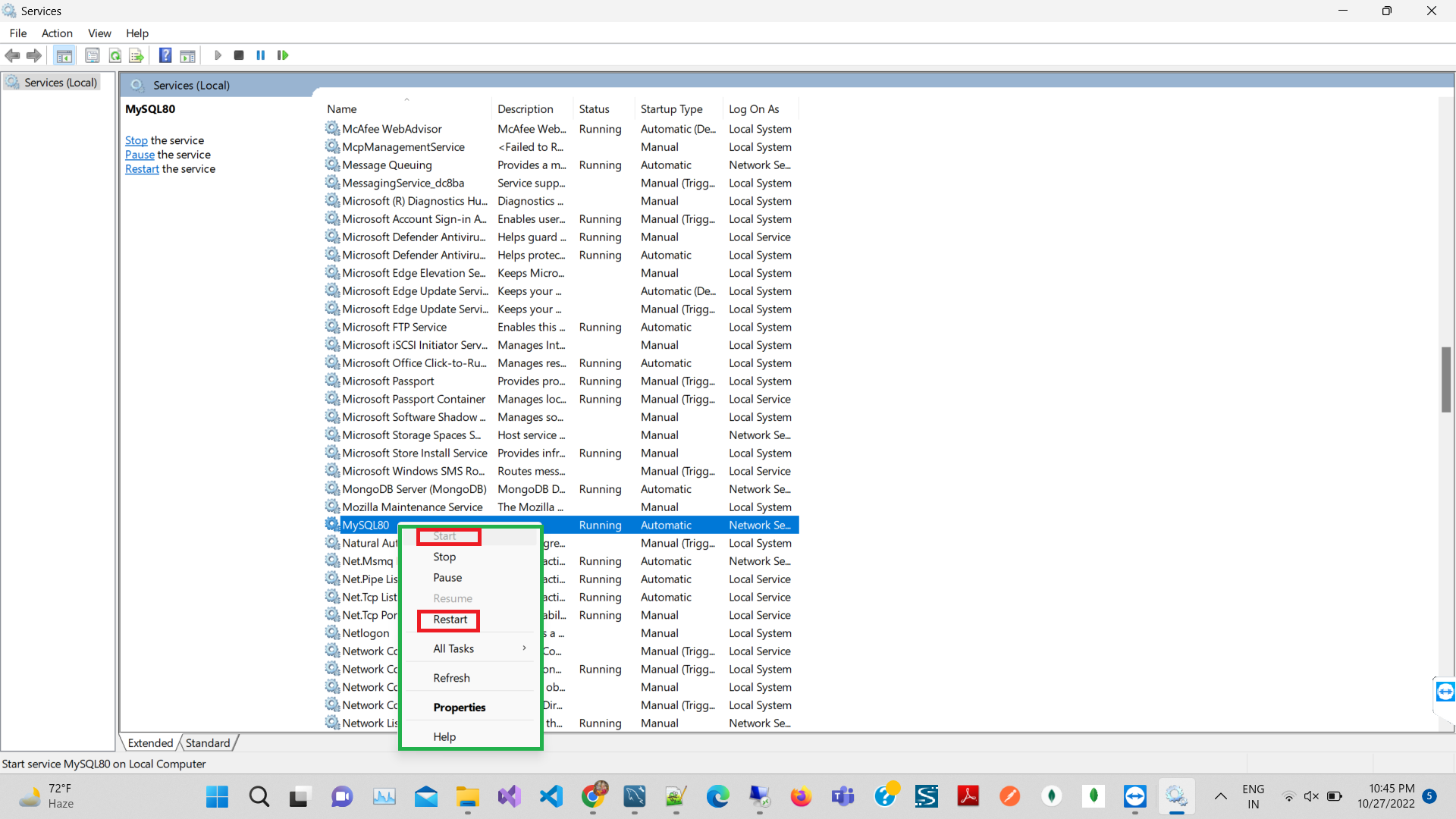
One of the simplest solutions to resolve the connection issue is to restart the MySQL service. Here’s how you can do it:
- Go to your computer's Start menu and type services.msc, then press Enter.
- In the Services window, locate the MySQL80 service (or the version you are using).
- Right-click on the service and select Start or Restart if it is already running.
Once the service has been restarted, attempt to reconnect your application to the MySQL database.

Checking MySQL Configuration
Another critical aspect to consider is the MySQL configuration file, typically named my.cnf or my.ini. Misconfigurations in this file can lead to connectivity issues. Here are some settings to verify:
- Bind Address: Ensure the bind-address parameter is set correctly. For local connections, it should typically be set to
127.0.0.1orlocalhost. - Port: Ensure that the port specified matches the port your MySQL server is listening on (default is 3306).
- User Credentials: Verify that the username and password used for the connection are correct and that the user has permission to access the database.
# Example of my.cnf settings
[mysqld]
bind-address = 127.0.0.1
port = 3306
Testing MySQL Connection
Before diving into the application code, it's a good idea to test the MySQL connection independently. You can do this using the MySQL command-line client or a GUI tool like MySQL Workbench. Here’s how to test using the command line:
mysql -h localhost -u your_username -pReplace your_username with your actual MySQL username. If the connection is successful, you will be prompted for a password. If you encounter an error, it may provide additional information about the connection issue.
Edge Cases & Gotchas
While troubleshooting the connection error, keep in mind some edge cases and gotchas that can complicate the process:
- Multiple MySQL Instances: If you have multiple MySQL instances running on the same machine, ensure that you are connecting to the correct instance.
- Configuration Changes: After making changes to the MySQL configuration file, always restart the MySQL service for the changes to take effect.
- Connection Pooling: If your application uses connection pooling, ensure that the pool size and timeout settings are configured correctly to avoid exhausting available connections.
Performance & Best Practices
To prevent connection issues and improve the overall performance of your MySQL database interactions, consider the following best practices:
- Use Connection Pooling: Implement connection pooling to reduce the overhead of establishing new connections, which can improve performance significantly.
- Monitor MySQL Health: Regularly monitor the health of your MySQL server using tools like MySQL Workbench or third-party monitoring solutions.
- Optimize Queries: Ensure that your SQL queries are optimized to reduce latency and improve response times.
- Secure Connections: Use SSL/TLS encryption for connections to enhance security, especially when connecting over public networks.
Conclusion
In summary, the 'Unable to connect to any of the specified MySQL hosts' error can stem from various issues, including service status, configuration settings, and network conditions. By following the troubleshooting steps outlined in this guide, you can effectively diagnose and resolve this error. Remember to implement best practices to prevent future occurrences.
- Always check if the MySQL service is running.
- Verify your connection settings and credentials.
- Test connections independently before troubleshooting application code.
- Implement connection pooling and monitor your database health.