Realtime Speech to Text converter using javascript
Understanding the Web Speech API
The Web Speech API is a powerful browser-based API that allows developers to integrate speech recognition and synthesis capabilities directly into web applications. It provides a simple interface for capturing spoken language and converting it into text, enabling real-time transcription that can enhance user experiences.
One of the primary benefits of the Web Speech API is its ability to work seamlessly in modern web browsers, particularly Google Chrome. This allows developers to create applications that can respond to voice commands, transcribe spoken words, and even provide feedback through synthesized speech. Its versatility makes it suitable for applications ranging from virtual assistants to accessibility tools for individuals with disabilities.
Prerequisites
Before diving into the implementation of our speech-to-text converter, ensure that you have the following:
- A modern web browser that supports the Web Speech API, with Google Chrome being the most widely used.
- Basic knowledge of HTML and JavaScript to understand and modify the code provided.
- A microphone connected to your device to capture audio input.
Setting Up the HTML Structure
To create our speech-to-text converter, we will first set up a basic HTML structure. This structure will include buttons for starting and stopping speech recognition, as well as a container to display the transcribed text. Here’s how to set it up:
<!DOCTYPE html>
<html lang="en">
<head>
    <meta charset="UTF-8">
    <title>Real-time Speech-to-Text</title>
</head>
<body>
    <h1>Real-time Speech-to-Text</h1>
    <button id="startSpeech">Start Speaking</button>
    <button id="stopSpeech" disabled>Stop Speaking</button>
    <div id="output"></div>
    <div id="stopDiv"></div>
</body>
</html>
Implementing Speech Recognition with JavaScript
Now, let's implement the speech recognition logic using JavaScript. This script will interact with the Web Speech API to capture the user's voice input and display the transcribed text in real-time. Below is the JavaScript code that achieves this:
document.addEventListener('DOMContentLoaded', (event) => {
    const startSpeechButton = document.getElementById('startSpeech');
    const stopSpeechButton = document.getElementById('stopSpeech');
    const outputDiv = document.getElementById('output');
    const stopDiv = document.getElementById('stopDiv');

    let recognition = new webkitSpeechRecognition(); // For WebKit browsers like Chrome
    recognition.continuous = true;
    recognition.lang = 'en-US';

    recognition.onstart = () => {
        outputDiv.innerHTML = 'Listening...';
        startSpeechButton.disabled = true;
        stopSpeechButton.disabled = false;
    };

    recognition.onresult = (event) => {
        const transcript = event.results[event.results.length - 1][0].transcript;
        if (outputDiv.innerHTML == "Listening...") {
            outputDiv.innerHTML = "";
        }
        outputDiv.innerHTML = outputDiv.innerHTML + ' ' + transcript;
    };

    recognition.onerror = (event) => {
        outputDiv.innerHTML = 'Error occurred: ' + event.error;
        stopSpeech();
    };

    recognition.onend = () => {
        stopDiv.innerHTML = 'Speech recognition stopped.';
        startSpeechButton.disabled = false;
        stopSpeechButton.disabled = true;
    };

    startSpeechButton.addEventListener('click', startSpeech);
    stopSpeechButton.addEventListener('click', stopSpeech);

    function startSpeech() {
        recognition.start();
    }

    function stopSpeech() {
        recognition.stop();
    }
});
Testing the Application
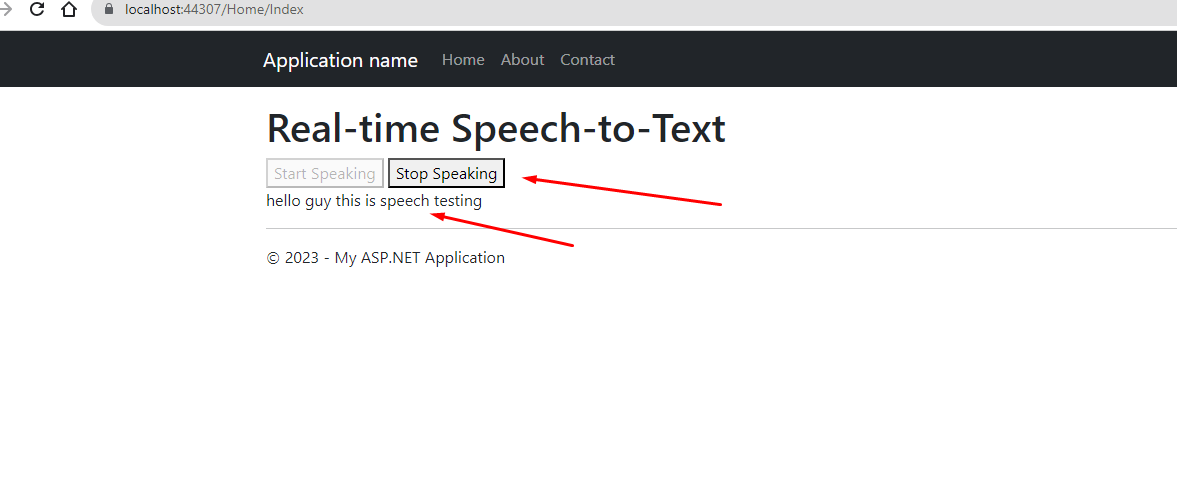
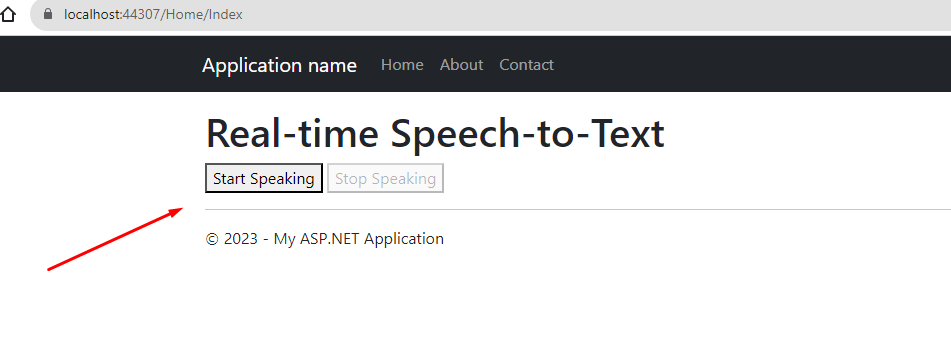
To test your speech-to-text application, open the HTML file in a supported browser like Google Chrome. Click the "Start Speaking" button and begin speaking clearly into your microphone. The recognized speech should appear in real-time on the web page.
Ensure you have allowed the browser to access your microphone, as this is essential for the speech recognition to function correctly. If you encounter issues, checking your browser settings and microphone permissions can help resolve them.
Edge Cases & Gotchas
When working with the Web Speech API, there are several edge cases and potential issues to be aware of:
- Language Support: Ensure that the language specified in the `recognition.lang` property is supported by the API. If it is not, you may receive unexpected results or errors.
- Noise Interference: Background noise can significantly affect the accuracy of speech recognition. It is advisable to use the application in a quiet environment for the best results.
- Browser Compatibility: While Chrome has robust support for the Web Speech API, other browsers may not support it fully or at all. Testing across different platforms is crucial.
- Microphone Permissions: Users must grant microphone access to the web application. If they deny this request, speech recognition will not function.
Performance & Best Practices
To ensure optimal performance of your speech-to-text application, consider the following best practices:
- Debouncing Input: To prevent excessive calls to the speech recognition service, implement debouncing techniques where applicable, especially in applications with frequent updates.
- Feedback Mechanism: Provide users with clear feedback about the application state, such as when it is listening or processing input. This can enhance user experience.
- Accessibility Considerations: Ensure the application is accessible to users with disabilities. This includes providing keyboard navigation and screen reader support.
- Testing in Diverse Environments: Test your application in various environments and conditions to ensure it performs well under different scenarios and microphone setups.
Conclusion
Integrating real-time speech-to-text functionality into web applications can significantly enhance user interaction and accessibility. The Web Speech API provides a convenient way to implement this feature, and with the provided HTML and JavaScript code, you can get started building your own real-time speech-to-text web application.
Key takeaways:
- Understanding the capabilities of the Web Speech API is essential for effective implementation.
- Testing across different browsers and environments ensures a seamless user experience.
- Being aware of edge cases and potential issues can help in creating a robust application.
- Implementing best practices can enhance performance and user satisfaction.