
Get User Location using JS
What is Geolocation?
Geolocation refers to the process of identifying the geographical location of a device, typically using its IP address or GPS data. This information can be invaluable for various applications, including personalized content delivery, location-based services, and analytics. For instance, e-commerce websites can tailor product recommendations based on a user's location, while travel applications can provide relevant information about nearby attractions.
In this blog, we will focus on obtaining user location details using JavaScript, specifically through IP-based geolocation. This method is often simpler than GPS-based location tracking, which requires user permissions and is dependent on device capabilities.
Prerequisites
Before diving into the code, ensure you have a basic understanding of JavaScript and how to work with APIs. Familiarity with the fetch API will be particularly beneficial, as we will be making network requests to obtain geolocation data.
Using IP Geolocation API
One popular option for obtaining geolocation information based on the user's IP address is the IP Geolocation API. This API allows developers to retrieve various details about the user, such as their city, country, and even timezone. Below is an example of how to implement this API:
function getLocationFromIP() { fetch('https://ipapi.co/json/') .then(response => response.json()) .then(data => { const city = data.city; const country = data.country; const ip = data.ip; console.log(data); console.log("City: " + city); console.log("Country: " + country); console.log("IP Address: " + ip); }) .catch(error => { console.log("Error occurred while retrieving the user's city: " + error); }); } // Call the function to get the user's city getLocationFromIP();In this code snippet, we use the fetch method to make an HTTP request to the ipapi.co API. The response is then parsed as JSON, allowing us to extract various pieces of information, including the city and country of the user.
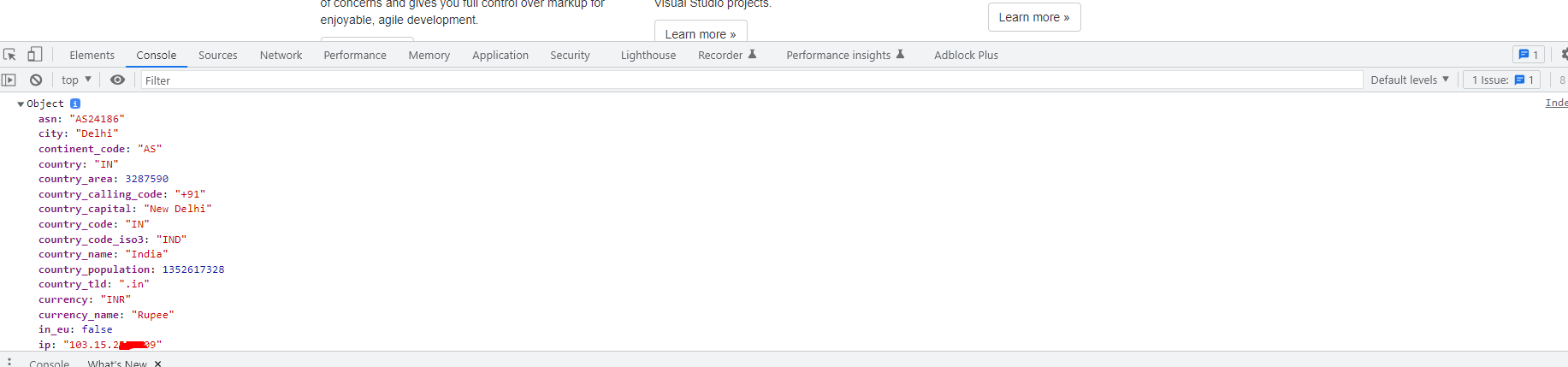
Understanding API Response
The API response contains a wealth of information. Depending on the API used, you may receive data such as:
- IP Address: The public IP address of the user.
- City: The city from which the user is accessing the internet.
- Region: The region or state associated with the user's IP.
- Country: The country of the user.
- Timezone: The timezone based on the user's location.
This data can be utilized in various ways, such as displaying the user's location on a map or tailoring content to their region.
Handling Errors and Edge Cases
When working with geolocation APIs, it is crucial to handle potential errors gracefully. Common issues include:
- Network Errors: If the user's device is offline or the API is unreachable, your application should respond appropriately.
- API Limitations: Most free-tier APIs come with usage restrictions. Make sure to check the terms of service and avoid exceeding your quota.
- VPNs and Proxies: Users utilizing VPNs or proxies may receive inaccurate location data. Always inform users about potential inaccuracies in geolocation data.
Here is an updated example that incorporates error handling:
function getLocationFromIP() { fetch('https://ipapi.co/json/') .then(response => { if (!response.ok) { throw new Error('Network response was not ok ' + response.statusText); } return response.json(); }) .then(data => { const city = data.city; const country = data.country; console.log(data); console.log("City: " + city); console.log("Country: " + country); }) .catch(error => { console.log("Error occurred while retrieving the user's location: " + error); }); } getLocationFromIP();Performance & Best Practices
When implementing geolocation features, consider the following best practices:
- Asynchronous Operations: Always perform network requests asynchronously to avoid blocking the main thread, ensuring a smooth user experience.
- Cache Results: If your application frequently requests location data, consider caching the results to minimize API calls and improve performance.
- Respect User Privacy: Always inform users how their location data will be used and ensure compliance with relevant regulations, such as GDPR.
- Fallback Options: Provide fallback content for users whose location cannot be determined. For instance, if the location API fails, consider displaying a generic welcome message.
Conclusion
In this post, we explored how to obtain user location details using JavaScript and the IP Geolocation API. By leveraging this information, developers can create more personalized and engaging user experiences. Remember to handle errors gracefully, respect user privacy, and follow best practices for optimal performance.
Key Takeaways:
- Geolocation can enhance user experience by providing relevant content.
- IP Geolocation APIs are easy to implement using JavaScript.
- Always include error handling and inform users about potential inaccuracies.
- Follow best practices for performance and user privacy.
