Login Register
Code2night
  • Home
  • Blog Archive
  • Learn
    • Tutorials
    • Videos
  • Interview Q&A
  • Languages
    • Angular Angular js ASP.NET Asp.net Core ASP.NET Core, C# C C# C#, ASP.NET Core, Dapper
      C#, ASP.NET Core, Dapper, Entity Framework DotNet HTML/CSS Java JavaScript Node.js Python Python 3.11, Pandas, SQL
      Python 3.11, SQL Python 3.11, SQLAlchemy Python 3.11, SQLAlchemy, SQL Python 3.11, SQLite React Security SQL Server TypeScript
  • Post Blog
  • Tools
    • Beautifiers
      JSON Beautifier HTML Beautifier XML Beautifier CSS Beautifier JS Beautifier SQL Formatter
      Dev Utilities
      JWT Decoder Regex Tester Diff Checker Cron Explainer String Escape Hash Generator Password Generator
      Converters
      Base64 Encode/Decode URL Encoder/Decoder JSON to CSV CSV to JSON JSON to TypeScript Markdown to HTML Number Base Converter Timestamp Converter Case Converter
      Generators
      UUID / GUID Generator Lorem Ipsum QR Code Generator Meta Tag Generator
      Image Tools
      Image Converter Image Resizer Image Compressor Image to Base64 PNG to ICO Background Remover Color Picker
      Text & Content
      Word Counter PDF Editor
      SEO & Web
      SEO Analyzer URL Checker World Clock
  1. Home
  2. Blog
  3. PostgreSQL
  4. A non-fatal error occured during cluster initialisation in Postgre SQL

A non-fatal error occured during cluster initialisation in Postgre SQL

Date- Sep 25,2020 Updated Mar 2026 11420
Postgre PgAdmin4

Understanding the Error

The error 'A non-fatal error occurred during cluster initialization' typically appears during the installation process of PostgreSQL. This message indicates that while the installation was able to proceed, there were issues initializing the database cluster, which is crucial for PostgreSQL to function correctly. Understanding the root cause of this error is essential for effective troubleshooting.

Common reasons for this error include file permission issues, existing PostgreSQL installations, or incorrect configuration settings. By addressing these potential pitfalls, you can ensure a smoother installation process. To check if there are existing clusters, you can run the following SQL command:

SELECT * FROM pg_catalog.pg_database;

Prerequisites for Installation

Before proceeding with the installation of PostgreSQL, ensure that your system meets the following prerequisites:

  • Operating System: PostgreSQL is compatible with various operating systems, including Windows, Linux, and macOS. Ensure you're using a supported version.
  • Administrative Access: You need administrative privileges to install PostgreSQL, particularly when creating folders and modifying system paths.
  • Disk Space: Ensure that you have sufficient disk space available for the installation and data storage.

Step-by-Step Installation Process

Here’s a detailed, step-by-step guide to successfully install PostgreSQL and resolve the aforementioned error:

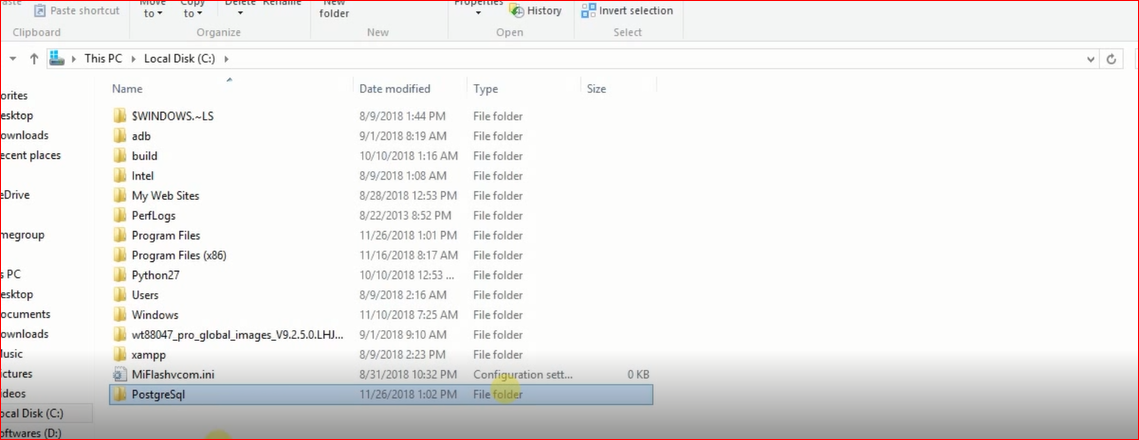
  1. Delete the existing PostgreSQL folder from the Program Files.
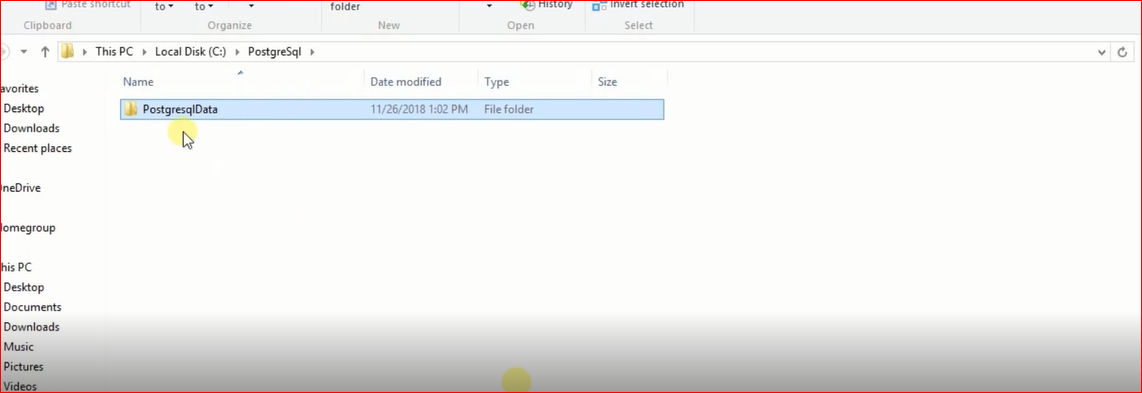
  2. Create a new folder named PostgreSql in the same location as shown in the image below.
  3. A non-fatal error occured during cluster initialisation in Postgre SQL
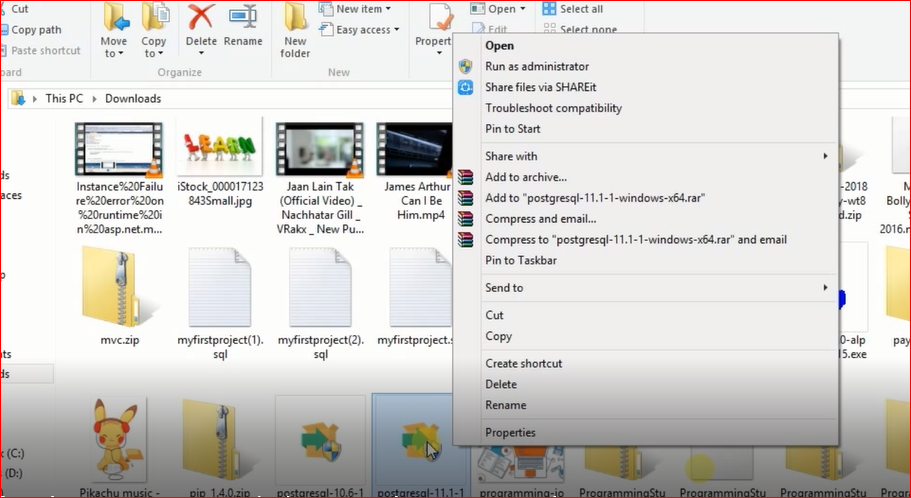
  4. Run the setup again by right-clicking and selecting Run As Administrator.
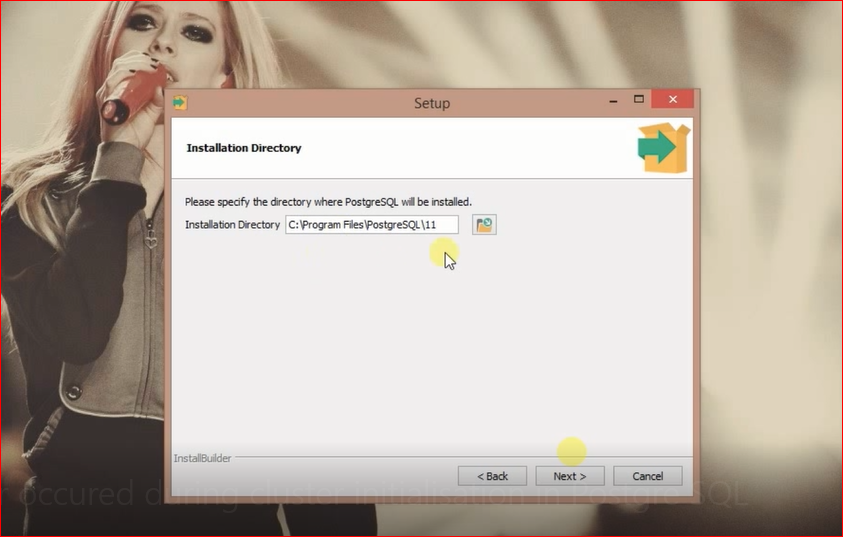
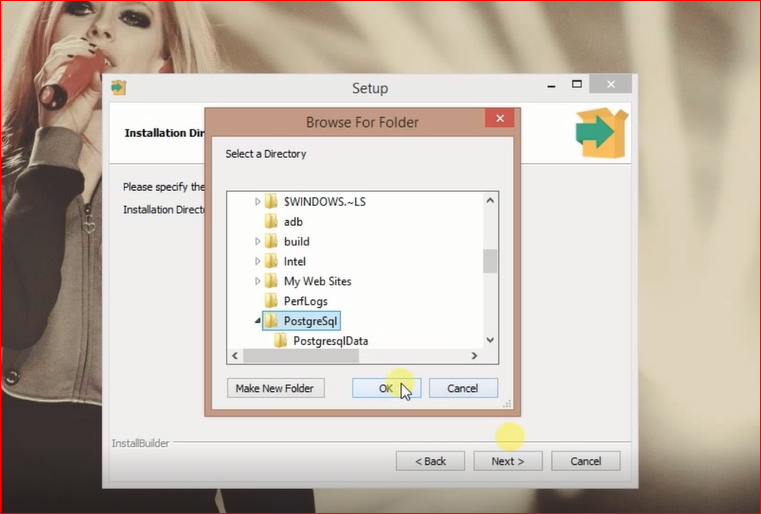
  5. Change the installation location to C:\PostgreSql by clicking the folder icon on the right side.
  6. A non-fatal error occured during cluster initialisation in Postgre SQL 2
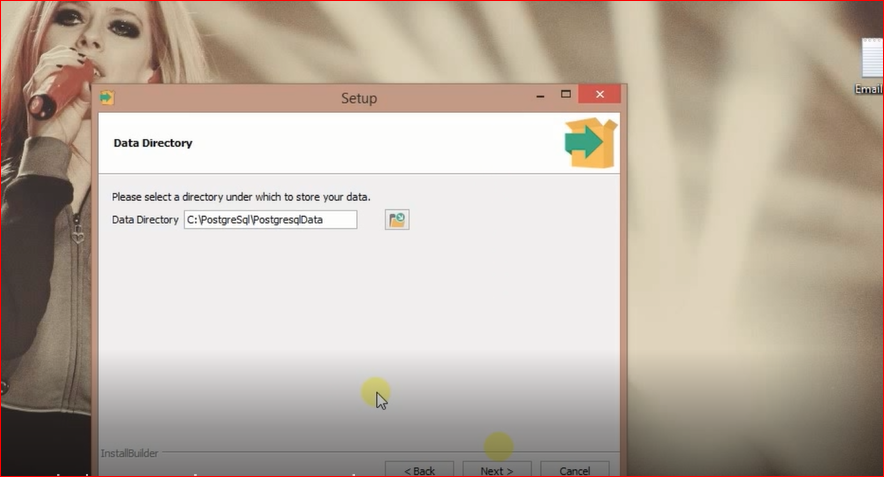
  7. On the next step, change the data folder location to C:\PostgreSql\PostgreSqlData.
  8. A non-fatal error occured during cluster initialisation in Postgre SQL 3
  9. Set the folder location as shown in the setup wizard.
  10. A non-fatal error occured during cluster initialisation in Postgre SQL 4
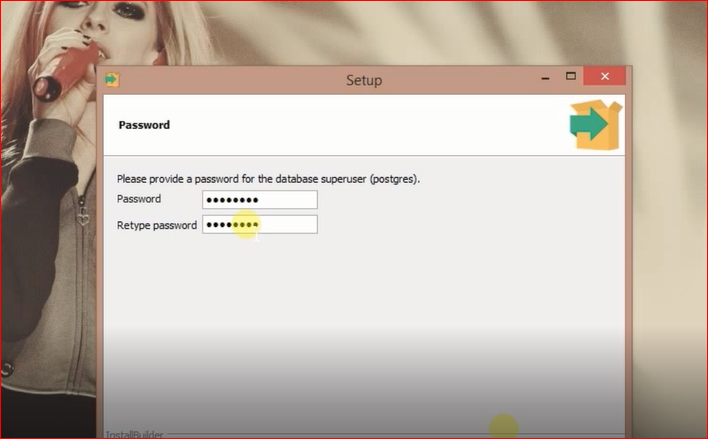
  11. Enter your username and password; you will need these for database connections.
  12. A non-fatal error occured during cluster initialisation in Postgre SQL 5
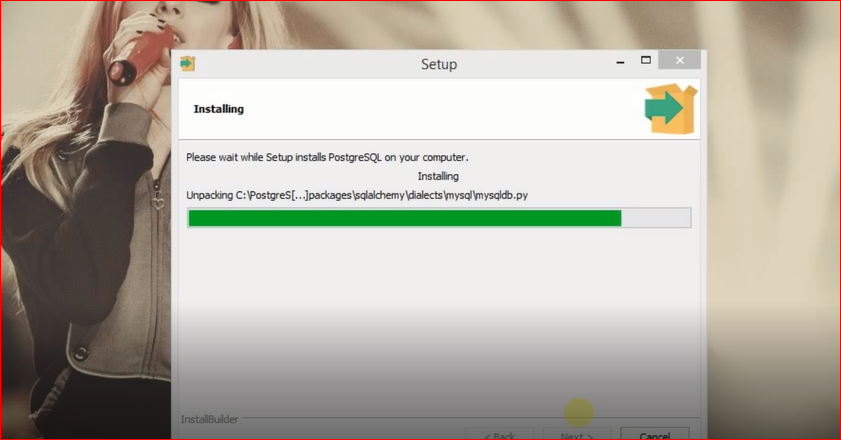
  13. Click Next to start the installation process.
  14. A non-fatal error occured during cluster initialisation in Postgre SQL 6
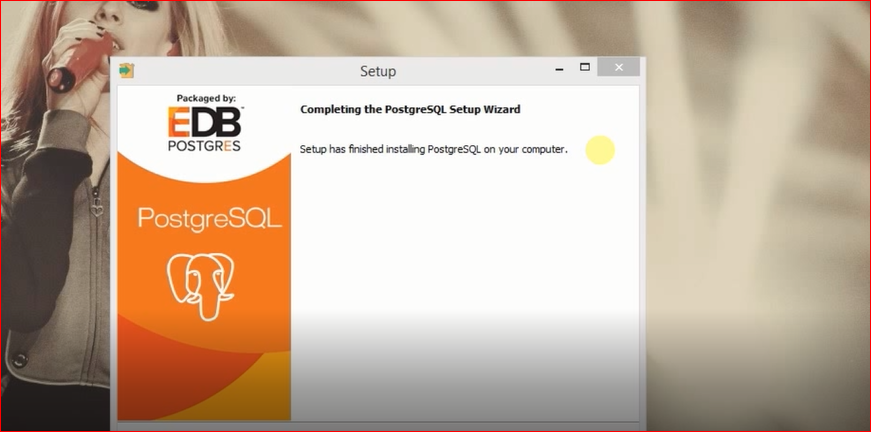
  15. Once the installation is complete, click Finish.
  16. A non-fatal error occured during cluster initialisation in Postgre SQL 7
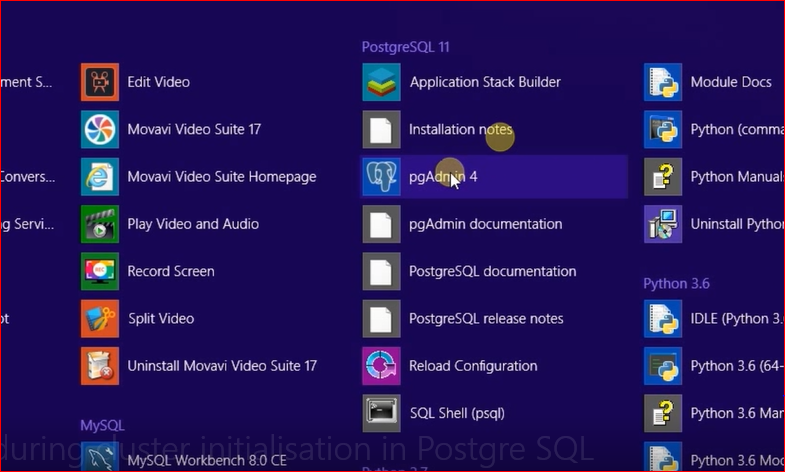
  17. Look for pgAdmin4 and click on it to start PostgreSQL.
  18. A non-fatal error occured during cluster initialisation in Postgre SQL 8
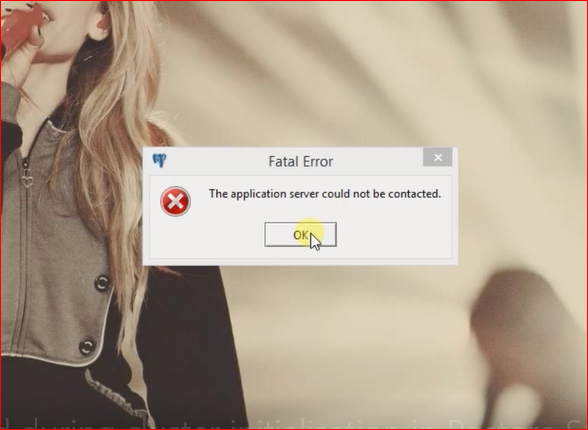
  19. You may see the error again, but don't worry. Just click OK and reopen pgAdmin4.
  20. A non-fatal error occured during cluster initialisation in Postgre SQL 9
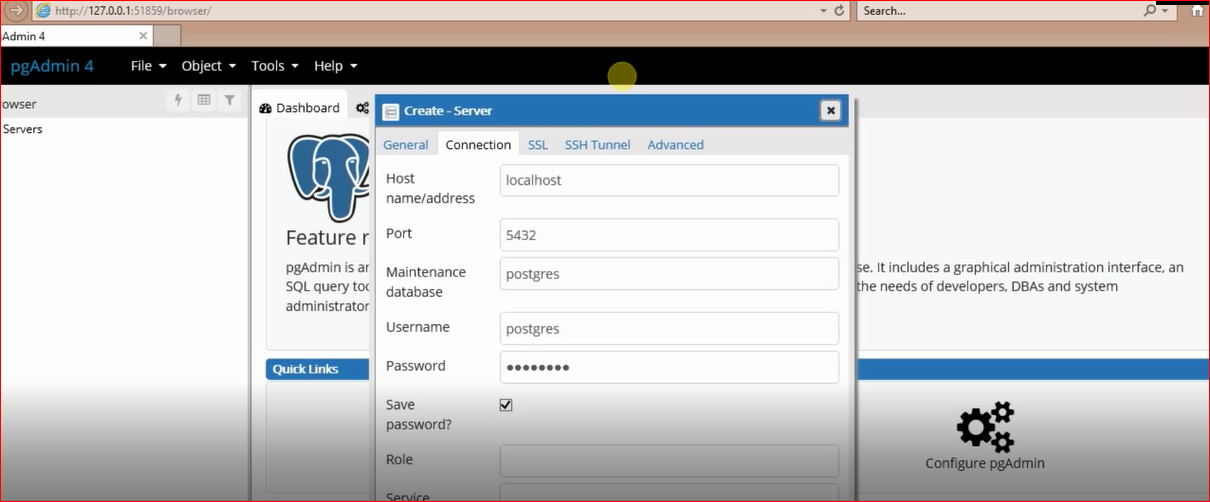
  21. After reopening, PostgreSQL should start without any issues.
  22. A non-fatal error occured during cluster initialisation in Postgre SQL 10
  23. Congratulations! You have resolved the error.
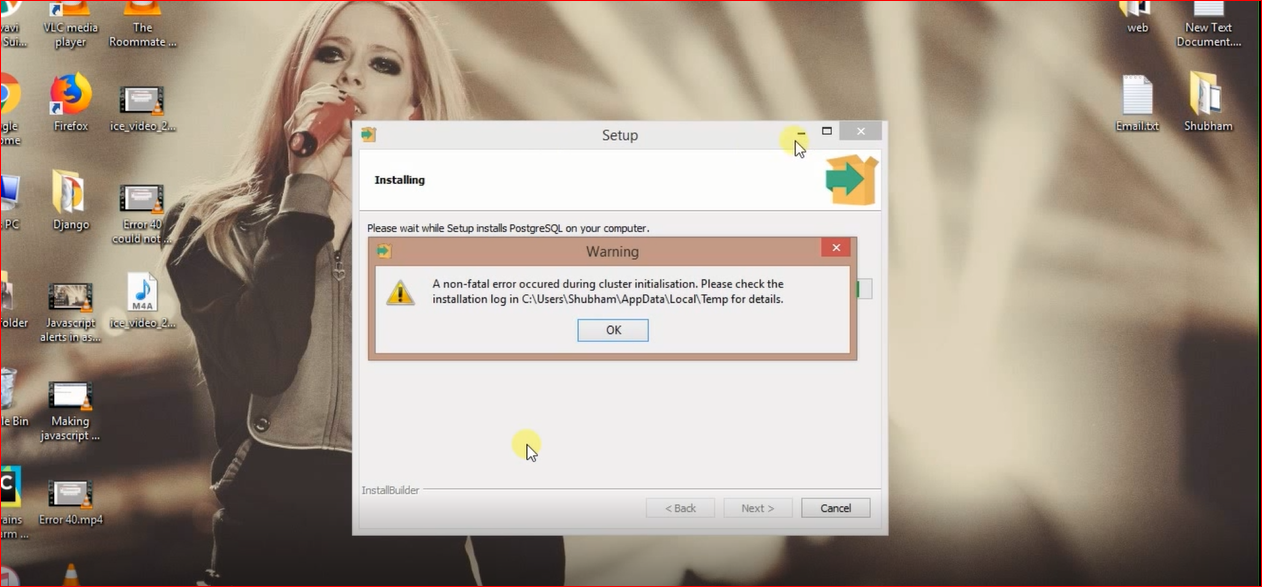
  24. A non-fatal error occured during cluster initialisation in Postgre SQL 11

Edge Cases & Gotchas

While following the above steps should resolve the error in most cases, there are some edge cases to consider:

  • Existing PostgreSQL Installations: If you have a previous installation of PostgreSQL, ensure that it is completely uninstalled. This includes checking for leftover files in the installation directory and the data directory.
  • File Permissions: Make sure that you have the necessary permissions to create folders and write to the installation and data directories. If you encounter permission issues, consider running the installer as an administrator.
  • Antivirus/Firewall Interference: Sometimes, antivirus software may interfere with the installation process. Temporarily disabling it during installation might help.

Performance & Best Practices

Once you have successfully installed PostgreSQL, consider the following best practices to optimize performance:

  • Regular Backups: Implement a regular backup strategy to avoid data loss. Use tools like pg_dump for backups.
  • pg_dump -U username -W -F t dbname > dbname.tar
  • Connection Pooling: Use connection pooling to manage database connections efficiently, especially in high-traffic applications. Tools like PgBouncer can help.
  • Tuning Configuration: Adjust PostgreSQL configuration settings such as shared_buffers, work_mem, and maintenance_work_mem based on your server's resources and workload.
  • Monitoring: Use monitoring tools like pgAdmin or Prometheus to keep track of database performance and identify bottlenecks.

Conclusion

In summary, the error 'A non-fatal error occurred during cluster initialization' can be resolved with a few straightforward steps. By ensuring you meet the prerequisites, following the installation steps carefully, and considering best practices post-installation, you can manage your PostgreSQL installation effectively.

Key Takeaways:

  • Ensure your system meets all prerequisites before installation.
  • Follow the provided installation steps carefully to avoid common pitfalls.
  • Check for existing installations and clean up any remnants.
  • Implement best practices for database management and performance optimization.
A non-fatal error occured during cluster initialisation in Postgre SQL 12 A non-fatal error occured during cluster initialisation in Postgre SQL 13 A non-fatal error occured during cluster initialisation in Postgre SQL 14

S
Shubham Batra
Programming author at Code2Night β€” sharing tutorials on ASP.NET, C#, and more.
View all posts β†’
Buy me a pizza

Comments

On this page

🎯

Interview Prep

Ace your PostgreSQL interview with curated Q&As for all levels.

View PostgreSQL Interview Q&As

Tags

AspNet C# programming AspNet MVC c programming AspNet Core C software development tutorial MVC memory management Paypal coding coding best practices data structures programming tutorial tutorials object oriented programming Slick Slider StripeNet
Free Download for Youtube Subscribers!

First click on Subscribe Now and then subscribe the channel and come back here.
Then Click on "Verify and Download" button for download link

Subscribe Now | 1770
Download
Support Us....!

Please Subscribe to support us

Thank you for Downloading....!

Please Subscribe to support us

Continue with Downloading
Be a Member
Join Us On Whatsapp
Code2Night

A community platform for sharing programming knowledge, tutorials, and blogs. Learn, write, and grow with developers worldwide.

Panipat, Haryana, India
info@code2night.com
Quick Links
  • Home
  • Blog Archive
  • Tutorials
  • About Us
  • Contact
  • Privacy Policy
  • Terms & Conditions
  • Guest Posts
  • SEO Analyzer
Dev Tools
  • JSON Beautifier
  • HTML Beautifier
  • CSS Beautifier
  • JS Beautifier
  • SQL Formatter
  • Diff Checker
  • Regex Tester
  • Markdown to HTML
  • Word Counter
More Tools
  • Password Generator
  • QR Code Generator
  • Hash Generator
  • Base64 Encoder
  • JWT Decoder
  • UUID Generator
  • Image Converter
  • PNG to ICO
  • SEO Analyzer
By Language
  • Angular
  • Angular js
  • ASP.NET
  • Asp.net Core
  • ASP.NET Core, C#
  • C
  • C#
  • C#, ASP.NET Core, Dapper
  • C#, ASP.NET Core, Dapper, Entity Framework
  • DotNet
  • HTML/CSS
  • Java
  • JavaScript
  • Node.js
  • Python
  • Python 3.11, Pandas, SQL
  • Python 3.11, SQL
  • Python 3.11, SQLAlchemy
  • Python 3.11, SQLAlchemy, SQL
  • Python 3.11, SQLite
  • React
  • Security
  • SQL Server
  • TypeScript
© 2026 Code2Night. All Rights Reserved.
Made with for developers  |  Privacy  Β·  Terms
Translate Page
We use cookies to improve your experience and analyze site traffic. By clicking Accept, you consent to our use of cookies. Privacy Policy
Accessibility
Text size
High contrast
Grayscale
Dyslexia font
Highlight links
Pause animations
Large cursor