
How to rename table column in sql server
Hello guys and welcome to Code2Night! In the world of SQL Server, creating tables is a common task that every database developer encounters. However, there are instances when we realize that we've made a mistake in naming the columns of a table, or we simply need to modify them to better align with our evolving data requirements. In such situations, it becomes essential to know how to rename table columns in SQL Server.
Renaming table columns may seem like a daunting task, especially for those who are new to SQL Server or have limited experience with database management systems. But fear not! In this blog post, we will guide you through the process of renaming table columns step by step, empowering you to make changes to your database structure with ease and confidence. Whether you're an aspiring SQL developer, a seasoned database administrator, or someone who simply wants to expand your skills, this guide will provide you with the necessary knowledge and techniques to rename table columns effectively. By the end, you'll have the expertise to modify column names and adapt your database to meet changing business needs. So, let's dive in and explore how to rename table columns in SQL Server!
Understanding SQL Column Renaming
In SQL Server, renaming a column is a straightforward process that can significantly improve the clarity and usability of your database. Often, developers create tables with column names that do not accurately reflect the data they store. For example, a column named 'CustName' might be better represented as 'CustomerName' to enhance readability.
Renaming columns is not just about aesthetics; it can have real implications for your database's integrity and usability. A well-named column can make queries easier to write and understand, reducing the likelihood of errors and improving collaboration among team members. Moreover, as business requirements evolve, the need to adapt your database schema becomes inevitable.
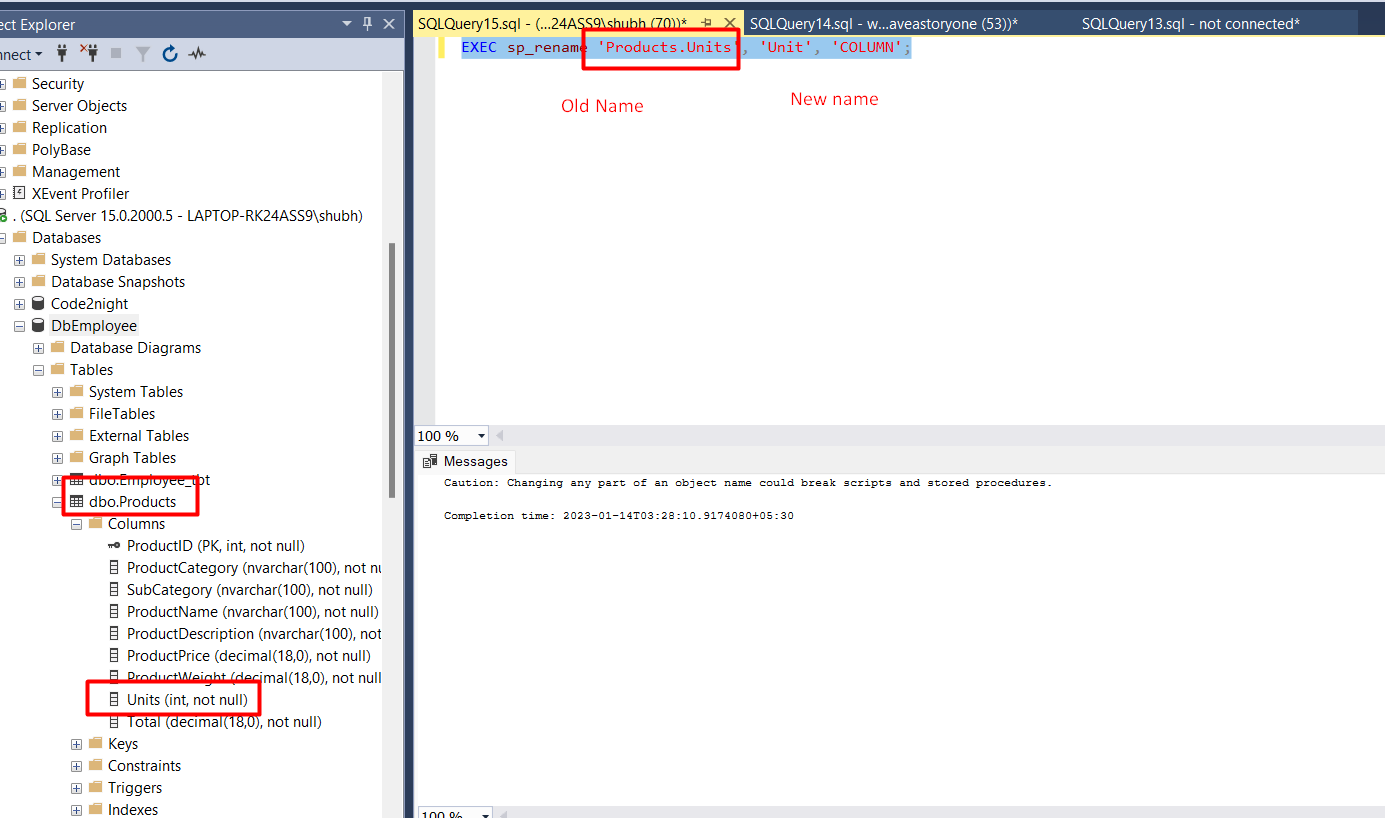
EXEC sp_rename 'TableName.OldColumnName', 'NewColumnName', 'COLUMN';This command is a powerful tool in your SQL toolbox. By replacing TableName and OldColumnName with your actual table and column names, and specifying NewColumnName, you can swiftly rename a column in your SQL Server database.
Prerequisites for Renaming Columns
Before you proceed with renaming columns in SQL Server, there are a few prerequisites you should be aware of:
- Permissions: Ensure you have the necessary permissions to modify the table structure. Typically, you will need to be a member of the db_owner role or have specific ALTER permissions on the table.
- Backup: Always back up your database before making structural changes. This precaution helps avoid data loss in case something goes wrong.
- Dependencies: Check for any dependencies such as views, stored procedures, or functions that may reference the old column name. Renaming a column can break these dependencies if not updated accordingly.
Executing the Rename Command
To rename a table column successfully, you will primarily use the sp_rename stored procedure. This command is versatile and can be used for various renaming tasks, including tables, indexes, and columns.
Here’s the syntax you will use:
EXEC sp_rename 'SchemaName.TableName.OldColumnName', 'NewColumnName', 'COLUMN';In this command, SchemaName is optional and can be omitted if you're working with the default schema. It's important to specify the correct schema if your database has multiple schemas to avoid confusion.
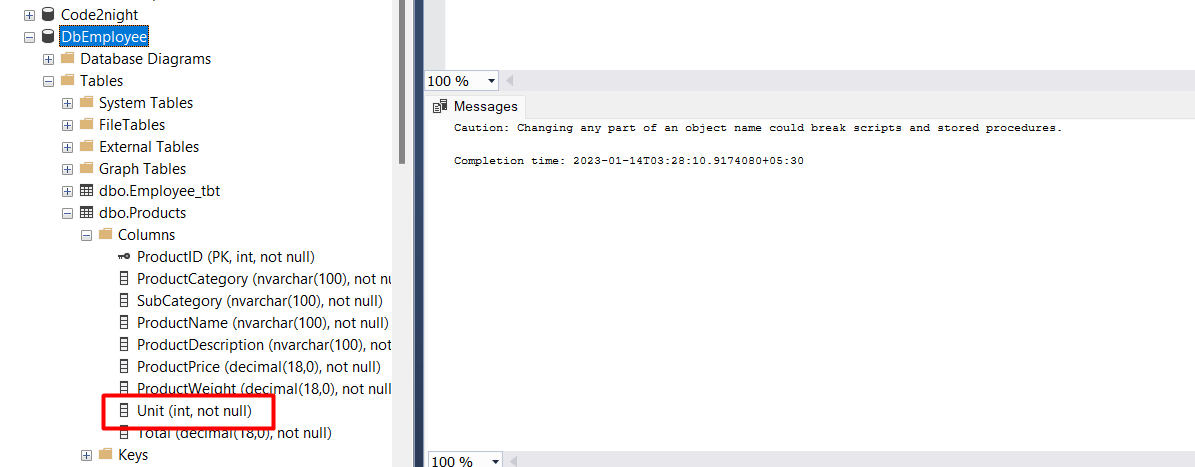
After executing the command, it’s good practice to refresh your database in SQL Server Management Studio (SSMS) to see the changes reflected immediately.
Edge Cases & Gotchas
When renaming columns, there are several edge cases and potential pitfalls to be aware of:
- Case Sensitivity: SQL Server is case-insensitive by default, but if your database is configured to be case-sensitive, ensure you use the exact case when renaming columns.
- Existing Constraints: If the column you are renaming is part of a primary key or has foreign key constraints, you may need to drop and recreate those constraints after the rename.
- Column Types: Changing a column's name does not affect its data type or constraints, but be cautious when renaming columns that may impact application logic or reporting tools.
Performance & Best Practices
Renaming columns in SQL Server is generally a low-impact operation, but there are best practices to consider to ensure smooth execution:
- Plan Ahead: Before renaming columns, map out any dependencies to minimize disruption. This includes checking application code, reports, and other database objects.
- Use Descriptive Names: Choose column names that are descriptive and convey the purpose of the data stored within. This practice enhances maintainability and readability.
- Document Changes: Always document any changes made to the database schema, including column renames, to maintain an accurate record for future reference.
- Test Changes: After renaming columns, execute relevant queries and test application functionalities to ensure everything operates as expected.
Conclusion
In summary, renaming columns in SQL Server is a vital skill for developers and database administrators. By understanding the process and following best practices, you can ensure that your database remains organized and adaptable to change. Here are the key takeaways:
- Renaming columns helps improve database clarity and usability.
- Always check for dependencies and permissions before renaming.
- Use the sp_rename stored procedure for renaming columns effectively.
- Be aware of edge cases and potential issues that may arise.
- Follow best practices for a smooth renaming process and maintain documentation.
