
how to use Web Api in Asp.net MVC
Welcome to the Code2Night blog post on "How to Use Web API in ASP.NET MVC". In today's fast-paced world, the importance of web-based applications cannot be emphasized enough. With the rise of RESTful Web APIs, developers now have a powerful tool at their disposal to build robust and scalable web applications. In this blog post, we will explore how to leverage Web APIs in ASP.NET MVC to create powerful web applications. Whether you are a seasoned developer or a newbie, this blog post will provide you with the knowledge and tools needed to get started with building web APIs in ASP.NET MVC. So, let's dive in and explore the world of web APIs in ASP.NET MVC!
Step 1 - Create a database and then create a new table product in SQL Server
CREATE TABLE [dbo].[Products](
	[ProductID] [int] IDENTITY(1,1) NOT NULL,
	[ProductCategory] [nvarchar](100) NOT NULL,
	[SubCategory] [nvarchar](100) NOT NULL,
	[ProductName] [nvarchar](100) NOT NULL,
	[ProductDescription] [nvarchar](100) NOT NULL,
	[ProductPrice] [decimal](18, 0) NOT NULL,
	[ProductWeight] [decimal](18, 0) NOT NULL,
	[Units] [int] NOT NULL,
	[Total] [decimal](18, 0) NOT NULL,
 CONSTRAINT [PK_Products] PRIMARY KEY CLUSTERED
(
	[ProductID] ASC
)WITH (PAD_INDEX = OFF, STATISTICS_NORECOMPUTE = OFF, IGNORE_DUP_KEY = OFF, ALLOW_ROW_LOCKS = ON, ALLOW_PAGE_LOCKS = ON, OPTIMIZE_FOR_SEQUENTIAL_KEY = OFF) ON [PRIMARY]
) ON [PRIMARY]
GO
- Create New Project -> Visual C# -> Web -> ASP.NET Web Application and enter your application and solution name.
- Select the empty template from the options and check the Web API checkbox and click OK
- Right-click on MVCAPI project-> Add-> New Item-> Data-> ADO.NET Entity Data Model and name it DbEmployeeEF.
- Choose EF designer from the database in the next step.
- Add the table created in the step1 into Entity Framework
- Create a class called DAL.cs in this project to access the data from DB by Web API service. The code is given below.
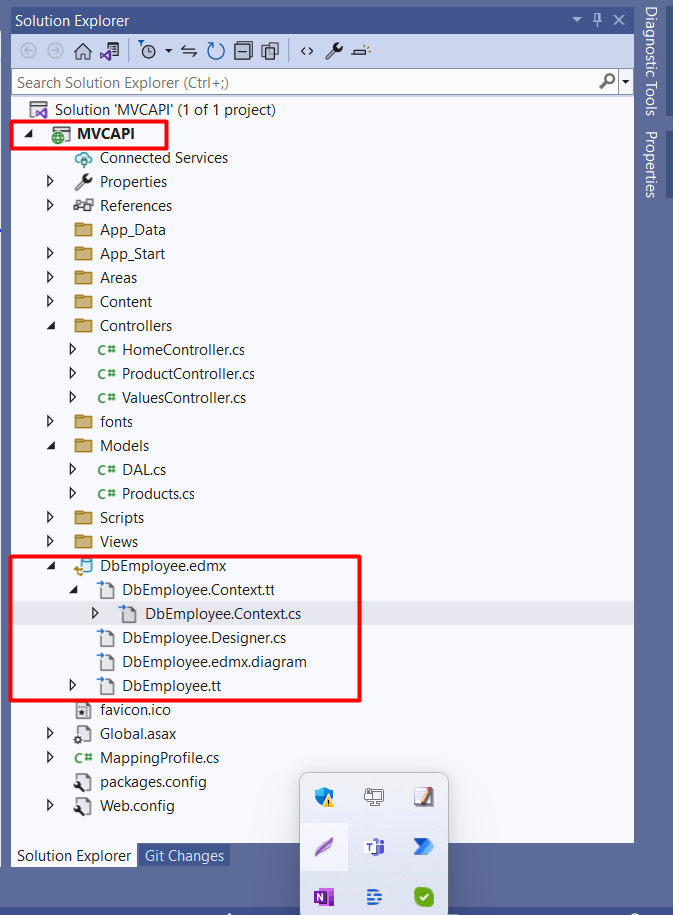
DAL.cs
    public static class DAL
    {
        static DbEmployeeEntities DbContext;
        static DAL()
        {
            DbContext = new DbEmployeeEntities();
        }

        public static List<Product> GetAllProducts()
        {
            return DbContext.Products.ToList();
        }

        public static Product GetProduct(int productId)
        {
            return DbContext.Products.Where(p => p.ProductID == productId).FirstOrDefault();
        }

        public static bool InsertProduct(Product productItem)
        {
            bool status;
            try
            {
                DbContext.Products.Add(productItem);
                DbContext.SaveChanges();
                status = true;
            }
            catch (Exception)
            {
                status = false;
            }
            return status;
        }
        public static bool UpdateProduct(Product productItem)
        {
            bool status;
            try
            {
                Product prodItem = DbContext.Products.Where(p => p.ProductID == productItem.ProductID).FirstOrDefault();
                if (prodItem != null)
                {
                    prodItem.ProductCategory = productItem.ProductCategory;
                    prodItem.SubCategory = productItem.SubCategory;
                    prodItem.ProductName = productItem.ProductName;
                    prodItem.ProductDescription = productItem.ProductDescription;
                    prodItem.ProductPrice = productItem.ProductPrice;
                    prodItem.ProductWeight = productItem.ProductWeight;
                    prodItem.Units = productItem.Units;
                    prodItem.Total = productItem.Total;
                    DbContext.SaveChanges();
                }
                status = true;
            }
            catch (Exception)
            {
                status = false;
            }
            return status;
        }
        public static bool DeleteProduct(int id)
        {
            bool status;
            try
            {
                Product prodItem = DbContext.Products.Where(p => p.ProductID == id).FirstOrDefault();
                if (prodItem != null)
                {
                    DbContext.Products.Remove(prodItem);
                    DbContext.SaveChanges();
                }
                status = true;
            }
            catch (Exception)
            {
                status = false;
            }
            return status;
        }
    }
  public class ProductController : ApiController
    {
        // GET: Product
        [HttpGet]
        public JsonResult<List<Products>> GetAllProducts()
        {
            List<Product> prodList = DAL.GetAllProducts();
            List<Products> products = new List<Products>();
            var config = new MapperConfiguration(cfg => cfg.CreateMap<Product, Products>());
            var mapper = new Mapper(config);
            foreach (var item in prodList)
            {
                products.Add(Mapper.Map<Product, Products>(item));
            }
            return Json<List<Products>>(products);
        }


        [HttpGet]
        public JsonResult<Products> GetProduct(int id)
        {
            Product dalProduct = DAL.GetProduct(id);
            Products products = new Products();
            var config = new MapperConfiguration(cfg => cfg.CreateMap<Product, Products>());
            var mapper = new Mapper(config);
            products = Mapper.Map<Product, Products>(dalProduct);
            return Json<Products>(products);
        }


        [HttpPost]
        public bool InsertProduct(Products product)
        {
            bool status = false;
            if (ModelState.IsValid)
            {
                var config = new MapperConfiguration(cfg => cfg.CreateMap<Products, Product>());
                IMapper mapper = config.CreateMapper();
                var source = new Product();
                var products = Mapper.Map<Products, Product>(product);
                status = DAL.InsertProduct(products);
            }
            return status;
        }


        [HttpPut]
        public bool UpdateProduct(Products product)
        {
            Product productObj = new Product();
            var config = new MapperConfiguration(cfg => cfg.CreateMap<Products, Product>());
            productObj = Mapper.Map<Products, Product>(product);
            var status = DAL.UpdateProduct(productObj);
            return status;
        }


        [HttpDelete]
        public bool DeleteProduct(int id)
        {
            var status = DAL.DeleteProduct(id);
            return status;
        }
    }
Create a Model class for the product
   public class Products
    {
        public int ProductID { get; set; }
        public string ProductCategory { get; set; }
        public string SubCategory { get; set; }
        public string ProductName { get; set; }
        public string ProductDescription { get; set; }
        public decimal ProductPrice { get; set; }
        public decimal ProductWeight { get; set; }
        public int Units { get; set; }
        public decimal Total { get; set; }
    }
Create a class for the MappingProfile
  public class MappingProfile : Profile
    {
        public MappingProfile()
        {
            CreateMap<Product, Products>();
            CreateMap<Products, Product>();
        }
    }
Open Global.asax and add AutoMapperConfiguration class
        protected void Application_Start()
        {
            AreaRegistration.RegisterAllAreas();
            GlobalConfiguration.Configure(WebApiConfig.Register);
            FilterConfig.RegisterGlobalFilters(GlobalFilters.Filters);
            RouteConfig.RegisterRoutes(RouteTable.Routes);
            BundleConfig.RegisterBundles(BundleTable.Bundles);
            AutoMapperConfiguration.Configure();
        }

        public class AutoMapperConfiguration
        {
            public static void Configure()
            {
                Mapper.Initialize(x =>
                {
                    x.AddProfile<MappingProfile>();
                });

                Mapper.Configuration.AssertConfigurationIsValid();
            }
        }
So, for testing this API we will use Postman. You can download Postman and there we have to call the URL like this.
HttpGet - So the first API we will create is GetAll. This API is basically for getting the list of data from the database. Here we have used a database that has a Product table in it.
https://localhost:44312/api/Product/
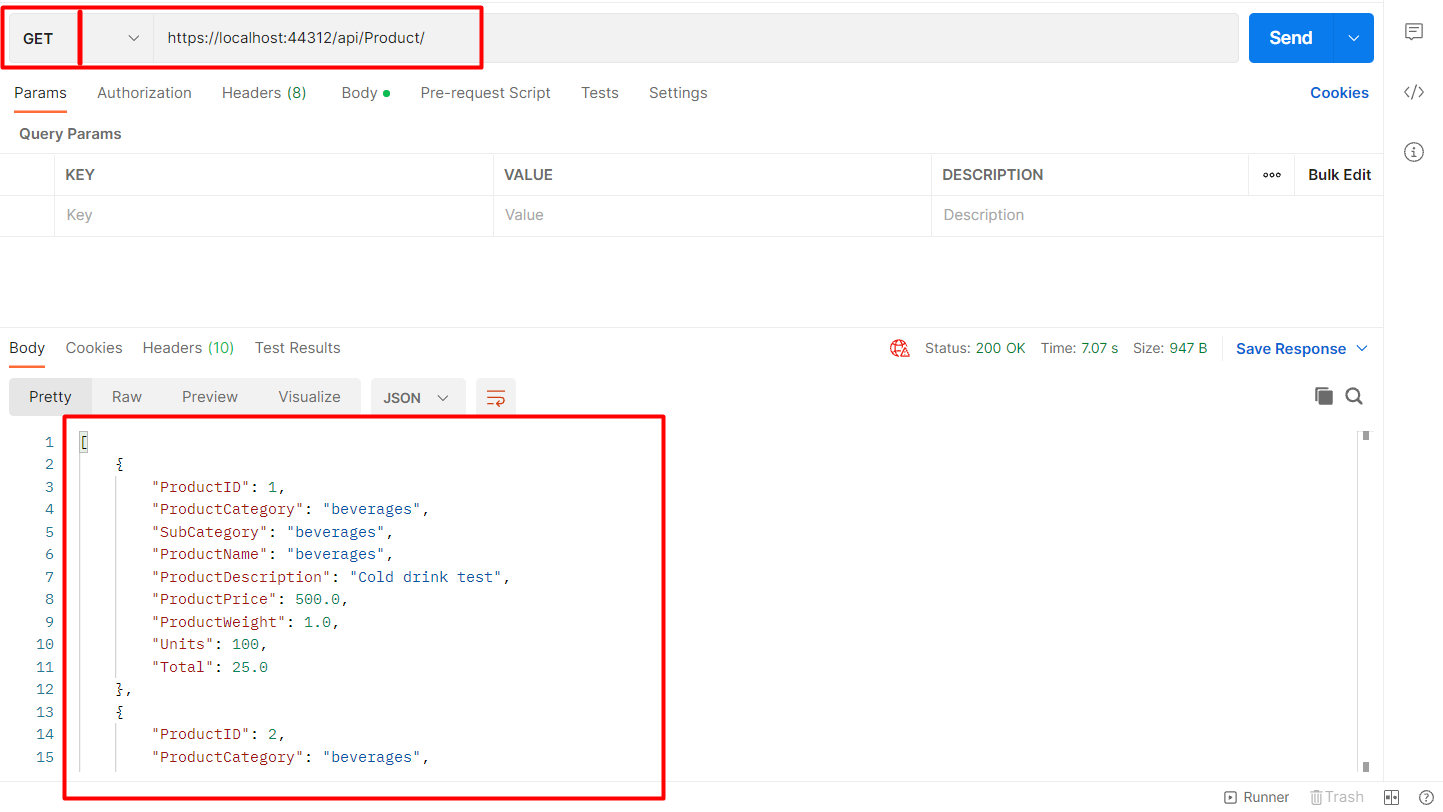
So, here you can see the list of Products returned back in the response.
https://localhost:44312/api/Product/GetProduct?=1
This API is basically for getting a single record of data from the database
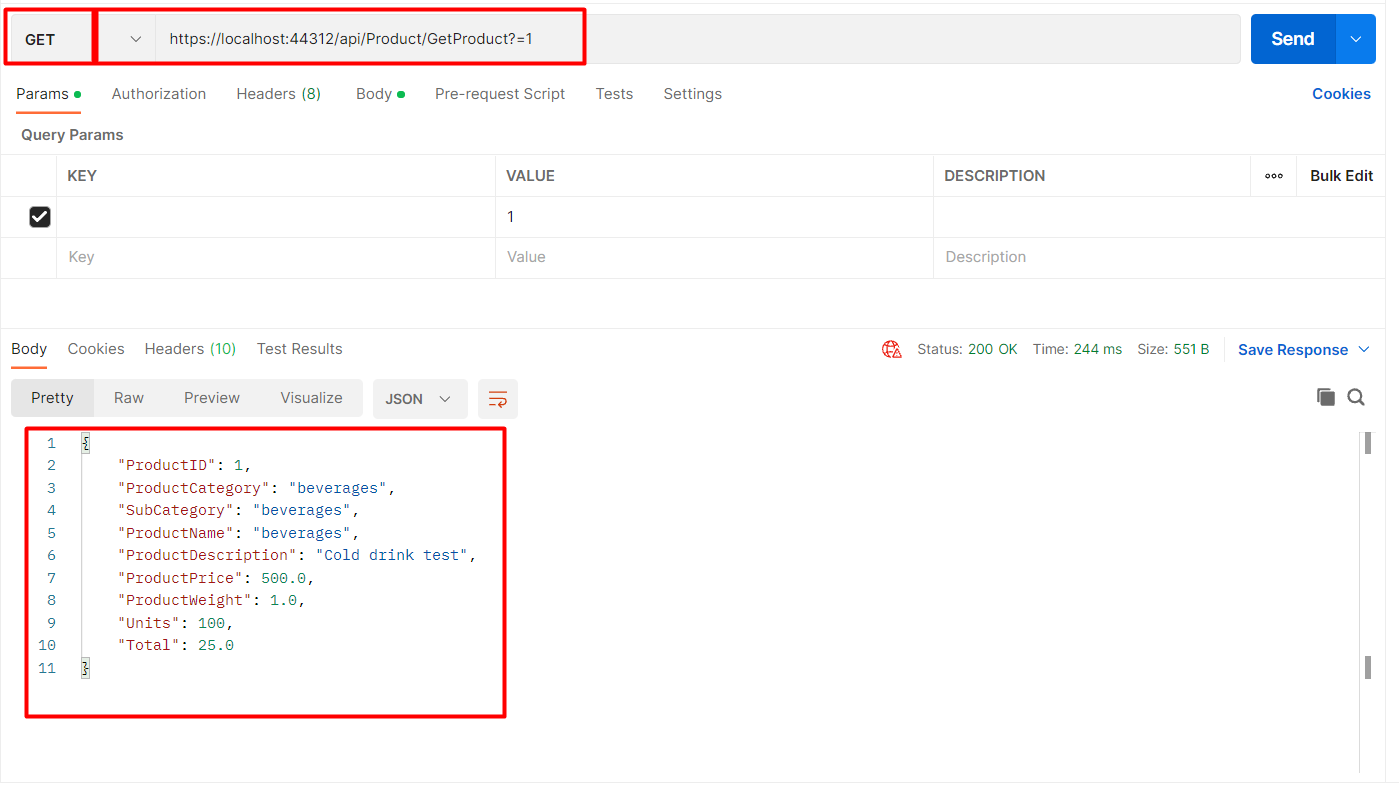
So, here you can see the Product returned back in the response.
https://localhost:44312/api/Product/
So, we will call the Create API by passing the object as JSON in Postman. You can have a look at the image below
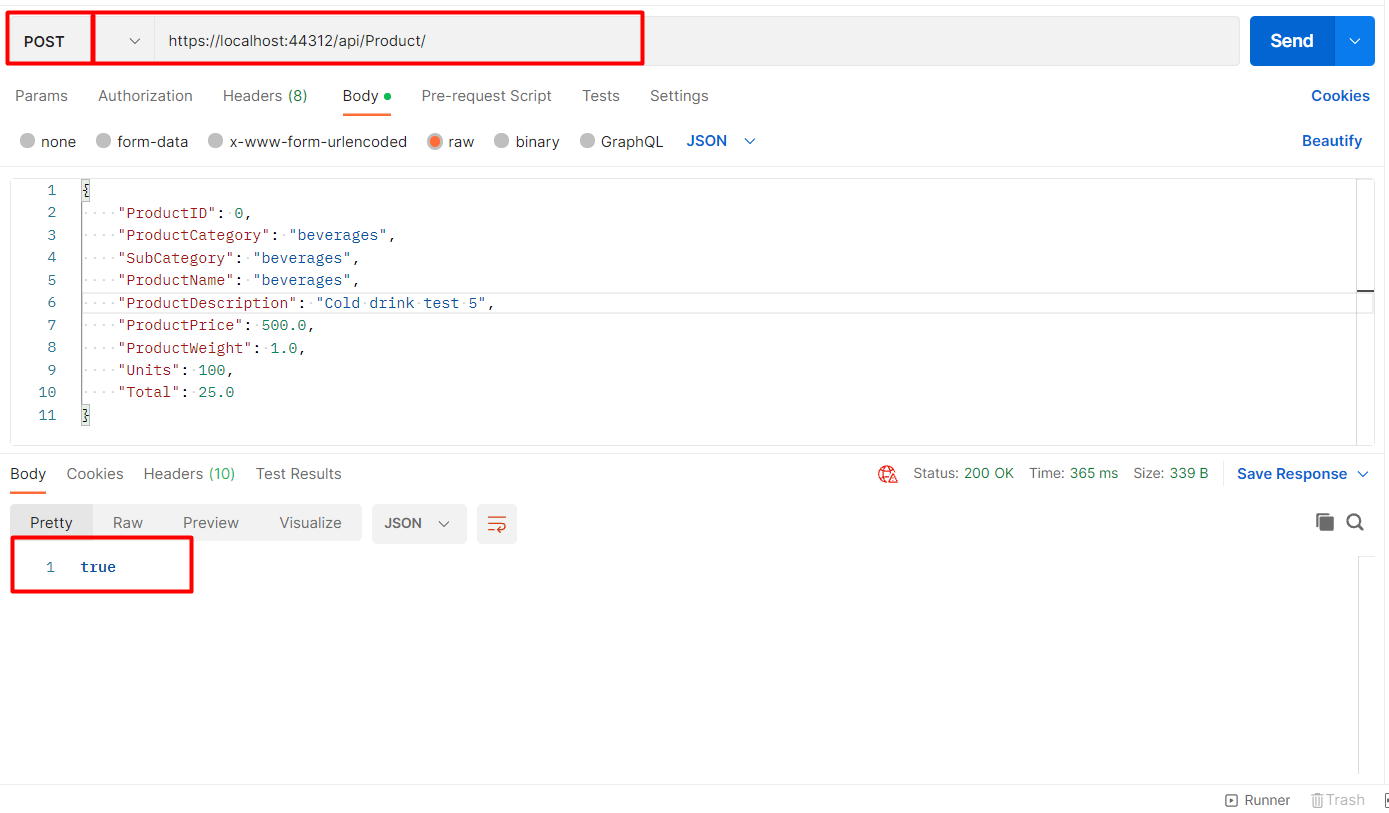
This will add one new record to the database. You have to use HttpPost to create operations.
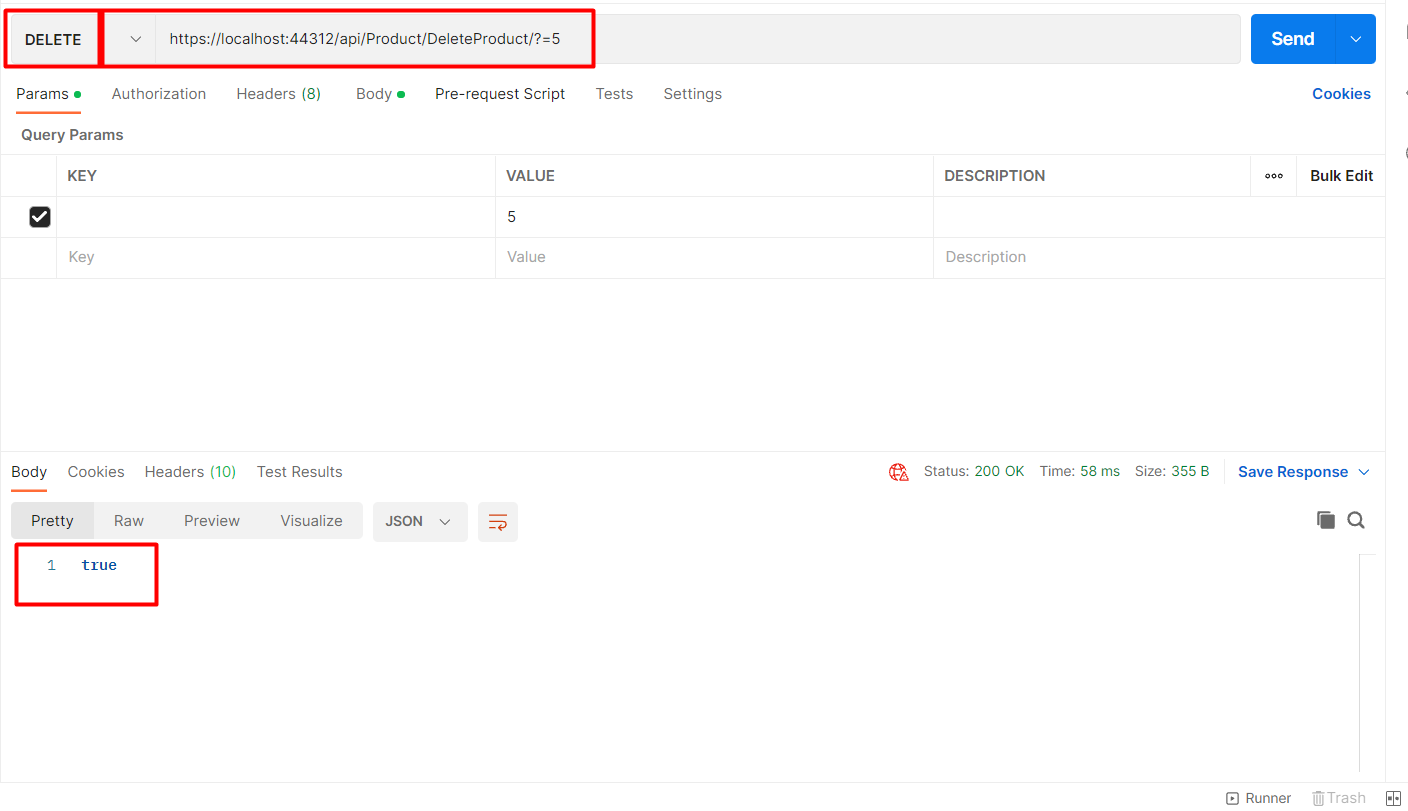
https://localhost:44312/api/Product/DeleteProduct/?=5
So, this is how we can delete the record using HttpDelete API.
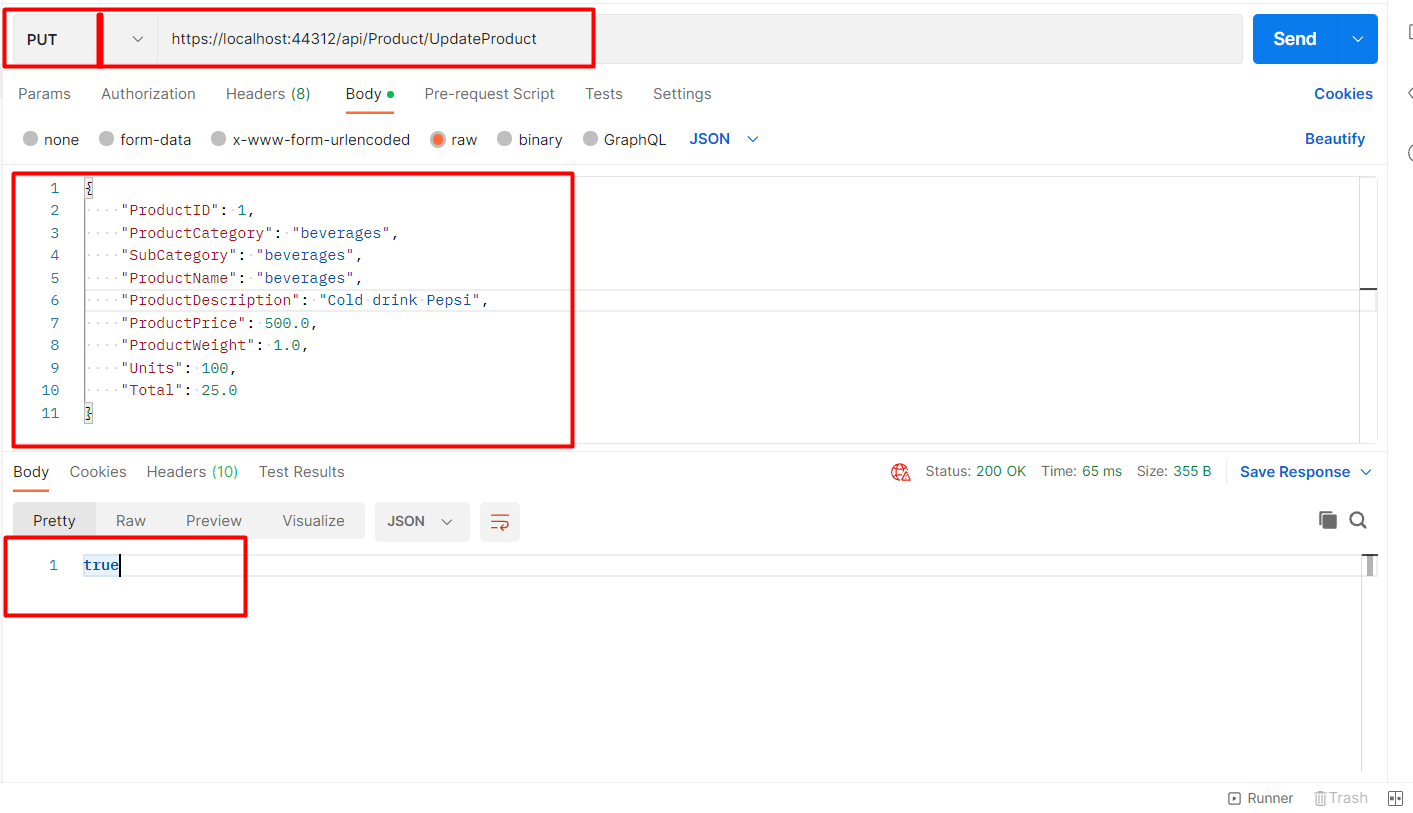
https://localhost:44312/api/Product/UpdateProduct
Here, you have to make sure you choose Put here in the Postman as we are using HttpPut API.
 This is how we can create Web API in Asp.net MVC.
