
How to read json file in asp.net Core
Reading JSON File in ASP.NET Core
In this article we will see how we can read json file and convert that into c# object in asp.net core.
In this article, we'll explore a simple HomeController class in an ASP.NET Core application that reads data from a JSON file.
The Code
Let's take a closer look at the Product class which we will use to deserialize the json data.
      namespace JsonReaderCore.Models
{
    public class Product
    {
        public int Id { get; set; }
        public string Name { get; set; }
        public decimal Price { get; set; }
        public string Description { get; set; }
    }
}
This is the controller code where we will read the sample json file and try to convert that to c# list object
           using JsonReaderCore.Models;
using Microsoft.AspNetCore.Mvc;
using Newtonsoft.Json;
using System.Diagnostics;

namespace JsonReaderCore.Controllers
{
    public class HomeController : Controller
    {
        private readonly ILogger<HomeController> _logger;
        private readonly IWebHostEnvironment _webHostEnvironment;


        public HomeController(ILogger<HomeController> logger, IWebHostEnvironment webHostEnvironment)
        {
            _logger = logger;
            _webHostEnvironment = webHostEnvironment;
        }

        public IActionResult Index()
        {
            var filePath = Path.Combine(_webHostEnvironment.WebRootPath, "Dummy.json");
            var result= JsonFileReader.ReadJsonFile<List<Product>>(filePath);
            return View(result);
        }

        public IActionResult Privacy()
        {
            return View();
        }

        [ResponseCache(Duration = 0, Location = ResponseCacheLocation.None, NoStore = true)]
        public IActionResult Error()
        {
            return View(new ErrorViewModel { RequestId = Activity.Current?.Id ?? HttpContext.TraceIdentifier });
        }
    }
}
Add JsonFileReader class in your project and copy following code
using System.IO;

using Newtonsoft.Json;

namespace JsonReaderCore.Models
{

    public class JsonFileReader
    {
        public static T ReadJsonFile<T>(string fileName)
        {
            var filePath = Path.Combine(Directory.GetCurrentDirectory(), fileName);

            using (var streamReader = new StreamReader(filePath))
            using (var jsonReader = new JsonTextReader(streamReader))
            {
                var serializer = new JsonSerializer();
                return serializer.Deserialize<T>(jsonReader);
            }
        }
    }
}
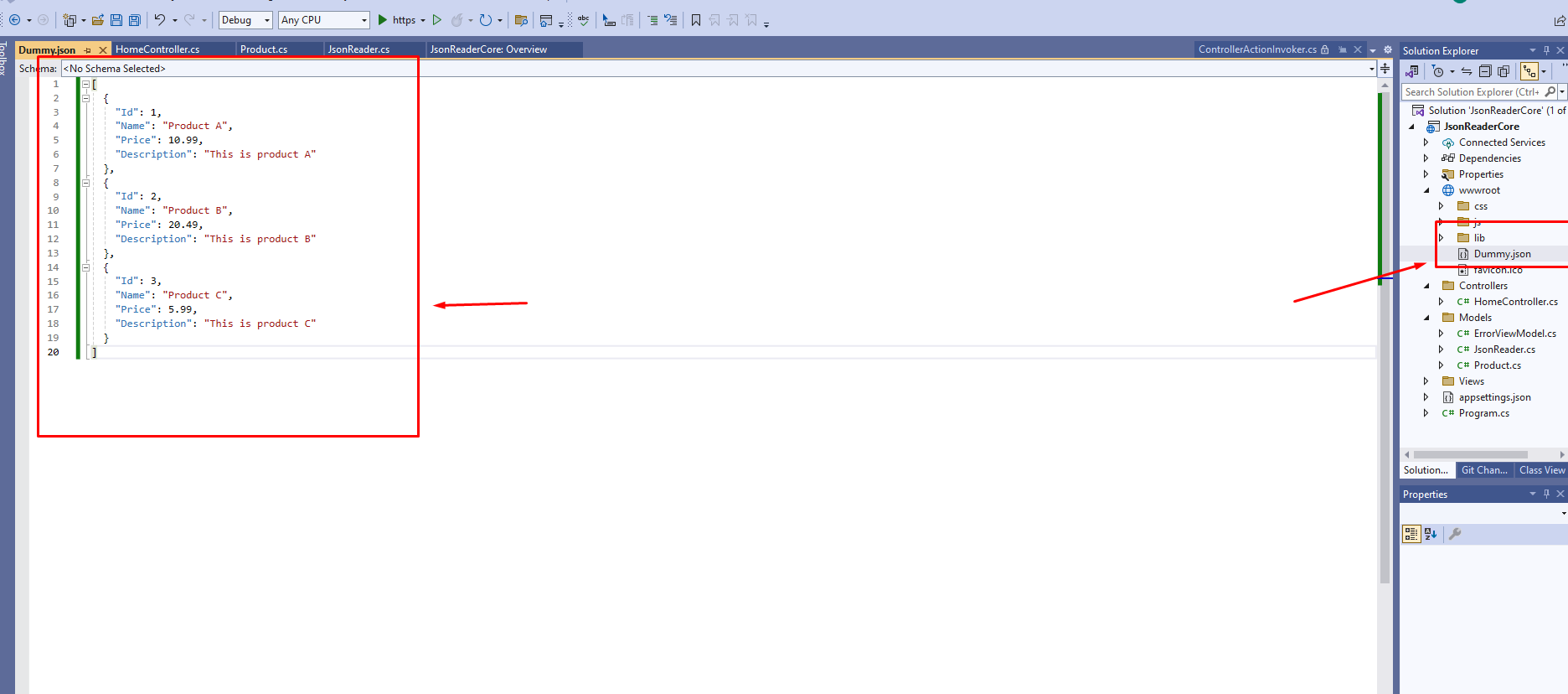
Add dummy.json file in the wwwroot folder in your project and add some dummy json in that
Explanation
This code resides in a controller class, HomeController. It defines an Index action that reads JSON data from a file named dummy.json.
Let's break down the key components of the code:
StreamReader: Initializes a new instance of theStreamReaderclass to read from the specified file path.Server.MapPath: Maps the virtual path to a physical path on the server. In this case, it resolves the path to thecountrycodes.jsonfile.JsonConvert.DeserializeObject: Deserializes the JSON data read from the file into aList<CountryCode>object.return View(items): Passes the deserialized data to the corresponding view for further processing or rendering.
This code assumes the existence of a class named CountryCode representing the structure of the JSON data. Make sure to replace it with your actual class definition.
using System.IO;: This line imports theSystem.IOnamespace, which provides classes for working with files and directories.using Newtonsoft.Json;: This line imports theNewtonsoft.Jsonnamespace, which contains classes for JSON serialization and deserialization.namespace JsonReaderCore.Models: This code resides within theJsonReaderCore.Modelsnamespace.public class JsonFileReader: This is a public class namedJsonFileReader, which contains a static methodReadJsonFile.public static T ReadJsonFile<T>(string fileName): This method takes a generic typeTand astringparameterfileName, representing the name of the JSON file to be read. It returns an object of typeT, which is deserialized from the JSON file.var filePath = Path.Combine(Directory.GetCurrentDirectory(), fileName);: This line constructs the full file path by combining the current directory path with the providedfileName.using (var streamReader = new StreamReader(filePath)): This line creates aStreamReaderto read from the file specified byfilePath. Theusingstatement ensures that theStreamReaderis disposed of properly after use.using (var jsonReader = new JsonTextReader(streamReader)): This line creates aJsonTextReaderto read JSON data from theStreamReader. Again, theusingstatement ensures proper disposal after use.var serializer = new JsonSerializer();: This line creates a new instance ofJsonSerializer, which is responsible for deserializing JSON data.
Conclusion
Reading JSON files in ASP.NET Core is a common task, and the provided code demonstrates a straightforward approach to achieve this. Feel free to adapt and customize it based on your specific requirements.
So this is how to read json file in asp.net core using a custom JsonFileReader class
