
How to get outlook emails in asp.net
Overview
Integrating email capabilities into web applications is extremely useful for notifications, marketing, support tickets, and more. Microsoft Outlook is one of the most popular email services, with over 400 million active users. This article will provide a comprehensive guide on how to use ASP.NET to securely connect to Outlook accounts and retrieve emails. This functionality is particularly beneficial for applications that require automated email processing, analysis, and backup.
In addition to retrieving emails, this integration can support features like email notifications, event scheduling, and user engagement tracking, which are essential for modern web applications.

Prerequisites
Before diving into the implementation, ensure you have the following prerequisites:
- Basic understanding of ASP.NET and C#.
- An active Microsoft Outlook account.
- Visual Studio or any other compatible IDE for ASP.NET development.
- Access to the internet and appropriate permissions to connect to the Microsoft Exchange server.
- NuGet package manager installed in your development environment.
Step 1: Add Microsoft Exchange NuGet Package
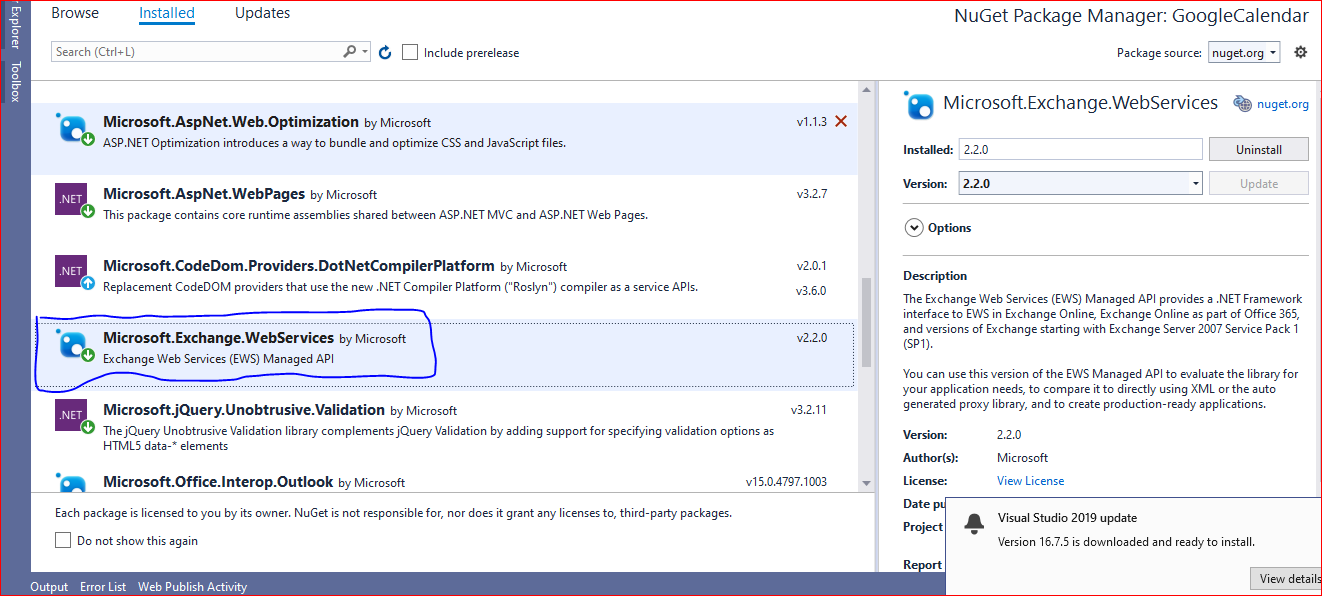
First, you need to add the Microsoft Exchange Services NuGet package to your application. This package will allow you to connect to Outlook from within your web application.
Install-Package Microsoft.Exchange.WebServicesTo install the package, you can use the NuGet Package Manager Console in Visual Studio or manage NuGet packages through the project context menu.
Step 2: Add Required Namespaces in Controller
After installing the package, add the necessary namespaces to your controller. These namespaces are essential for accessing the built-in methods required to retrieve Outlook emails.
using Microsoft.Exchange.WebServices.Data;Step 3: Create an Email Service Class
Next, we will create a separate class in your project to handle the email retrieval logic. This class will encapsulate the functionality needed to connect to the Outlook account and fetch emails.
using Microsoft.Exchange.WebServices.Data;
using System;
using System.Collections.Generic;
using System.Linq;
using System.Web;

namespace OutlookEmail.Models {
    public class EmailService {
        private readonly string _exchangeServiceUrl;
        private readonly string _username;
        private readonly string _password;

        public EmailService(string exchangeServiceUrl, string username, string password) {
            _exchangeServiceUrl = exchangeServiceUrl;
            _username = username;
            _password = password;
        }

        public void GetEmails() {
            // Create the ExchangeService object
            ExchangeService service = new ExchangeService(ExchangeVersion.Exchange2013);
            // Set credentials
            service.Credentials = new WebCredentials(_username, _password);
            // Set the URL of the Exchange server
            service.Url = new Uri(_exchangeServiceUrl);
            try {
                // Define the properties to retrieve (e.g., subject, sender, body)
                SearchFilter searchFilter = new SearchFilter.SearchFilterCollection(LogicalOperator.And, new SearchFilter.IsEqualTo(EmailMessageSchema.IsRead, false));
                // Retrieve emails using FindItems method
                FindItemsResults<Item> findResults = service.FindItems(WellKnownFolderName.Inbox, searchFilter, new ItemView(10));
                // Iterate through the results
                foreach (Item item in findResults) {
                    if (item is EmailMessage) {
                        EmailMessage message = item as EmailMessage;
                        string subject = message.Subject;
                        string sender = message.Sender.Name;
                        string body = message.Body.Text;
                        // Do something with the email
                    }
                }
            } catch (Exception ex) {
                // Handle exceptions
                Console.WriteLine("Error: " + ex.Message);
            }
        }
    }
}
Step 4: Integrate Email Service in the Controller
After creating the EmailService class, we will now integrate it into the controller to fetch data from Outlook. This integration will allow your application to retrieve and display emails effectively.
using OutlookEmail.Models;
using System;
using System.Collections.Generic;
using System.Configuration;
using System.Linq;
using System.Web;
using System.Web.Mvc;

namespace OutlookEmail.Controllers {
    public class HomeController : Controller {
        private readonly EmailService _emailService;

        public HomeController() {
            // Initialize EmailService with appropriate credentials
            _emailService = new EmailService("https://outlook.office365.com/EWS/Exchange.asmx", ConfigurationManager.AppSettings["OutlookEmail"].ToString(), ConfigurationManager.AppSettings["OutlookPassword"].ToString());
        }

        public ActionResult Index() {
            // Call GetEmails method to retrieve emails
            _emailService.GetEmails();
            return View();
        }
    }
}
Configuration: Storing Credentials
You need to add the following keys into your web.config file to securely store the Outlook account credentials:
<appSettings>
    <add key="OutlookEmail" value="YourUser@outlook.com" />
    <add key="OutlookPassword" value="YourPassword" />
</appSettings>
Edge Cases & Gotchas
When working with the Microsoft Exchange Services, developers should be aware of several edge cases and potential pitfalls:
- Network Issues: Ensure that your application handles network errors gracefully. Implement retry logic or fallback mechanisms to handle transient faults.
- Rate Limiting: Be cautious of rate limits imposed by the Exchange server. Exceeding these limits may result in throttling or temporary bans.
- Email Size Limits: Be aware of the size limits for emails that can be retrieved. Large emails may need special handling, such as pagination or filtering.
- Authentication Failures: Ensure proper error handling for authentication failures, and consider implementing OAuth for enhanced security.
Performance & Best Practices
To ensure optimal performance and maintainability of your email retrieval implementation, consider the following best practices:
- Use Asynchronous Programming: Implement asynchronous methods to avoid blocking the main thread when retrieving emails. This enhances the responsiveness of your application.
- Limit Retrieved Items: Always specify a limit on the number of emails retrieved in a single request. This prevents performance degradation and reduces memory consumption.
- Cache Results: If applicable, cache email results to minimize redundant API calls and improve performance.
- Implement Pagination: For applications that deal with large volumes of emails, implement pagination to retrieve emails in manageable chunks.
Conclusion
In this article, we explored how to retrieve Outlook emails using ASP.NET and Microsoft Exchange Services. By following the outlined steps, developers can integrate email functionalities into their web applications efficiently.
- We added the Microsoft Exchange NuGet package to facilitate email retrieval.
- We created an EmailService class to encapsulate the logic for connecting to the Outlook account.
- We integrated the email service into an ASP.NET controller for seamless email retrieval.
- We discussed edge cases, performance considerations, and best practices for maintaining a robust email integration.
