
Payout using Paypal Payment Gateway
Hello and welcome to Code2Night. In this article, we will discuss how to make payouts to other users using a PayPal digital wallet payment gateway. When using an online payment system, there may be times when you need to transfer funds to another user. A digital wallet payment gateway provides a reliable and secure way to make such payments. One such payment gateway is an e-wallet. When making a payout, it is important to ensure that you have sufficient funds in your e-wallet account or linked bank account to cover the transaction. Additionally, you should always verify the identity of the recipient and confirm that the payment details are accurate to avoid any errors or fraudulent transactions. So, let's start the process.
Payout basically means paying out funds to someone else from your account. So sometimes when we use the payment gateway we often need to transfer funds to other users. So we will see how you can make payouts in PayPal Payment gateway API.
So, first of all, we have to install the following Nuget packages in your Asp.net core application.
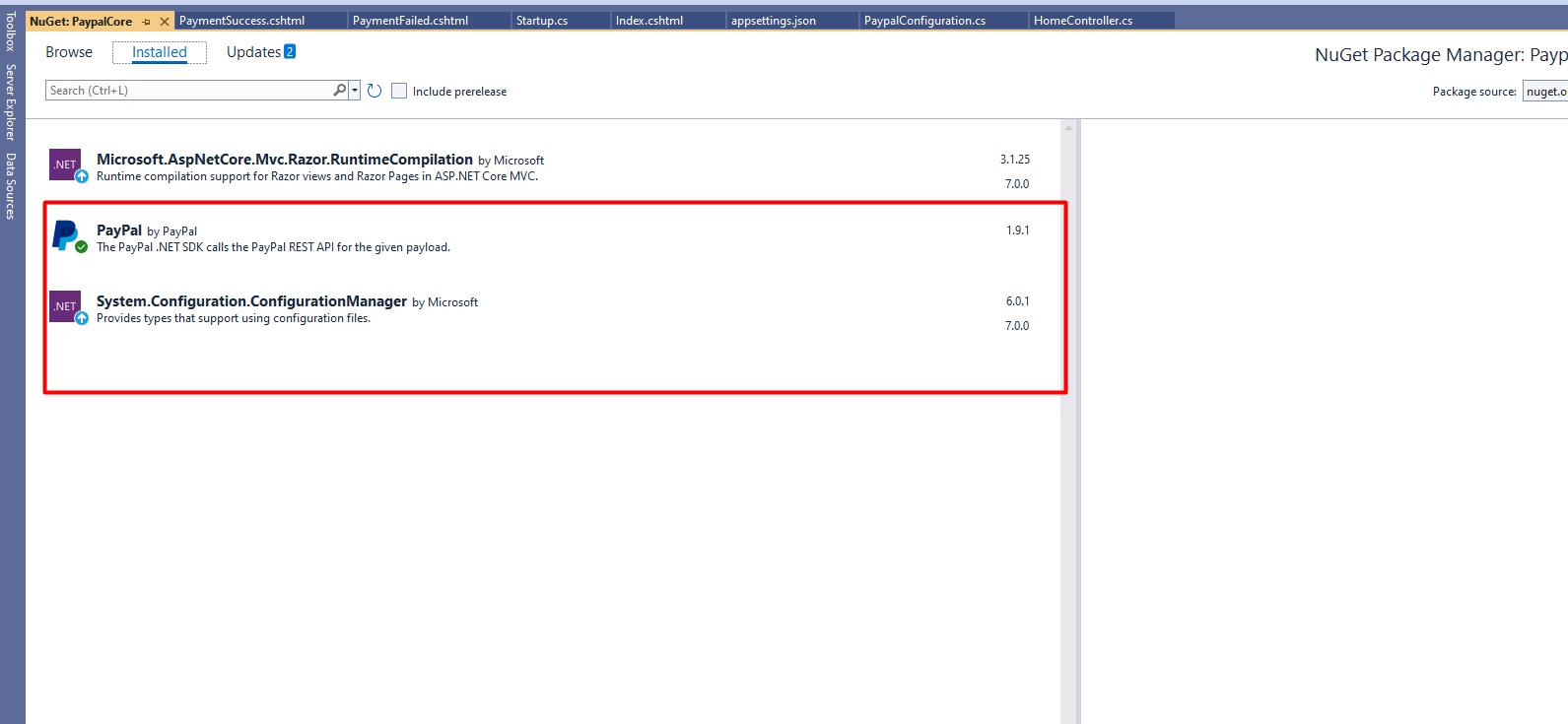
After you have installed the following packages. Now, we can add a controller where we have to add functionality for payout.
You can copy the following code for that.
 public class HomeController : Controller
    {
        private readonly ILogger<HomeController> _logger;
        private IHttpContextAccessor httpContextAccessor;
        IConfiguration _configuration;
        public HomeController(ILogger<HomeController> logger, IHttpContextAccessor context, IConfiguration iconfiguration)
        {
            _logger = logger;
            httpContextAccessor = context;
            _configuration = iconfiguration;
        }

        public IActionResult Index()
        {
            return View();
        }
        private PayPal.Api.Payout payout;
        public ActionResult PaymentWithPaypal(string Cancel = null, string blogId = "", string PayerID = "", string guid = "")
        {
            //getting the apiContext
            var ClientID = _configuration.GetValue<string>("PayPal:Key");
            var ClientSecret = _configuration.GetValue<string>("PayPal:Secret");
            var mode = _configuration.GetValue<string>("PayPal:mode");
            APIContext apiContext = PaypalConfiguration.GetAPIContext(ClientID, ClientSecret, mode);
            this.payout = new Payout()
            {
                items = new List<PayoutItem>
                {
                    new PayoutItem
                    {
                        receiver="shubhambatra1994@gmail.com",
                        amount=new Currency{currency="usd",value="1.00"},
                        note="Test",
                        recipient_type=PayoutRecipientType.EMAIL,
                        sender_item_id=Guid.NewGuid().ToString()

                    }
                }
            };
            this.payout.sender_batch_header = new PayoutSenderBatchHeader
            {
                sender_batch_id = Guid.NewGuid().ToString(),
                email_subject = "Test",
                recipient_type = PayoutRecipientType.EMAIL
            };
            var response = this.payout.Create(apiContext);


            return View("PaymentSuccess");
        }
    }
You have to also add the credentials in the appseting.json file so you can copy the code from here
{
  "Logging": {
    "LogLevel": {
      "Default": "Information",
      "Microsoft": "Warning",
      "Microsoft.Hosting.Lifetime": "Information"
    }
  },
  "AllowedHosts": "*",
  "PayPal": {
    "Key": "AfIlrsAAigAdLni0SFFIUrfLObfNvqtCT2mcBvNUxgLTxPUs_o21gVTjoggSpYFcF2hqkMhfVUSqCv1w",
    "Secret": "ECeznQaAnGPzbeq1mNvyZATUIrZxfsA-XJlZgrDwjJSI1hj1lqT5r1nISJLYeR2xwBarEg5Mq4n18Lm7",
    "mode": "sandbox"
  }
}
Here, you have to remember that you can share funds to another PayPal user using
1. Email
2. Paypal AccountId
3. Phone
in the article above we have used PayoutRecipientType.EMAIL there you can change the transfer mode as per your requirements. Now adding the following code in a class file.
using PayPal.Api;
using System.Collections.Generic;

namespace PaypalCore.Models
{
    public static class PaypalConfiguration
    {
        //Variables for storing the clientID and clientSecret key

        //Constructor

        static PaypalConfiguration()
        {

        }
        // getting properties from the web.config
        public static Dictionary<string, string> GetConfig(string mode)
        {
            return new Dictionary<string, string>()
            {
                {"mode",mode}
            };
        }
        private static string GetAccessToken(string ClientId, string ClientSecret, string mode)
        {
            // getting accesstocken from paypal
            string accessToken = new OAuthTokenCredential(ClientId, ClientSecret, new Dictionary<string, string>()
            {
                {"mode",mode}
            }).GetAccessToken();
            return accessToken;
        }
        public static APIContext GetAPIContext(string clientId, string clientSecret, string mode)
        {
            // return apicontext object by invoking it with the accesstoken
            APIContext apiContext = new APIContext(GetAccessToken(clientId, clientSecret, mode));
            apiContext.Config = GetConfig(mode);
            return apiContext;
        }
    }
}
So, now you can add one view and add the following code there
<div class="row">
   <a class="btn btn-primary" href="/Home/PaymentWithPaypal">Pay Now</a>
</div>
So, this is how you can make a payout using the PayPal payment gateway in Asp.net core.
