
Microsoft Outlook Get and Add Contacts Asp.Net MVC
Overview of Microsoft Exchange Service
The Microsoft Exchange Service provides a robust API that allows developers to access and manipulate various Outlook functionalities, including managing contacts, calendars, and tasks. By utilizing the Exchange Web Services (EWS), developers can create applications that interact with Outlook data directly, enabling features such as contact synchronization and calendar management.
This integration is particularly useful in enterprise applications where managing user data efficiently is critical. For instance, a CRM (Customer Relationship Management) system can utilize this service to fetch and update customer contact details directly from Outlook, ensuring that the data remains consistent across platforms.
Prerequisites
Before diving into the code, ensure you have the following prerequisites:
- A Microsoft Outlook account with Exchange Online or an on-premises Exchange server.
- Visual Studio installed on your machine.
- Basic understanding of ASP.NET MVC and C# programming.
- Access to NuGet Package Manager to install necessary libraries.
Setting Up the Project
To begin, we need to set up our ASP.NET MVC project and install the necessary NuGet packages. Follow these steps:
- Create a new ASP.NET MVC project in Visual Studio.
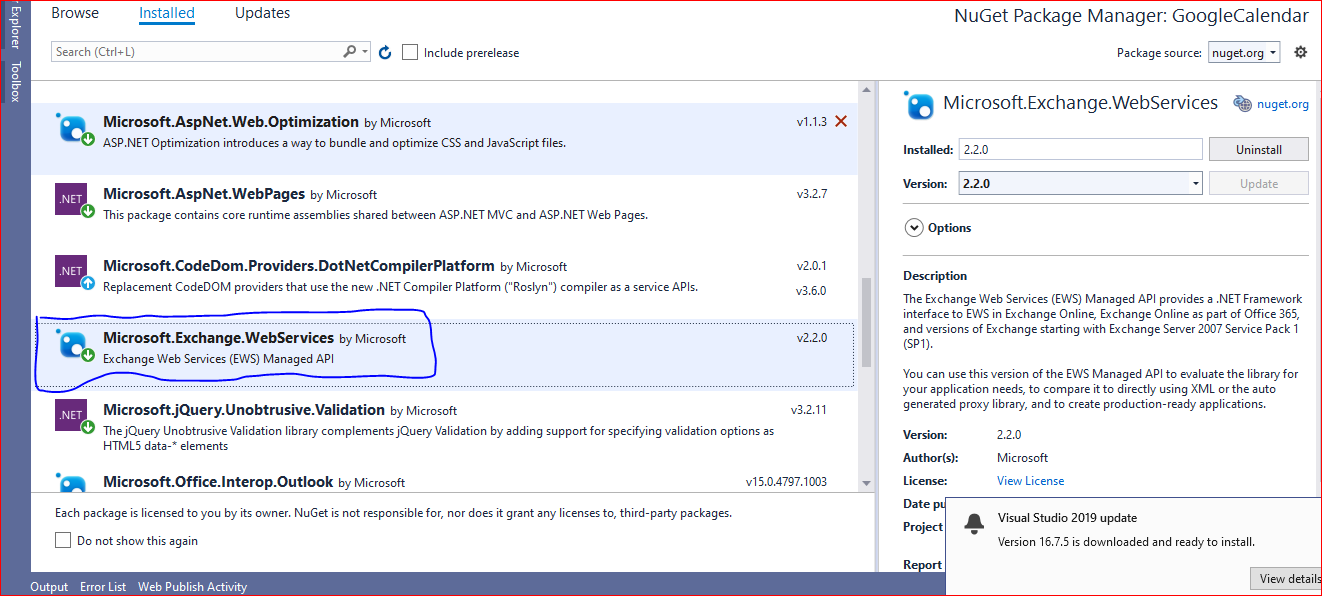
- Open the Package Manager Console and run the following command to install the EWS Managed API:
Install-Package Microsoft.Exchange.WebServicesOnce the package is installed, we can start coding our contact management functionalities.
Getting Contacts from Outlook
To retrieve contacts from a user's Outlook account, we will utilize the EWS Managed API. Below is a detailed implementation of the method to get contacts:
public void GetContact() {
string ewsUrl = "https://outlook.office365.com/EWS/Exchange.asmx";
string userName = "outlookusername";
string password = "outlookpassword";
ExchangeService servicex = new ExchangeService();
servicex.Url = new Uri(ewsUrl);
servicex.Credentials = new WebCredentials(userName, password);
ContactsFolder contactsfolder = ContactsFolder.Bind(servicex, WellKnownFolderName.Contacts);
int numItems = contactsfolder.TotalCount < 50 ? contactsfolder.TotalCount : 50;
if (numItems == 0) AddContact();
ItemView view = new ItemView(numItems);
view.PropertySet = new PropertySet(BasePropertySet.IdOnly, ContactSchema.DisplayName);
FindItemsResults- contactItems = servicex.FindItems(WellKnownFolderName.Contacts, view);
foreach (Item item in contactItems) {
if (item is Contact) {
Contact contact = item as Contact;
Console.WriteLine(contact.DisplayName);
}
}
}
In this method, we establish a connection to the EWS service using the user's credentials. We then bind to the Contacts folder and retrieve a specified number of contacts (up to 50 in this case). The retrieved contacts are displayed using their display names.
Adding Contacts to Outlook
After retrieving contacts, the next logical step is to add new contacts to the user's Outlook account. The following code demonstrates how to accomplish this:
public void AddContact() {
    string ewsUrl = "https://outlook.office365.com/EWS/Exchange.asmx";
    string userName = "outlookusername";
    string password = "outlookpassword";
    ExchangeService servicex = new ExchangeService();
    servicex.Url = new Uri(ewsUrl);
    servicex.Credentials = new WebCredentials(userName, password);

    Contact contact = new Contact(servicex);
    contact.GivenName = "Brian";
    contact.MiddleName = "David";
    contact.Surname = "Johnson";
    contact.FileAsMapping = FileAsMapping.SurnameCommaGivenName;

    contact.CompanyName = "Contoso";
    contact.PhoneNumbers[PhoneNumberKey.BusinessPhone] = "425-555-0110";
    contact.PhoneNumbers[PhoneNumberKey.HomePhone] = "425-555-0120";
    contact.PhoneNumbers[PhoneNumberKey.CarPhone] = "425-555-0130";

    contact.EmailAddresses[EmailAddressKey.EmailAddress1] = new EmailAddress("abc_1@123.com");
    contact.EmailAddresses[EmailAddressKey.EmailAddress2] = new EmailAddress("abv_2@123.com");

    contact.ImAddresses[ImAddressKey.ImAddress1] = "brianIM1@contoso.com";
    contact.ImAddresses[ImAddressKey.ImAddress2] = "brianIM2@contoso.com";

    PhysicalAddressEntry paEntry1 = new PhysicalAddressEntry();
    paEntry1.Street = "123 Main Street";
    paEntry1.City = "Chandigarh";
    paEntry1.State = "WA";
    paEntry1.PostalCode = "11111";
    paEntry1.CountryOrRegion = "India";
    contact.PhysicalAddresses[PhysicalAddressKey.Home] = paEntry1;

    PhysicalAddressEntry paEntry2 = new PhysicalAddressEntry();
    paEntry2.Street = "456 Corp Avenue";
    paEntry2.City = "Chandigarh";
    paEntry2.State = "WA";
    paEntry2.PostalCode = "11111";
    paEntry2.CountryOrRegion = "India";
    contact.PhysicalAddresses[PhysicalAddressKey.Business] = paEntry2;

    contact.Save();
}
This method constructs a new contact object, populates it with various details such as name, company, phone numbers, email addresses, and physical addresses, and then saves it to the user's Outlook account.
Edge Cases & Gotchas
When working with the Microsoft Exchange Service, there are several edge cases and potential issues to be aware of:
- Authentication Failures: Ensure that the provided username and password are correct. Consider implementing OAuth for improved security and user experience.
- Rate Limiting: Be aware of potential rate limits when making API calls. If too many requests are made in a short period, you may receive errors indicating that you have exceeded the allowed limit.
- Data Validation: Validate the data before attempting to save contacts. This includes checking for null or invalid fields to avoid exceptions during the save operation.
Performance & Best Practices
To ensure optimal performance when interacting with the Microsoft Exchange Service, consider the following best practices:
- Batch Processing: If you need to add or retrieve multiple contacts, consider using batch processing techniques to minimize the number of API calls.
- Caching: Implement caching strategies for frequently accessed data to reduce the load on the Exchange server and improve response times.
- Asynchronous Programming: Use asynchronous programming patterns to avoid blocking the main thread and improve the responsiveness of your application.
Conclusion
In this tutorial, we learned how to integrate Microsoft Outlook contact management into an ASP.NET MVC application using the Microsoft Exchange Service. We covered how to retrieve and add contacts, explored potential edge cases, and discussed best practices for optimal performance. Key takeaways include:
- Utilizing the EWS Managed API for seamless integration with Outlook.
- Understanding how to manage authentication securely.
- Implementing best practices for efficient data handling and performance.
