
Integrating Google Translate into ASP.NET Webpage
Expanding the reach of your ASP.NET webpage by making it accessible to users from diverse linguistic backgrounds is essential for enhancing user experience and increasing engagement. One effective way to achieve this is by integrating Google Translate into your webpage, enabling users to translate the content into their preferred language effortlessly. To add the Google Translate button to your ASP.NET webpage, you can use the Google Translate Element. This element provides a simple and intuitive interface for language translation. Here's how: Now, let's integrate the Google Translate button into your ASP.NET page. By following these steps, you'll enhance the accessibility of your webpage and cater to a broader audience: By incorporating Google Translate into your ASP.NET webpage, you've taken a significant step towards improving user accessibility and engagement. Users from different linguistic backgrounds can now seamlessly access and comprehend your content in their preferred language. This enhancement not only enhances the user experience but also expands the reach of your website, fostering a more inclusive online environment. Congratulations on successfully integrating the Google Translate button into your ASP.NET webpage! You can check the output in following imagesIntegrating Google Translate into ASP.NET Webpage
Setting up the Google Translate Button
                <div id="google_translate_element"></div>
                <script type="text/javascript">
                    function googleTranslateElementInit() {
                        new google.translate.TranslateElement({
                            pageLanguage: 'en',
                            includedLanguages: 'af,sq,am,ar,hy,az,eu,be,bn,bs,bg,ca,ceb,ny,zh-CN,zh-TW,co,hr,cs,da,nl,en,eo,et,tl,fi,fr,fy,gl,ka,de,el,gu,ht,ha,haw,iw,hi,hmn,hu,is,ig,id,ga,it,ja,jw,kn,kk,km,ko,ku,ky,lo,la,lv,lt,lb,mk,mg,ms,ml,mt,mi,mr,mn,my,ne,no,or,ps,fa,pl,pt,pa,ro,ru,sm,gd,sr,st,sn,sd,si,sk,sl,so,es,su,sw,sv,tg,ta,te,th,tr,uk,ur,ug,uz,vi,cy,xh,yi,yo,zu',
                            layout: google.translate.TranslateElement.InlineLayout.HORIZONTAL
                        }, 'google_translate_element');
                    }
                </script>
                <script type="text/javascript" src="//translate.google.com/translate_a/element.js?cb=googleTranslateElementInit"></script>
Adding Google Translate Button to ASP.NET Page
                <div id="google_translate_element"></div>
                <script type="text/javascript">
                    // JavaScript function to initialize Google Translate
                    function googleTranslateElementInit() {
                        // Initialize Google Translate Element
                        new google.translate.TranslateElement({
                            pageLanguage: 'en',
                            includedLanguages: 'af,sq,am,ar,hy,az,eu,be,bn,bs,bg,ca,ceb,ny,zh-CN,zh-TW,co,hr,cs,da,nl,en,eo,et,tl,fi,fr,fy,gl,ka,de,el,gu,ht,ha,haw,iw,hi,hmn,hu,is,ig,id,ga,it,ja,jw,kn,kk,km,ko,ku,ky,lo,la,lv,lt,lb,mk,mg,ms,ml,mt,mi,mr,mn,my,ne,no,or,ps,fa,pl,pt,pa,ro,ru,sm,gd,sr,st,sn,sd,si,sk,sl,so,es,su,sw,sv,tg,ta,te,th,tr,uk,ur,ug,uz,vi,cy,xh,yi,yo,zu',
                            layout: google.translate.TranslateElement.InlineLayout.HORIZONTAL
                        }, 'google_translate_element');
                    }
                </script>
                <script type="text/javascript" src="//translate.google.com/translate_a/element.js?cb=googleTranslateElementInit"></script>
Conclusion
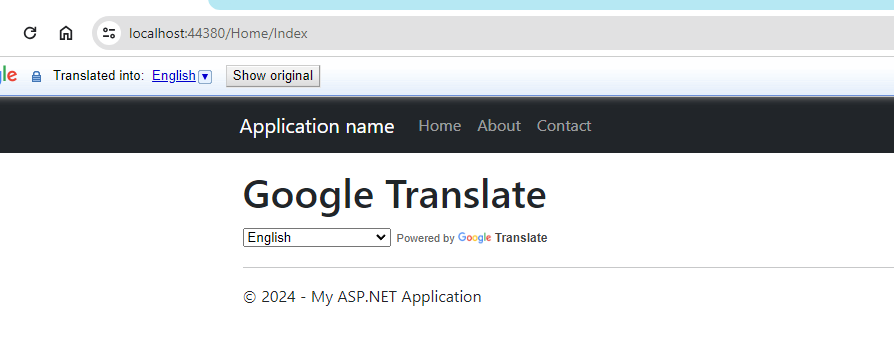
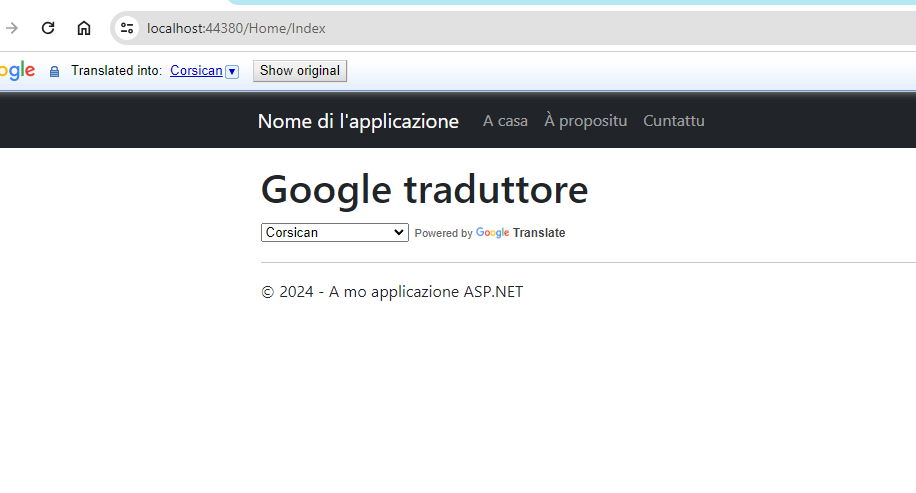 So this is how we can add Google translate in our asp.net project.
